If employees are blocked from submitting a time off request because they can’t upload a document, this is usually caused by the Document management feature being turned off.
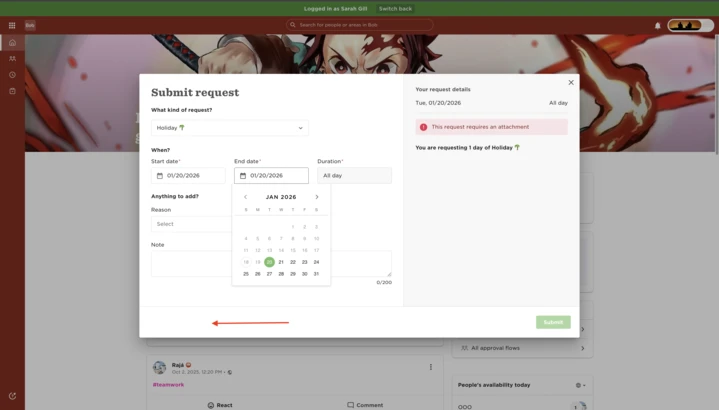
When a time off policy requires an attachment, employees can only upload supporting documents if Document management is enabled at the company level. If it’s off, the request will show an error—even though the policy requires an attachment.
To fix this, check the feature setting:
-
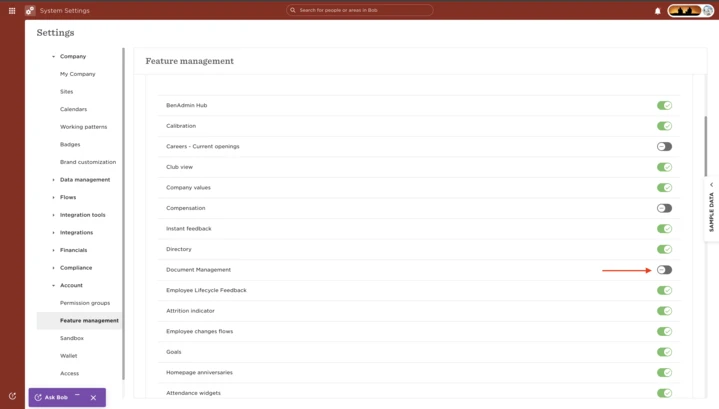
Go to Settings.
-
Open Feature management.
-
Make sure Document management is toggled on.
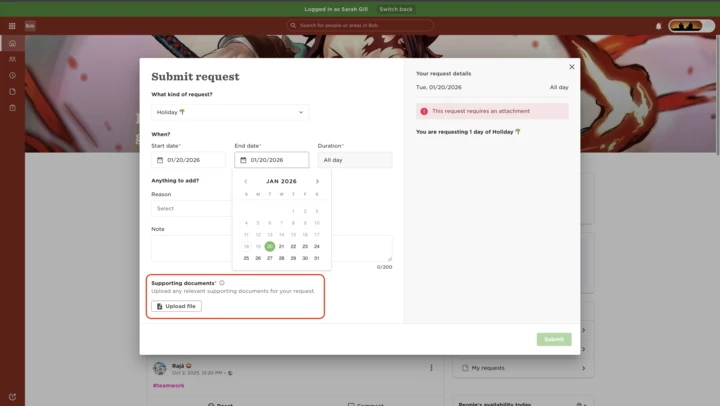
Once this feature is enabled, employees will see the Supporting documents section when submitting a time off request and can upload the required file as expected.
What this looks like in practice
-
When Document management is off, the request shows an error saying an attachment is required, but there’s no option to upload a file.
When Document management is on, the Upload file option appears, allowing the employee to complete the request.
If the upload button is visible but disabled, permissions may be missing check out this article