


Position visibility in Workforce Planning is determined by employee-based permissions and the position hierarchy, rather than by attributes assigned directly to a position.
Having permission to view employees from a particular Department, Site, Job Level, or other employee population does not automatically provide access to every position with those same attributes.
How position visibility works
Bob first determines which employees a user has permission to view based on their permission groups.
The positions assigned to those employees provide the starting point for determining which positions the user can access in Workforce Planning.
From there, Bob uses the position hierarchy to determine which positions below that starting point are also visible.
What is the position hierarchy?
The position hierarchy is the reporting structure between positions in Workforce Planning. This hierarchy is determined by the Manager ID assigned to each position in WFP.
This is separate from the employee’s manager listed on their employee profile. When determining the WFP position hierarchy, Bob looks at the Manager ID configured on the position.
Example
Imagine the following position hierarchy:
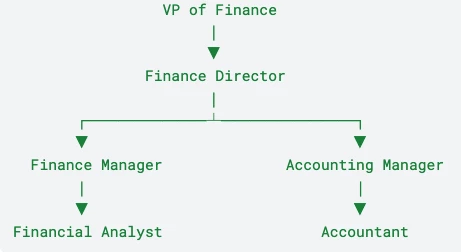
If a user has permission to view the employee assigned to the Finance Manager position, Finance Manager becomes their starting point in the position hierarchy.
In this example, the user can see:
-
Finance Manager, because it is held by an employee they have permission to view.
-
Financial Analyst, along with any additional positions below Financial Analyst in that same branch of the hierarchy.
The user would not gain visibility into:
-
Finance Director or VP of Finance, because positions above their starting point are not included.
-
Accounting Manager or Accountant, because those positions belong to a separate branch of the hierarchy.
A simpler way to think about it
Start with an employee the user has permission to view. The position held by that employee becomes the user’s starting point in Workforce Planning.
From that position, the user can see that position and the positions below it that are connected through Manager ID relationships.
They do not gain access to positions above that starting point or to separate branches of the hierarchy.
Position attributes such as Department, Site, or Job Level do not independently grant visibility.
What about vacant positions?
A vacant position can still be visible as long as its Manager ID connects it to a branch of the position hierarchy the user can access.
What if the user needs access to all positions?
The Manage positions permission can provide access to all positions. However, it is important to note that this is not a view-only permission. It also allows the user to manage positions, including adding and making changes to position data.
Because this permission provides both broad visibility and management capabilities, it may not be appropriate for users who only need to view positions outside of their employee-based permission scope.
Related areas
This can affect Hiring workflows when WFP positions are connected to openings or recruitment processes. See the linked reference from the Hiring section when troubleshooting position visibility questions that surface through hiring-related flows.