
1. Do I have to allocate a budget to each worksheet?
A: No, it’s not mandatory. Some worksheets can have an allocated budget and others can be without.
2. Can I change the guideline after the setup step?
A: Yes, you can edit the guideline after the setup, as long as the status is still in “draft” status (the event was not launched yet)
3. Can I edit the allocated amount in my worksheet?
A: Only the event creator or Bob Admin can edit the allocated amount in each worksheet. As a planner, you can request funds that over-budget the allocated amount.
4. Why does the baseline cost not change after the setup?
A: The baseline is calculated based on the existing approved positions. Once the event is at the pre-launch status, the baseline won’t be changed and will remain the same throughout the planning process.
5. Can I add a position with a different currency to my event/worksheet?
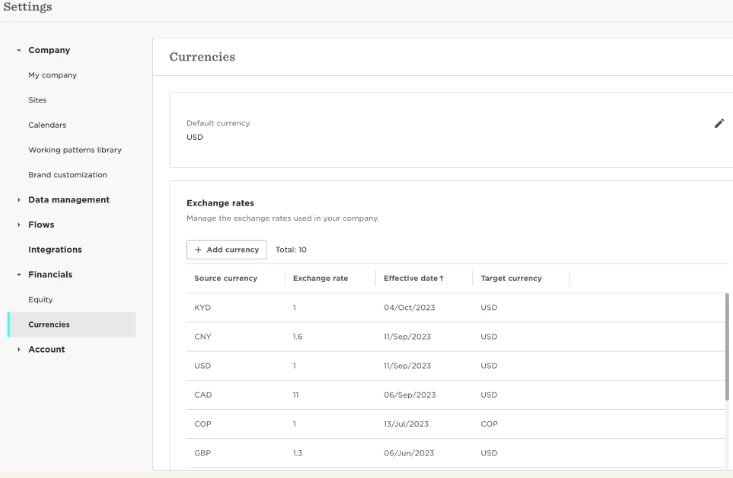
Yes! However, you’ll have to define the exchange rate in the Currencies section under Financials for those currencies. See screenshot:
6. What happens if a position doesn’t have a cost?
A: If the position doesn’t have a cost, then the baseline cost won’t include the cost of this position. If during the planning, even after the event was launched, the cost will change, i.e. from not having a cost to having one for this position, the additional cost will be added to the “requested” amount.
7. As a planner, can I request more funds than the allocated amount I received?
A: Yes, absolutely you can request more funds, but then the worksheet approvers will need to approve the overspending.