

Use payroll report previews in the Summary step to review totals, catch discrepancies, and validate payroll before submission.
Before submitting payroll, it’s a good idea to review the built-in reports available in step 3 of the pay cycle (summary). These reports give you a clear snapshot of what’s about to be processed, so you can validate amounts, spot errors, and ensure everything looks right.
To access the reports:
Go to Payroll and open the relevant pay cycle
Move to step 3: Summary
Click Download report previews
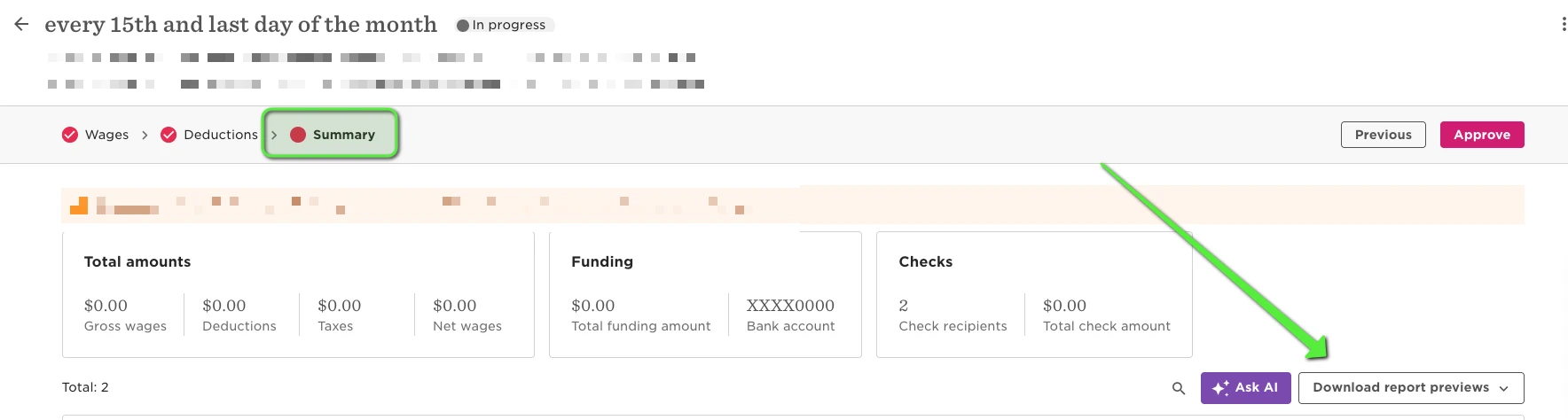
You’ll see three key reports available to download:
Cash requirements
Shows the total amount needed to fund payroll, including employee net pay and employer liabilities.
Use this to confirm your funding amounts before processing and avoid underfunding payroll.
Payroll register
A detailed, employee-level breakdown of earnings, deductions, taxes, and net pay.
This is the best report for auditing individual payroll results and validating employee-level accuracy.
Payroll summary
A high-level overview of payroll totals across the company.
Useful for validating totals at a glance and comparing against expectations from previous cycles.
When reviewing these reports, here are a few helpful checks:
- Compare totals to the previous pay cycle
- Look for unexpected spikes or drops in gross pay, taxes, or net pay.
- Validate employee changes
- Check for new hires, terminations, or employees who may be missing from the payroll register.
- Review large variances
- Scan for unusually high or low earnings, deductions, bonuses, or reimbursements.
- Confirm tax and deduction accuracy
- Spot-check a few employees to make sure taxes and benefits look correct based on their setup.
- Double-check net pay
- Ensure net pay aligns with expectations, especially for employees with recent changes.
- Use the cash requirements report to confirm funding
- Make sure the total debit amount matches what you expect to withdraw for payroll.
- Reconcile totals across reports
- High-level totals in the payroll summary should align with the detailed totals in the payroll register.
- Check for duplicate or unexpected entries
- Look for employees appearing more than once or unfamiliar pay components.
If something doesn’t look right, you can go back to earlier steps in the pay cycle to make corrections before submitting.