


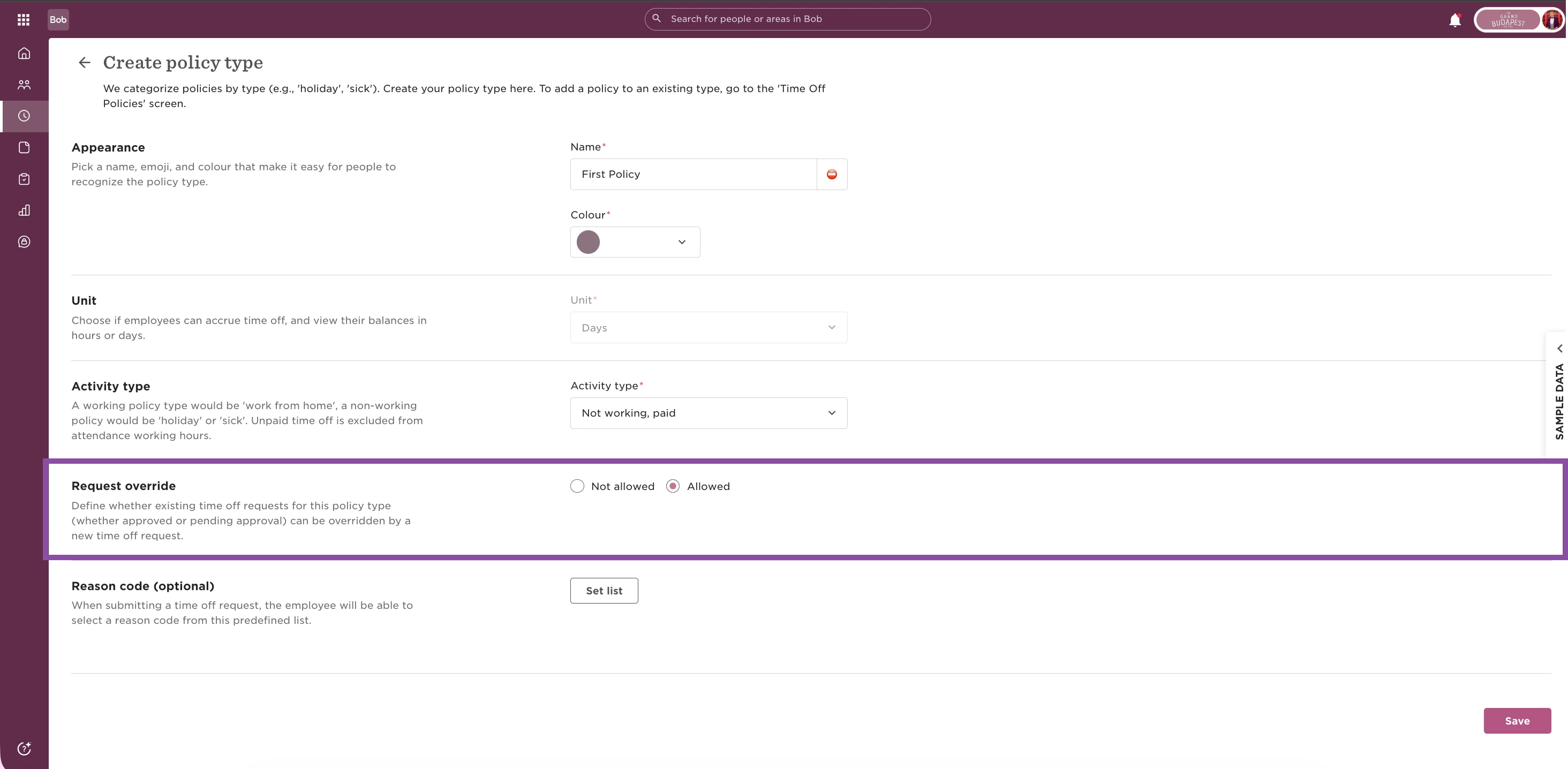
To allow overlapping requests, make sure Request override is enabled in the relevant policy types:
-
Go to Time → Time off settings → Policy types
-
Click on the relevant policy type
-
Then click on Actions → Edit
-
Under Request override, select Allowed
Some initial considerations:
-
The first request must come from a policy type where Request override is set to Allowed. The second request can come from any policy, whether Request override is enabled or not.
-
Double-counting is not supported when two full-day requests overlap.
-
If any of a set of overlapping requests are cancelled or deleted, balances are automatically restored.
-
If a request was originally submitted while “Different number of hours each day” was enabled, the request must be deleted and resubmitted after changing the policy configuration. Existing requests do not retroactively update when policy settings change.
-
Open-ended requests [see note 3 below] don’t block overlaps, but when an end date is set, they are treated as a range of full-day requests, so all previously existing requests are reduced to 0 days’ deduction.
How to read the tables
The order of the requests shown in the tables does not affect the result.
For example, “Full day + Half day” behaves the same as “Half day + Full day”.
Requests based on days
How overlapping requests behave with each other when they both have Policy Types with daily unit (Policy type settings > Unit: Day):
| Request already in place | Latest request | Overlap result |
| Full day | Full day | Works |
| Half day | Half day | Works |
| Full day | Half day | Works |
| Full days, with partial time off for multiple days enabled [1] | Full day | Works |
| Full days, with partial time off for multiple days enabled | Half day | Works |
| Full days, with partial time off for multiple days enabled | Full days, with partial time off for multiple days enabled | Works |
| Full days, with partial time off for multiple days enabled | Half days (first and last day only) | Works |
| Full days, with partial time off for multiple days enabled | Half days (all days in range) | Works |
| Full days | Multiple days, as a percentage [2] | Not supported |
| Half days | Multiple days, as a percentage | Not supported |
| Multiple days, as a percentage | Multiple days, as a percentage | Not supported |
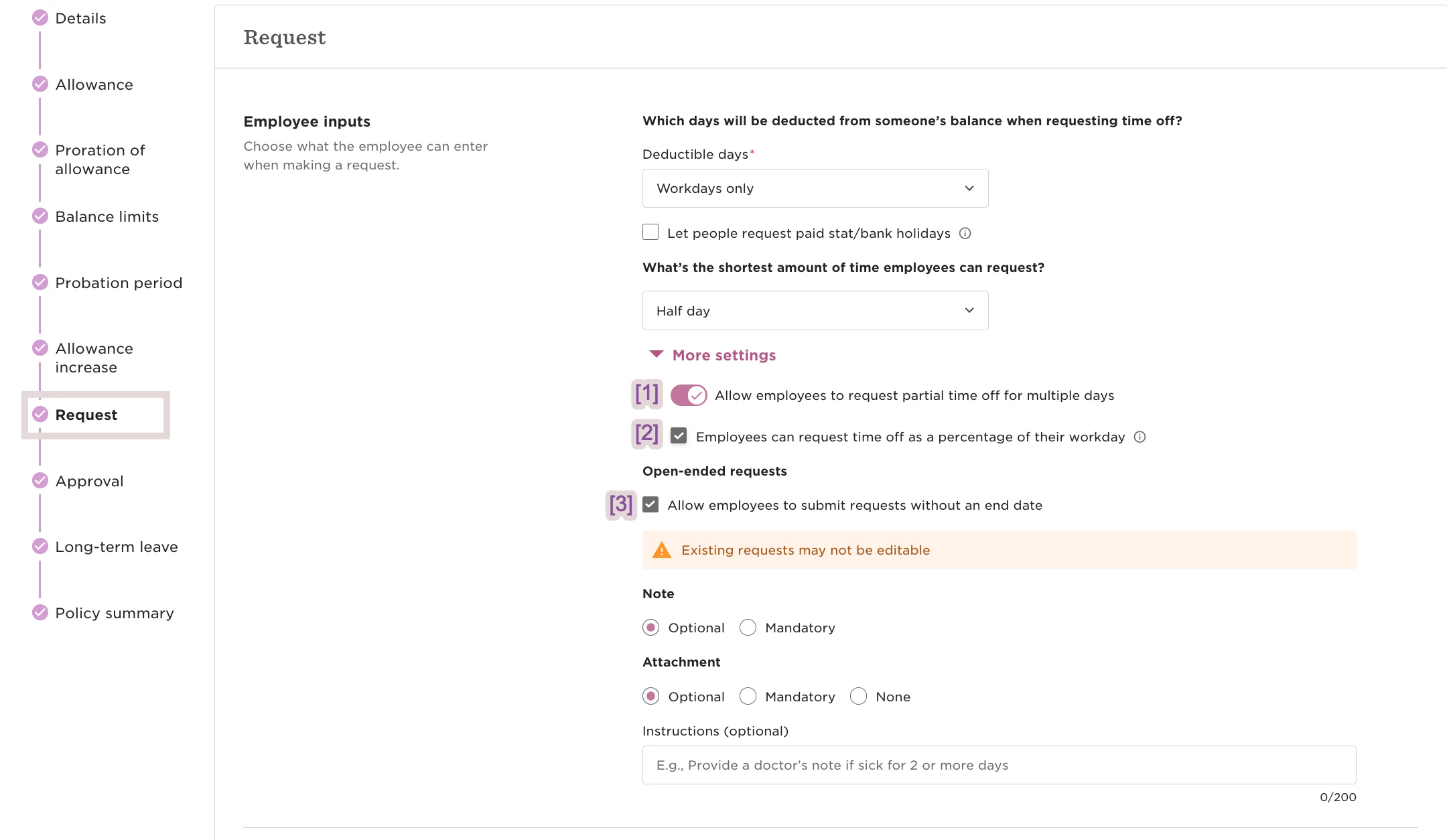
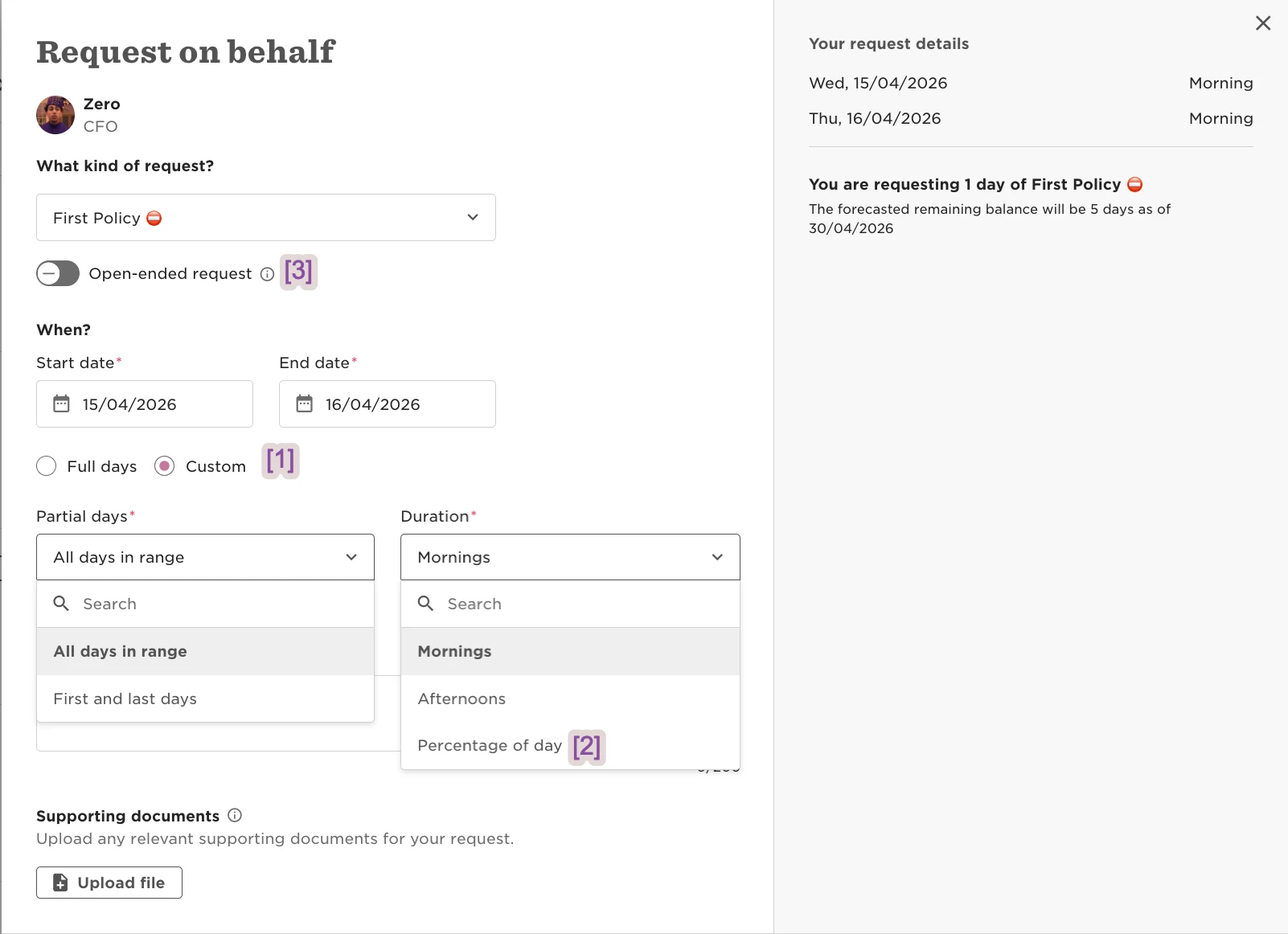
[1] “Request partial time off for multiple days” enabled, as shown below.
[2] “Percentage” of the day enabled, as shown below.
[3] Open-ended requests enabled, as shown below.
Settings View:
UI View:
Requests based on hours
How overlapping requests behave with each other when they both have Policy Types with hourly unit (Policy type settings > Unit: Hours):
For requests submitted from the same policy, “Employees can submit multiple requests from this policy on the same day” must also be enabled under Policy settings > Request > More settings > Restrictions.
| Request already in place | Latest request | Result |
| Full day | Full day | Works |
| Half day | Half day | Works |
| Full day | Half day | Works |
| Number of hours [4] | Number of hours | Works |
| Between specific hours [5] | Between specific hours | Works |
| Number of hours | Between specific hours | Works |
| Half day | Number of hours | Works |
| Half day | Number of hours (same amount each day) | Works |
| Half day | Between specific hours (same amount each day) | Works |
| Number of hours (same amount each day [6]) | Number of hours (same amount each day) | Works |
| Between specific hours (same amount each day [6]) | Between specific hours (same amount each day) | Works |
| Number of hours (same amount each day) | Between specific hours (same amount each day) | Works |
| Full day | Between specific hours | Not supported |
| Half day | Between specific hours | Not supported |
| Full day | Number of hours | Not supported |
| Full day | Number of hours (same amount each day) | Not supported |
| Full day | Number of hours (same amount each day – percentage) | Not supported |
| Full day | Number of hours (different number of hours each day) | Not supported |
| Half day | Number of hours (same amount each day – percentage) | Not supported |
| Half day | Number of hours (different number of hours each day) | Not supported |
| Full day | Between specific hours (same amount each day) | Not supported |
| Full day | Between specific hours (same amount each day – percentage [*]) | Not supported |
| Full day | Between specific hours (different number of hours each day) | Not supported |
| Half day | Between specific hours (same amount each day – percentage) | Not supported |
| Half day | Between specific hours (different number of hours each day) | Not supported |
| Number of hours (same amount each day) | Number of hours (different number of hours each day) | Not supported |
| Number of hours (same amount each day) | Between specific hours (different number of hours each day) | Not supported |
| Between specific hours (different number of hours each day [7]) | Between specific hours (different number of hours each day) | Not supported |
| Number of hours (different number of hours each day [7]) | Number of hours (different number of hours each day) | Not supported |
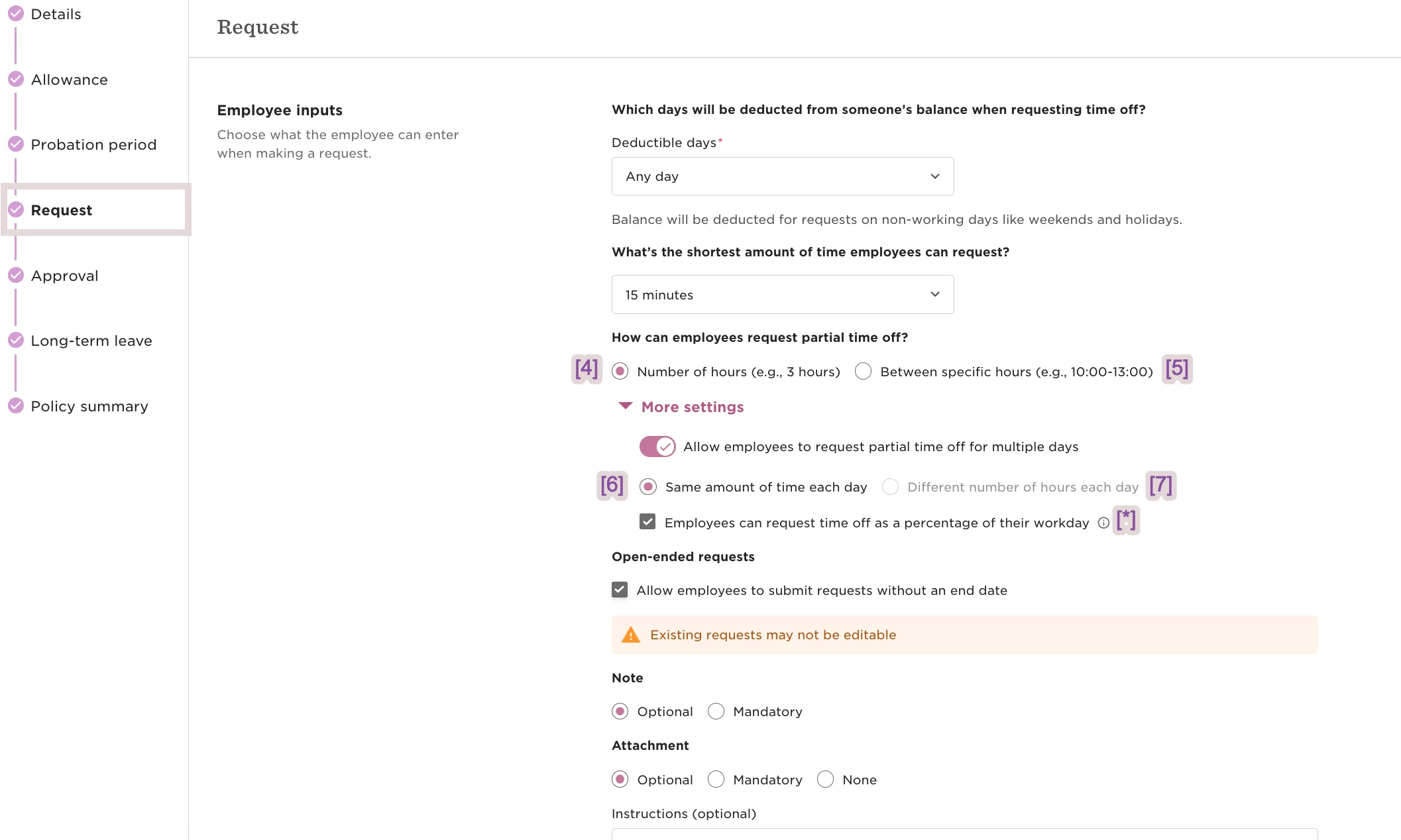
[*] Percentage is only available when using “Same amount of time each day”
[4] Number of Hours
[5] Between specific hours
[6] Same amount of time each day
[7] Different number of hours each day
Policy settings view:
Requests combining days and hours
How overlapping requests behave with each other when their Policy Types have different time units.
| Request already in place | Latest request | Result |
| Half day (day) | Number of hours (hours) | Works |
| Half day (day) | Between specific hours (hours) | Works |
| Half day (day) | Number of hours (same amount each day) | Works |
| Half day (day) | Between specific hours (same amount each day) | Works |
| Full day (day) | Number of hours (hours) | Not supported |
| Full day (day) | Between specific hours (hours) | Not supported |
| Full day (day) | Number of hours (same amount each day) | Not supported |
| Full day (day) | Number of hours (same amount each day – percentage) | Not supported |
| Full day (day) | Number of hours (different number of hours each day) | Not supported |
| Half day (day) | Number of hours (same amount each day – percentage) | Not supported |
| Half day (day) | Number of hours (different number of hours each day) | Not supported |
| Full day (day) | Between specific hours (same amount each day) | Not supported |
| Full day (day) | Between specific hours (same amount each day – percentage) | Not supported |
| Full day (day) | Between specific hours (different number of hours each day) | Not supported |
| Half day (day) | Between specific hours (same amount each day – percentage) | Not supported |
| Half day (day) | Between specific hours (different number of hours each day) | Not supported |