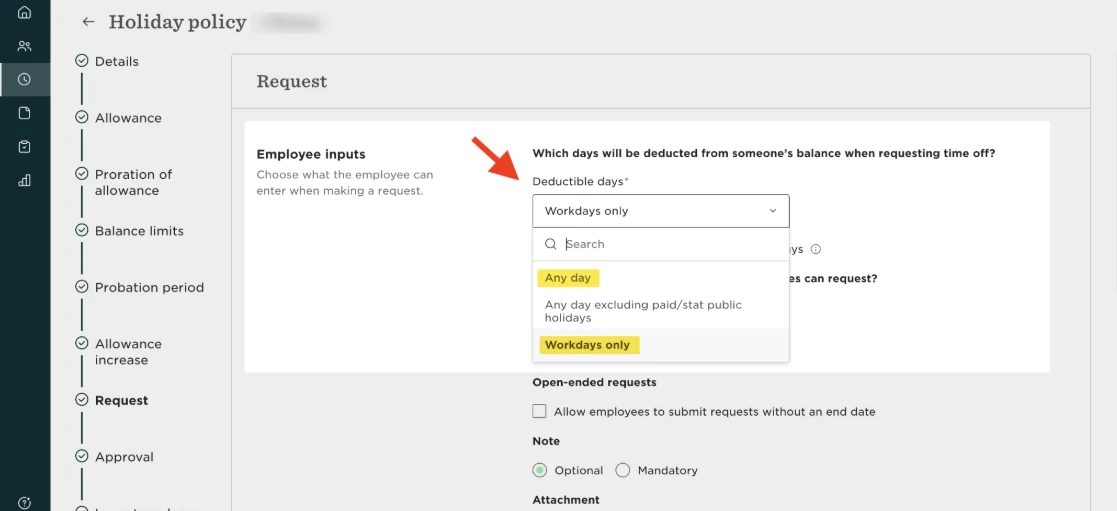
If a weekend day is marked as a working day in the employee’s assigned calendar but they can't request time off for that date, it’s useful to check their working pattern and time off policy.
A working-type event in the assigned calendar doesn't override the employee's assigned working pattern. For example, if an employee's working pattern is Monday–Friday and their time off policy only allows balance deductions on workdays, they won't be able to request Saturday off even when that Saturday is marked as a working day in the country calendar.
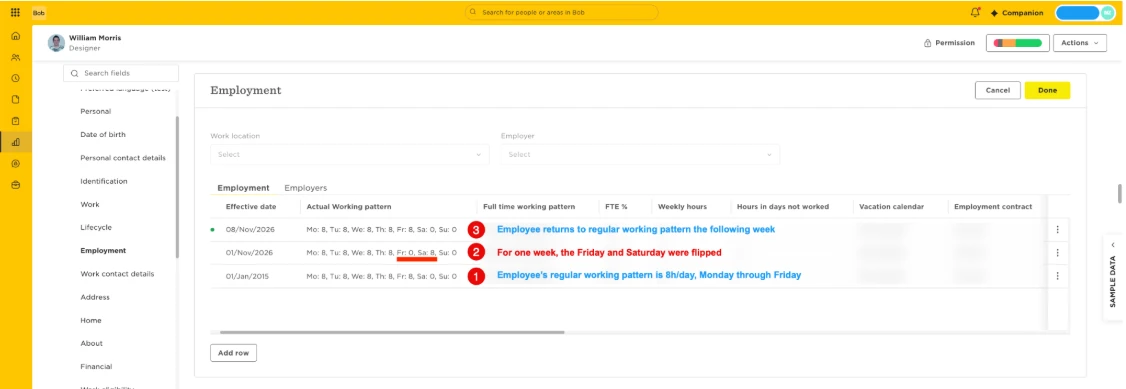
For an occasional rescheduled working day, you can keep the policy setup as is, and temporarily update the employee's working pattern using new rows in their Employment table:
- Add a new Employment table row effective from the relevant date and update the working pattern so the rescheduled weekend day is a working day.
- Add another Employment table row effective after the exception to return the employee to their regular working pattern.
- The employee can then request time off for the rescheduled working day.
Alternatively, you can edit the time off policy so that ‘Any day’ is deductible. Keep in mind that this updates deductions for all requests in the open cycle. Employees should only request the days they want deducted and avoid including non-working days.