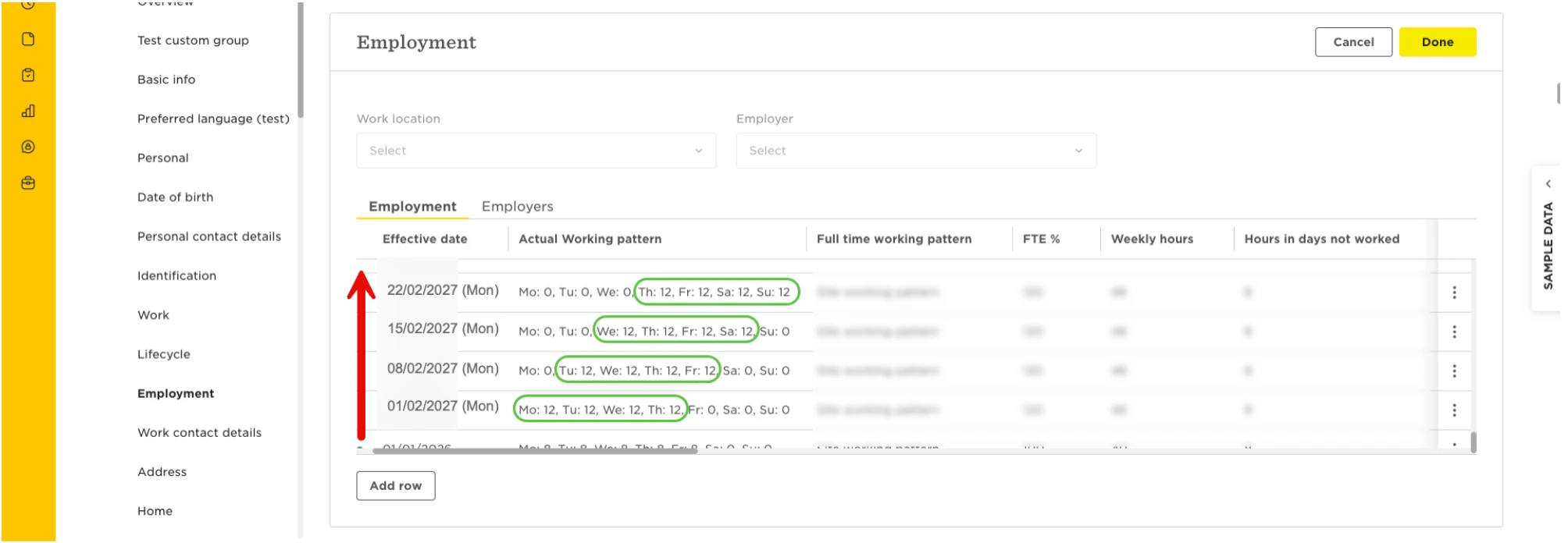
If your employees work on a rota or shift cycle longer than two weeks, you can use future-dated Employment table entries to record their working pattern sequence in Bob.
Bob currently supports weekly and bi-weekly working patterns.
For rota shifts with cycles longer than two weeks, the workaround is to add multiple rows to the employee’s Employment table, with each row recording the working pattern that applies from a specific week. It’s possible to do this using Import table data.
You can add as many future-dated rows as needed to represent the employee’s working pattern for as far in advance as you’d like. This allows Bob to know the employee’s expected working days, so that, for example, time off requests are deducted accordingly.
Before that, to help you, you can create all the relevant Working Patterns in your library (read more).
Tip: use Excel tools to populate the import file with sequential future dates and repeat the working patterns
How to record this?
Let’s say an employee rotates between working pattern A, B, then C:
- Add a row to the employee’s Employment table and assign them to the working pattern A, effective from the beginning of the first week (for example, Monday, February 1st, 2027).
- Add a new row and assign working pattern B, effective from the beginning of the next week (following the same example, Monday, February 8th, 2027).
- Assign working pattern C, effective from the beginning of the following week (Monday, February 15th, 2027).
- Assign working pattern A, effective from the beginning of the following week (Monday, February 22nd, 2027).
- Continue adding future-dated Employment table entries to repeat the working pattern sequence as needed.
Some use cases:
1. Employee works one Saturday every month:
| Assign from Week 1 | Working Pattern A | Mon 8h, Tue 8h, Wed 8h, Thu 8h, Fri 8h, Sat 0h, Sun 0h |
| Assign from 3 weeks later | Working Pattern B | Mon 8h, Tue 8h, Wed 8h, Thu 8h, Fri 8h, Sat 8h, Sun 0h |
| Assign from following week | Working Pattern A | |
| Assign from 3 weeks later | Working Pattern B | |
| And so on... |
2. Employee works 12h/day, 4 days on, 4 days off:
| Assign from Week 1 | Working Pattern A | Mon 12h, Tue 12h, Wed 12h, Thu 12h, Fri 0h, Sat 0h, Sun 0h |
| Assign from Week 2 | Working Pattern B | Mon 0h, Tue 12h, Wed 12h, Thu 12h, Fri 12h, Sat 0h, Sun 0h |
| Assign from Week 3 | Working Pattern C | Mon 0h, Tue 0h, Wed 12h, Thu 12h, Fri 12h, Sat 12h, Sun 0h |
| Assign from Week 4 | Working Pattern D | Mon 0h, Tue 0h, Wed 0h, Thu 12h, Fri 12h, Sat 12h, Sun 12h |
| Assign from Week 5 | Working Pattern E | Mon 0h, Tue 0h, Wed 0h, Thu 0h, Fri 12h, Sat 12h, Sun 12h |
| Assign from Week 6 | Working Pattern F | Mon 12h, Tue 0h, Wed 0h, Thu 0h, Fri 0h, Sat 12h, Sun 12h |
| Assign from Week 7 | Working Pattern G | Mon 12h, Tue 12h, Wed 0h, Thu 0h, Fri 0h, Sat 0h, Sun 12h |
| Assign from Week 8 | Working Pattern H | Mon 12h, Tue 12h, Wed 12h, Thu 0h, Fri 0h, Sat 0h, Sun 0h |
| Assign from Week 9 | Working Pattern A | |
| And so on... |