Notification for approved time off request

  • March 7, 2023
  • 32 replies
  • 987 views

How can I send a notification for an upcoming approved time off request for an employee?


In order for a notification to be sent for an upcoming time off request for an employee, you can use a "Task List" with the ‘anchor event’ for the relevant time off policy. This anchor event is anchored to the request date for the employee.
You can then set up an email task to be sent out notifying that there is an upcoming time off request. It will trigger in relation to the leave request date of the employee.

To set up the task list:

  • Tasks
  • Task Lists Settings 
  • +Add New
  • toggle on ‘Add scheduling’
  • select the specific time off policy as the anchor event
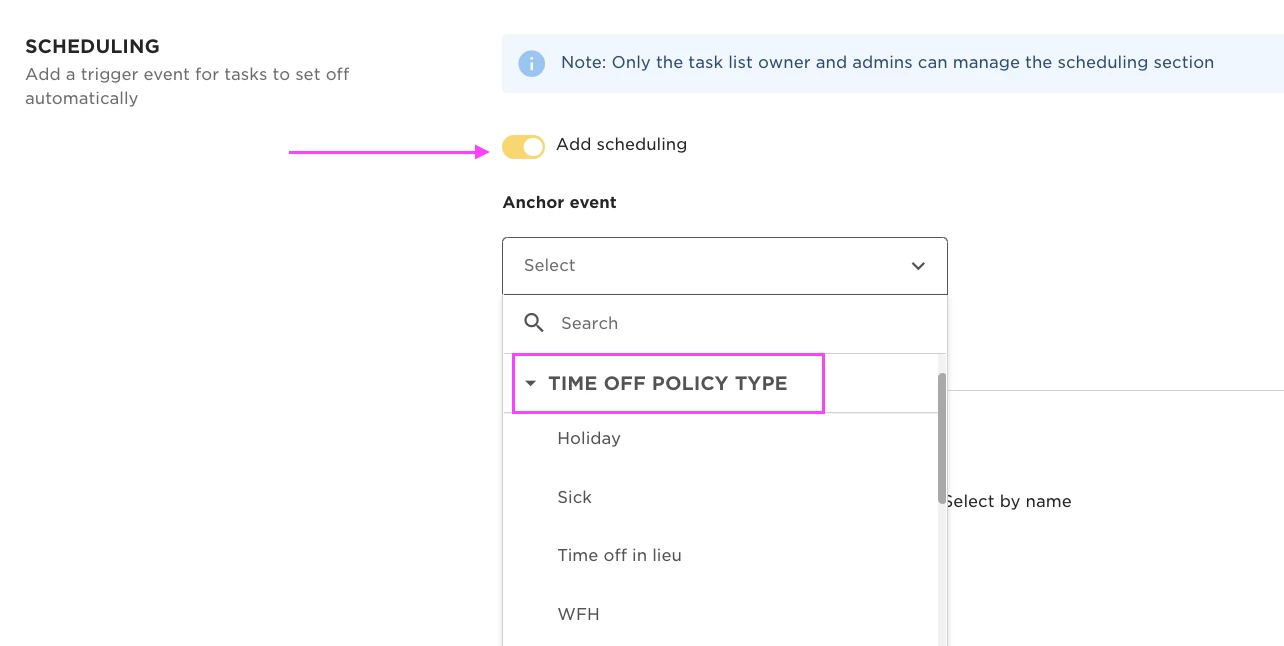


Then create an email task to be sent to the appropriate employee.
You can set the email to be sent "X" number of days before, after or on the time off request date
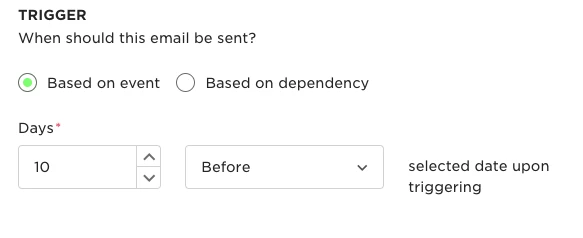




32 replies

  • June 1, 2023

Hi - can the task list send a notification once its been approved by the manager as an FYI?


Lindsay Sinenberg
Bobber

Hi @Lauren ! The task list is only applicable to approved requests already. So there won’t be a 2nd notification that will be or can be sent since the task is triggered for approved requests already.

Cc: ​​​​@Karen Stewart Longest 


KseniaPushABBYY

@Ben Edwards , @Lindsay Sinenberg Is there any way to add information about start and end day of the request to the notification? I check the functionality, but I can’t figure out on how to add more specifics to email. 


Lindsay Sinenberg
Bobber

Hi @KseniaPushABBYY! That is currently a feature request with our product team 😊 The time off details are unfortunately not variables that can be added to tasks at this time. I went ahead and added your your company to the open request - it’s under PM review at the moment.


Olga Frolova

Hi @Lindsay Sinenberg !

Are there any updates about Ksenia’s question? Our company also needs an ability to add start and end dates of a TimeOff to e-mail and general tasks. Could you please add us to this feature request? 


Lindsay Sinenberg
Bobber

Hi @Olga Frolova! No update as of now but I added your company to the ticket with Product. We do advise reaching out directly to your CSM to check-in on updates 😊


mateo.strbic

@Lindsay Sinenberg 

We implemented this same process in our company, but due to timing when the tasks (in this case email) are sent, we receive information only the following day.


Example:

Our timing of sending tasks is set to 9:30 AM CET

Employee requests sick leave (which is automatically approved) at 10:30 AM CET, but our admin-hr teams will only receive this info tomorrow at 9:30 AM CET.

Is there a way for this email to be sent out immediately when the time off is requested (or approved)?

Thank you.


Jessica Lane
Bobber

Hi @mateo.strbic 👋🏻


The tasks will send based on the timing in the task list.

For scheduled task lists (based on anchor event), there might be a delay of up to 6 hours until you see the task list.
This is because Bob collects all future scheduled task lists every 6 hours and triggers them.


mateo.strbic

Hi @Jessica Lane, thank you.

Is there any other way to set up email for time off to be sent to specific people? e.g. Manager is the approver, but we need some other people to be notified too. It’d be great if it could be set up that a group is a recipient of that email.


Kiare Tavarez
Bobber

Hi @mateo.strbic! The steps provided on this community post provided by our internal Bobber, Ben, go over the steps for a workaround to send notifications for time off. 

📌 Just a heads up as of October 29th, there will be a new update that will let you add groups as an assignee for a task. In the meantime, before this is released, you will need to select employees by name or role. For more clarity on our roadmap and a sneak peek at what's coming up, you can review our feature release notes in our help center.


mateo.strbic

Hi @Kiare Tavarez , thank you.


mateo.strbic

Hi @Jessica Lane and @Kiare Tavarez,

We’ve been working on resolving issues with notifications, but we’re still running into some challenges.

Here’s our current process: when an employee requests sick leave (which doesn’t require approval), the notification is sent only to their manager. However, HR and Admin teams don’t receive this notification at all. To address this, we created a task list that triggers when a sick leave request is submitted. Unfortunately, we often receive the notification with a 6-hour delay, which is too late for our needs.

Would it be possible to adjust the notification settings for time-off requests so that multiple roles or specific people can be selected, rather than just one? This change would help us address the issue effectively.

Thank you for considering this!


Jessica Lane
Bobber

Hi @mateo.strbic 👋🏻

While it is not currently possible to update the notification settings for time off requests, we do have a Feature Request open for this. 

I have added you to this. 😊


  • March 6, 2025

Hi! Bumping here, as we have the same challenge.

The task list to send an email is great, but the 6 hour delay makes it pretty meaningless when folks call in sick. That’s really the only situation where this is important, as anything that’s pre-scheduled is already visible to anyone relevant in the Time Off calendar.

Is there any hope that the 6 hour gap between pulling that info is going to be changed?

TX!


mateo.strbic

Hi ​@Naomi, I found a workaround by creating a scheduled report of sick leave requests made that day, which is sent to me via email at 9:30 AM every day. All people that request sick leave usually do that before start of work at 09:00 AM so I get all the info in time.


  • March 7, 2025

Hi ​@Naomi, I found a workaround by creating a scheduled report of sick leave requests made that day, which is sent to me via email at 9:30 AM every day. All people that request sick leave usually do that before start of work at 09:00 AM so I get all the info in time.

Amazing! going to give this a try 🤞🏻


  • March 8, 2025

@mateo.strbic this has literally changed my life,  I can’t tell you how happy I am! You’re kinda my hero now. 🏆


mateo.strbic

@Naomi I’m happy to help!


Hi is there any update on being able to include the holiday the employee requested in the new task email?


Jessica Lane
Bobber

Hi ​@Amy Feasey 👋🏻


The FR is still under review, and so unfortunately the time off details are not variables that can be added to tasks at this time.


Hello, is there anyway of adding the dates to the time off requests approved notification? Our office EA’s need to be able to know the dates that people are taking off. Currently they only get notified that a request has been approved. 


Thanks!


This is a need for us too. Having the email trigger without the time off details is meaningless. When do you think the product team will be able to release this feature?


I have figured this out (there may be a better way, but this works for us). In the email trigger that is set up, you can add in the ;’start date’ and ‘end date’ of the time off request. So it now comes up with more details for the time off requested. 


I have figured this out (there may be a better way, but this works for us). In the email trigger that is set up, you can add in the ;’start date’ and ‘end date’ of the time off request. So it now comes up with more details for the time off requested. 


Yes, After commenting here and went back to figure this out. If the task list is triggered by an ‘event’ we can chose the event start & end date on the email body. Thank you for this :)


Hi ​@Amelia Coats, ​@Nehlusha Weeratunge,
I’m really interested in your workaround here! Where are you adding in the event start & end date in the email?  Is it a particular field name you are adding in?
Thanks for any guidance!