


I just changed the visibility to public in one time off policy, and we can't see already approved time off from that policy in People's time off calendar. Why is this?

  • May 2, 2023 1:16 PM UTC
  • Sep 17, 2024 10:02 AM UTC
  • 4 replies
  • 177 views
  • Translate All

Paula Fernandes
Bobber

Any requests that were placed before the policy visibility was changed, will still have the visibility settings the policy had when the request was done.

So for instance if you have changed a policy visibility today from private to public, but someone has placed a request yesterday (when the visibility was private) then that request will still be private and only the requests that are placed from today on, will be public.

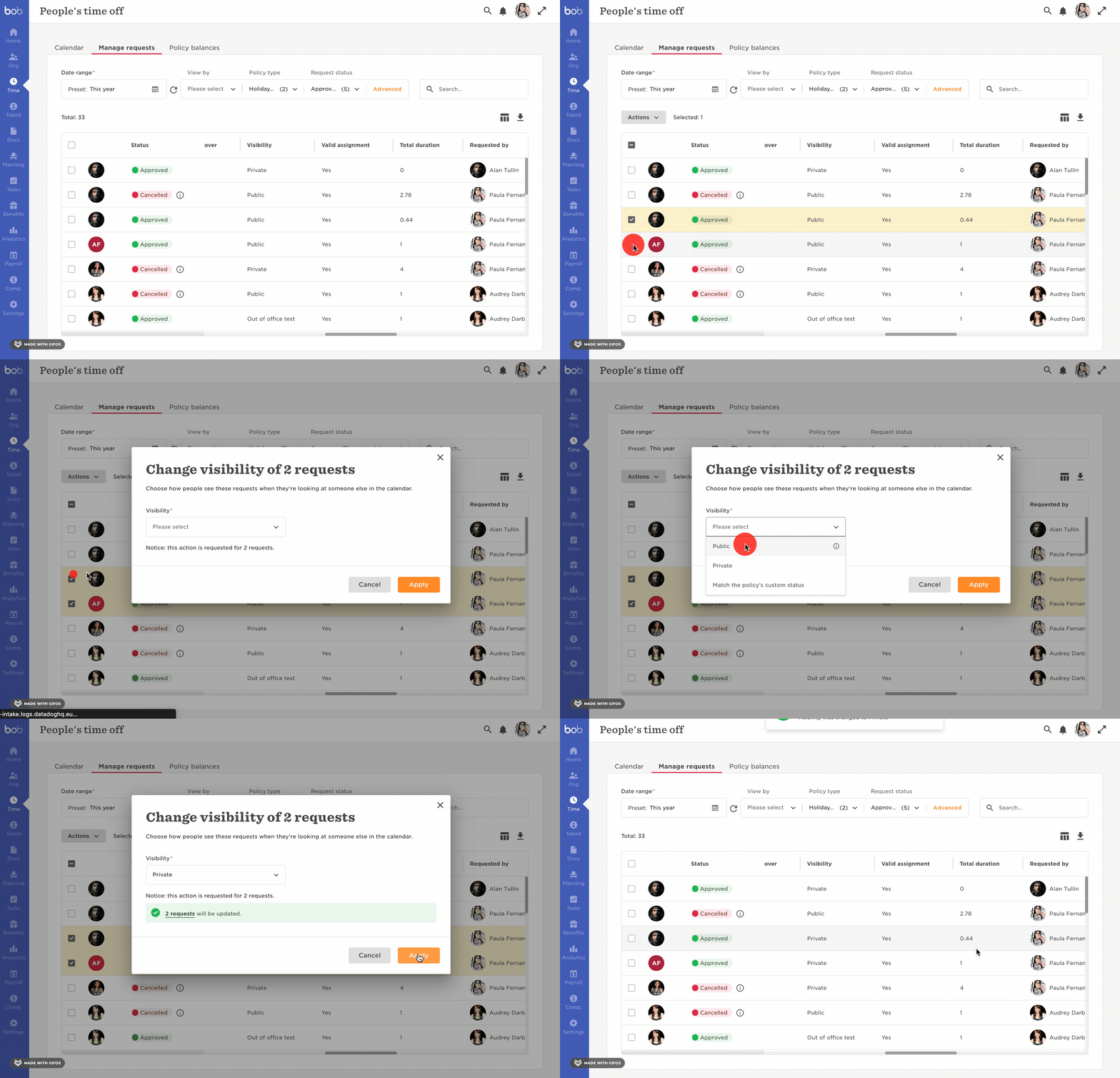
However, you can also change the visibility of individual requests from public to private (not the other way around, though - there is a way, but you'd have to delete the requests and then import them again).

To do this, head to Time > People's time off > Manage Requests > Select the public visibility requests > Actions > Change visibility:


4 replies

If I delete a Time Off policy (we only want vacation and sick not holiday) will I still be able to view historical requests for it?

Translate

Paula Fernandes
Bobber

Hi @Ryan Lehrkinder! Yes, you will be able to see historical requests even if you delete the policy 😃

Translate

@Paula Fernandes thank you! I tried deleting the policy but it says: This policy is assigned to 68 employees, and cannot be deleted. In order to delete the policy, remove or replace it from the employees’ profiles.


It seems like there is a rule set up that it defaults to all Employed employees too? I tried changing the policy to be only assigned to me as a workaround but the Employed setting seemed to override. 

Translate

Paula Fernandes
Bobber

Hey @Ryan Lehrkinder , please refer to these two articles that might be helpful:

If you’re still having issues, please open a support ticket and we’ll be happy to look into the case for you!

Translate