


Custom Holiday Calendar Update

  • December 17, 2025
  • 3 replies
  • 186 views

Anna Uriadnykova
Bobber

If you’re using custom or country-based calendars in Bob, here’s how holidays work year to year.


When you create a custom calendar, you can add events for future years in advance. That way, your regional holidays can be set up ahead of time without needing to recreate the calendar.
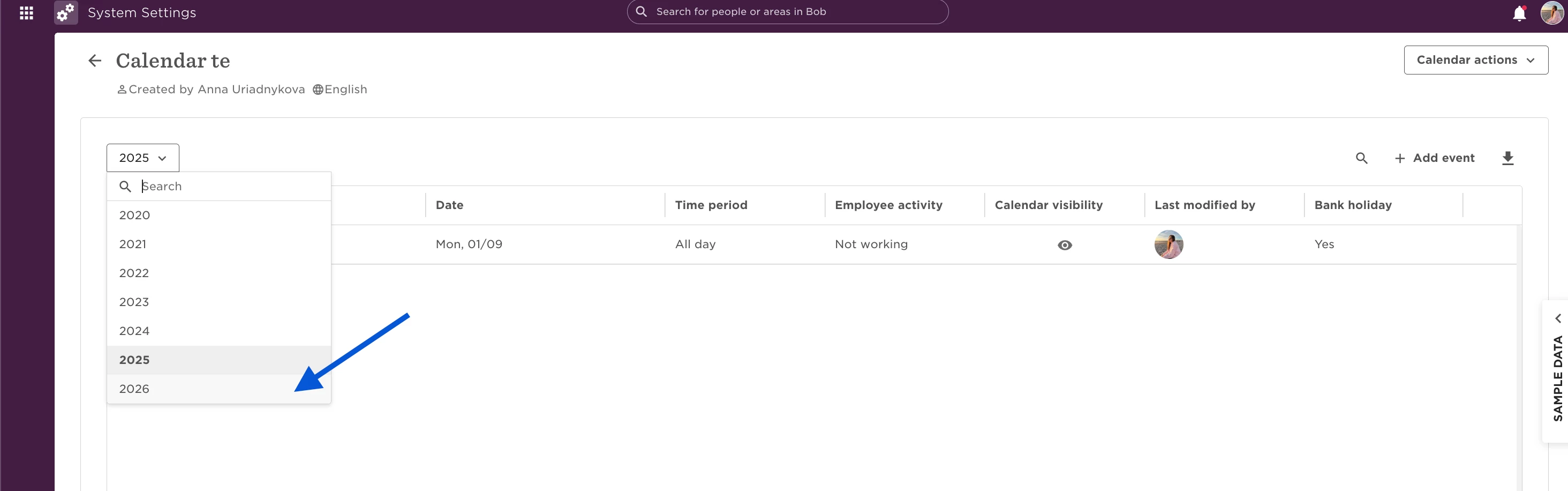


When you use a country-based calendar, Bob automatically adds the next year’s standard public holidays for that country. However, any custom edits you made this year won’t carry over. Each year, you’ll need to review the preloaded holidays and adjust them so they reflect your company’s schedule.


  • Custom calendar → holidays don’t reset, you just keep adding to it.
  • Country-based calendar → holidays reset each year, and your customizations need to be re-added.

 

3 replies

How do I adjust visibility settings for this calendar? Currently only admins can see it, but I want all site’s employees to see it. Thanks!


Joy Whittaker

@Anna Uriadnykova I’ve created a custom calendar, but when I add the dates to either 2026 or 2027 they don’t appear in the other year (i.e. 2026 dates don’t carry forward to 2027 calendar, 2027 dates don’t backfill to 2026 calendar).

Please can you confirm exactly what actions I need to take to create a calendar that will automatically repeat the specific days each year?

Equally, is there any way to automatically add days in lieu when the standard public holiday falls on a weekend? The office I’m making a calendar for only closes for New Year’s Day, Christmas Day and Boxing Day (UK-based).


  • August 11, 2026

@Anna Uriadnykova hi there has the product team received feedback that customers would like custom calendars to pre-populate holidays for future years? Creating them manually is a lot of effort, especially as we add more sites, today my company has a total of 17.