Sometimes employees submit Time Off requests for past dates, which can disrupt payroll and reporting. While Bob doesn’t completely block retroactive requests, you can use policy settings and a few management tweaks to minimize them.
To prevent employees from adding time off after payroll is finalized, adjust your Time Off policy settings:
-
Go to Settings > Time Off > Policies
-
Select the relevant policy
-
Click Edit
-
In the Request tab, scroll down to More settings
-
Find the option called Requests after cutoff
-
Uncheck Allow requests after cutoff
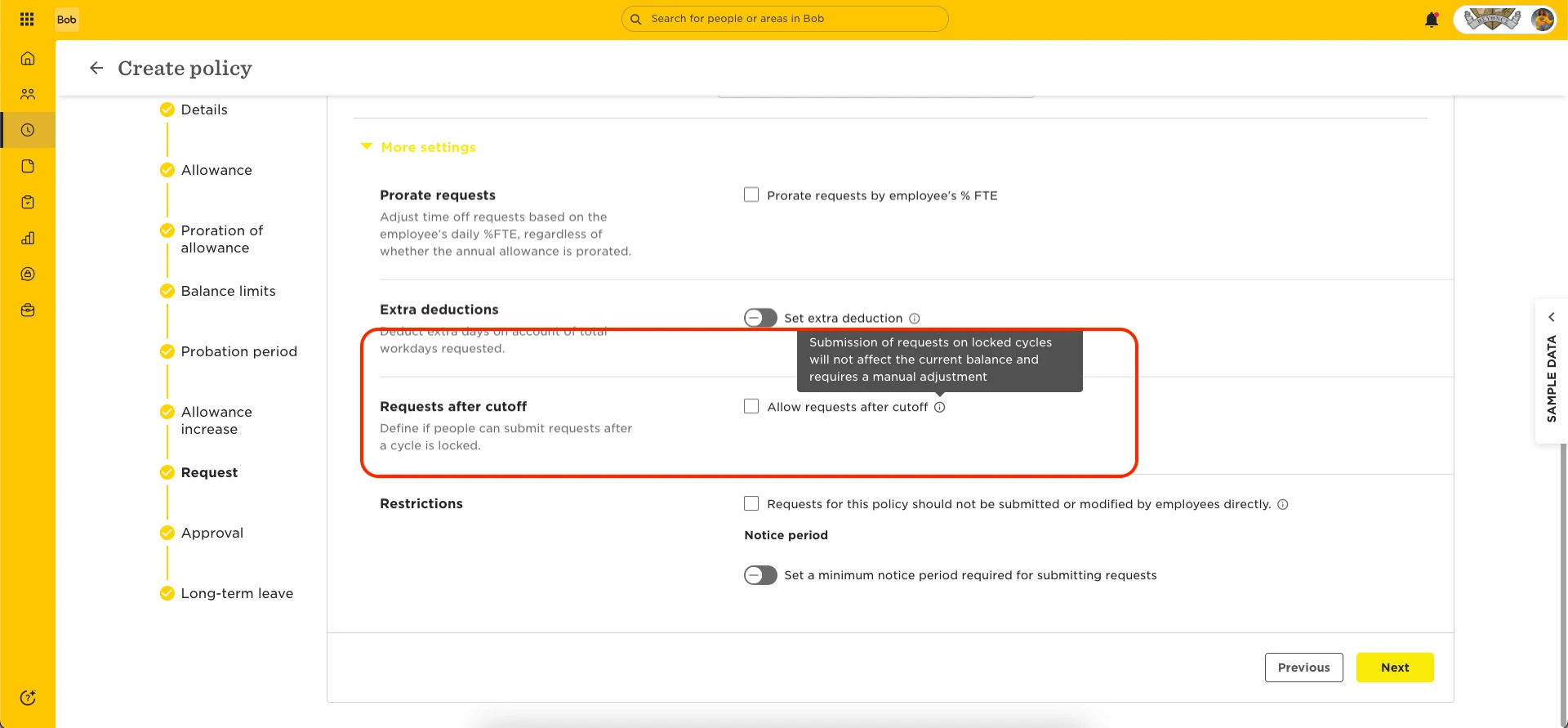
This prevents employees from submitting Time Off requests once a cycle is locked—helping you keep payroll and balance data consistent.
⚠️ Keep in mind: This setting only applies to locked cycles. Employees may still be able to request time off for open past periods unless those are also closed or locked.
For current, open cycles, retroactive requests are still possible. You can manage them by:
-
Setting up an approval flow and asking approvers not to approve backdated requests
-
Shortening your Time Off policy cycle to monthly or quarterly
If you change the cycle, you’ll need to recreate or duplicate the policy to adjust its settings.
With a shorter cycle—for example, monthly—employees can’t request time off for a past period once that month ends and the cutoff passes.