Reopen an attendance cycle and the timesheet

  • Mar 22, 2023 6:21 PM UTC
  • Sep 17, 2024 9:48 AM UTC
  • 7 replies
  • 603 views
  • Translate All

You can reopen the Attendance Cycle by following the steps below:

  • Go through Time > People's Attendance > Timesheets
  • Select the cycle from the drop down 
  • Click the Actions button on the right hand side > Extend Cycle
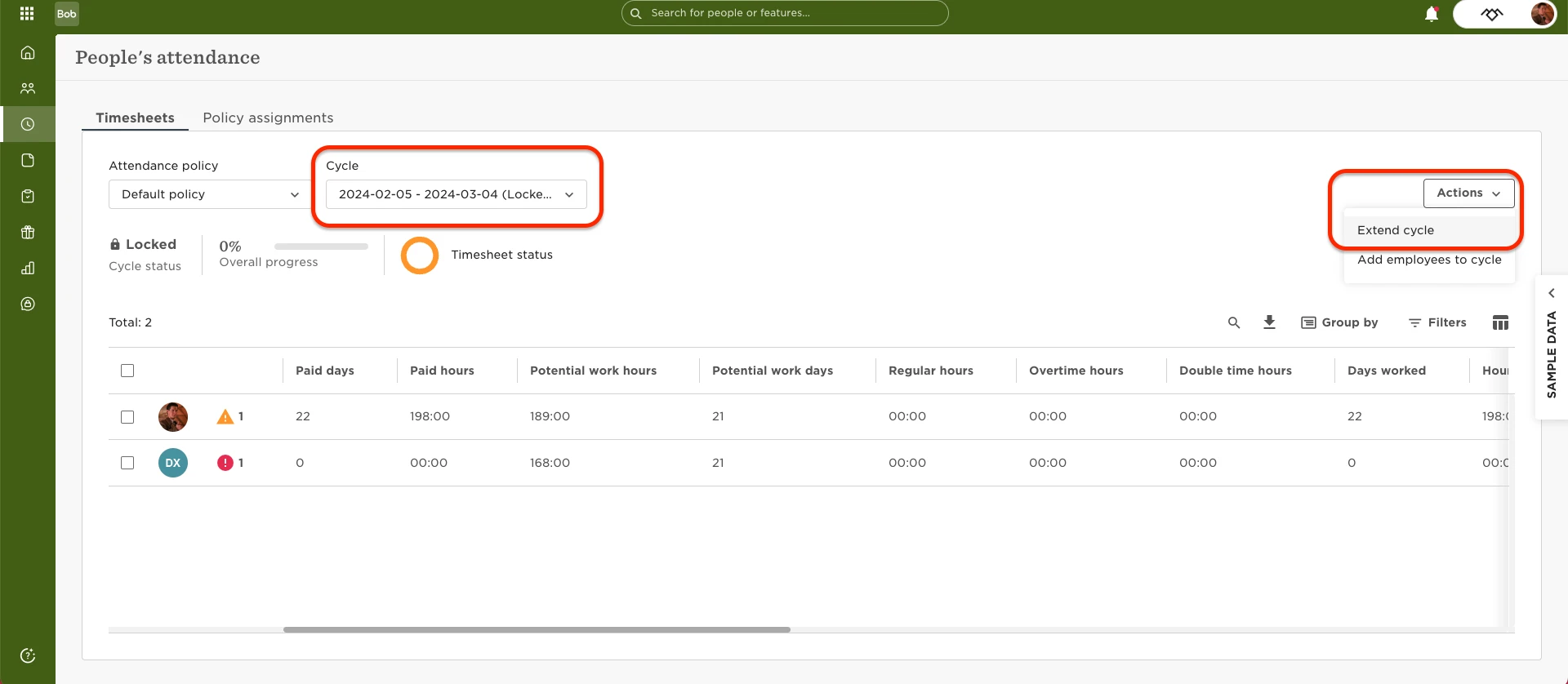
 

  • If the timesheet has already been submitted, then you will need to decline the time sheet to reopen it. Once it has been declined, then it will be open for the employee to make amendments to and resubmit.




7 replies

Andrea Reisinger

Hi @Ben Edwards,

I was following your instructions regarding to take some changes. It was very helpful, thank you. 😉
Refering to the end of the cycle I have another issue, maybe you can help me with this. 


For our past cycle, we had set the end of the cycle to 3th of June. We were told by our implementation manager that employees have until 23:59 that day to submit their timesheets. But today in the morning, the timesheet was already closed and the employees had no chance to submit it. So we opened it again and set the date to 4th of June as you can see in the Screenshot. Another curiosity is, that we recieved the reminder-e-mail from bob on the 1tth of June which told us, that we should submit the timesheet until the end of this day. 

Is this a bug? Should we log a ticket? 

Looking forward to your reply - have a good day.

Andrea

Translate

KatrinAmend
HiBob Service Partner
  • HiBob Service Partner
  • Jun 3, 2024 11:30 AM UTC

Hi @Ben Edwards

just to jump in here as well, I am the implementation manager :-) 

There might be two issues here, one an inconsistency, and the other a wording/translation issue. Could you check this?

  • For performance / surveys etc., the deadline is always for 23:59 on the date entered as last day of the event. E.g., if my performance review or survey runs from 01st March until 31st March, then the survey will close on 31st March at 23:59, and no responses can be logged on 1st February anymore.
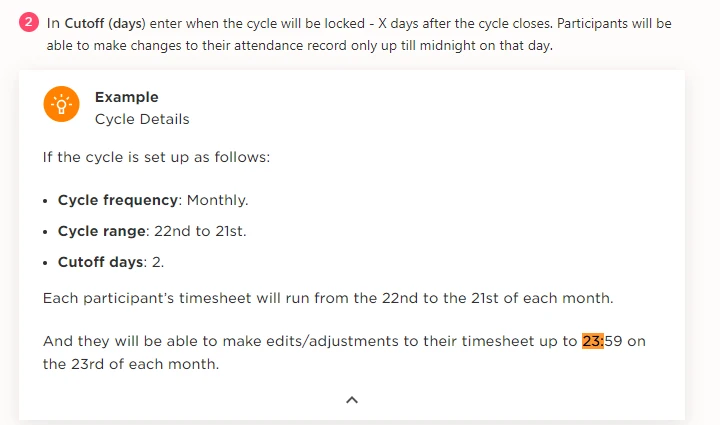
  • For T&A, the time for the timesheet to lock should be last day of the cycle + cutover days. So if cycle is ending on 31st of each month and I have 3 cutover days, then the timesheet should be locked at 23:59 on the 3rd.
  • It seems that currently the timesheet reminder is “until 4th of June” but then the cycle actually locks already at 23:59 on 2nd of June, so by 3rd of June. 
  • The wording in the reminder email could therefore be adjusted (“please complete timesheet until end of day on xx date” instead of “please complete your timesheet by the 4th” which is what it currently says and can be confusing, especially when translated.)


Thank you as always for investigating and for any tips or feedback!

Best wishes

Kat

Translate

Hi there, 

Please is it possible to reopen / extend a time and attendance cycle for a singular employee and not the whole group?

And if I have to open it up for the whole group, does it notify everyone? Or have any impact on previous rules set in place for its lock?

I’d appreciate responses to this. Thank you!

Translate

Andrea Reisinger

Hi Olutomi,

as far as I know, it is not possible to reopen the cycle for certain people only. However, no notification is sent. I have also found that it is unfortunately not possible to close the cycle manually, but that it only closes again after the end date has passed. 

Hope this helps.

Have a good day,

Andrea

Translate

Hi Olutomi,

as far as I know, it is not possible to reopen the cycle for certain people only. However, no notification is sent. I have also found that it is unfortunately not possible to close the cycle manually, but that it only closes again after the end date has passed. 

Hope this helps.

Have a good day,

Andrea

Thank you so much Andrea

Translate

Yvonne Van Vierzen

Hi, 


Is this only possible when you have the permission 

Manage attendance policies?


We don't want to open that up for local teams as we have multiple companies per country and we don't want them to change a wrong policy by accident. 


Thank you

Yvonne 

Translate

Andrea Reisinger

Hi, 


Is this only possible when you have the permission 

Manage attendance policies?


We don't want to open that up for local teams as we have multiple companies per country and we don't want them to change a wrong policy by accident. 


Thank you

Yvonne 

Hi Yvonne,

Opening a cylcle is only possible with the permission, thats right. So in my case, I am not a super-admin but have the permission to manage attendance policies, I am able to open a cycle.

I hope information helps.

Sunny greetings,

Andrea

Translate