


A part-time employee may be unable to submit their timesheet when their employment setup expects hours on every workday, but they only record hours on the days they work.
This article explains how to review the employee’s working pattern and update it to reflect a flexible, part-time working arrangement.
Why this happens
In the reported case, the employee’s FTE was set to 100%, and their employment setup expected hours on every workday. Because the employee had not recorded hours for every expected workday, they could not submit their timesheet.
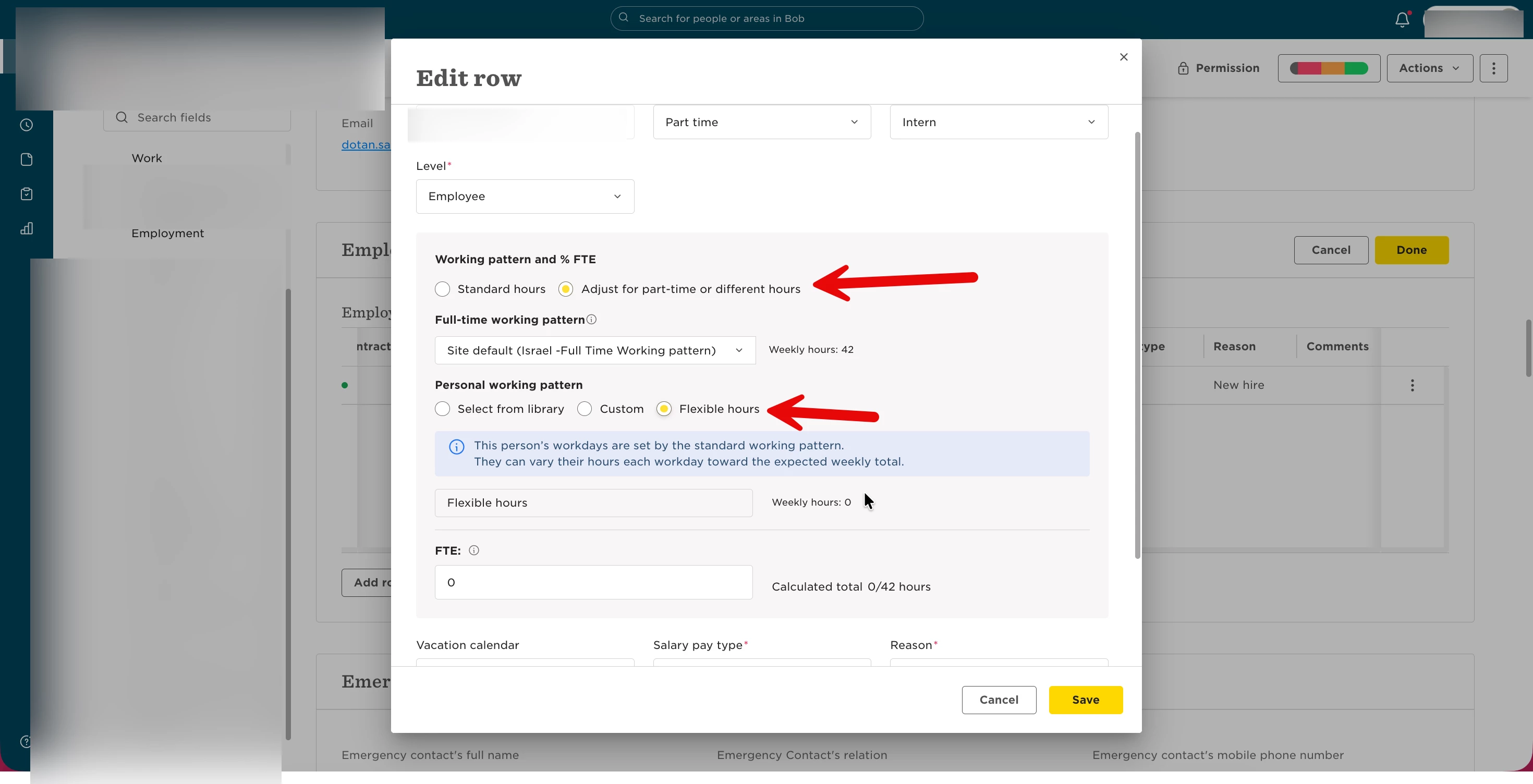
The resolution was to align the employee’s working pattern and FTE with their actual working arrangement and select Flexible hours.
How to resolve it
- Open the employee’s profile.
- In the Employment table, edit the relevant employment row.
- Update the working pattern and FTE % to reflect the employee’s actual part-time working arrangement.
- Select Flexible hours.
- Save the changes.
Important: Only change the FTE percentage if it does not accurately reflect the employee’s employment arrangement. Do not reduce FTE solely to bypass a timesheet submission issue.
Verify the resolution
Ask the employee to review their timesheet, record the hours they actually worked, and try submitting it again.
For the scenario described above, the corrected setup should allow the employee to submit entries for the days they worked without requiring entries on every workday.
If submission is still blocked, contact HiBob Support with the affected timesheet period and any error message displayed.