
In case the employee does not appear in a cycle or does not have access to his attendance page, please make sure:
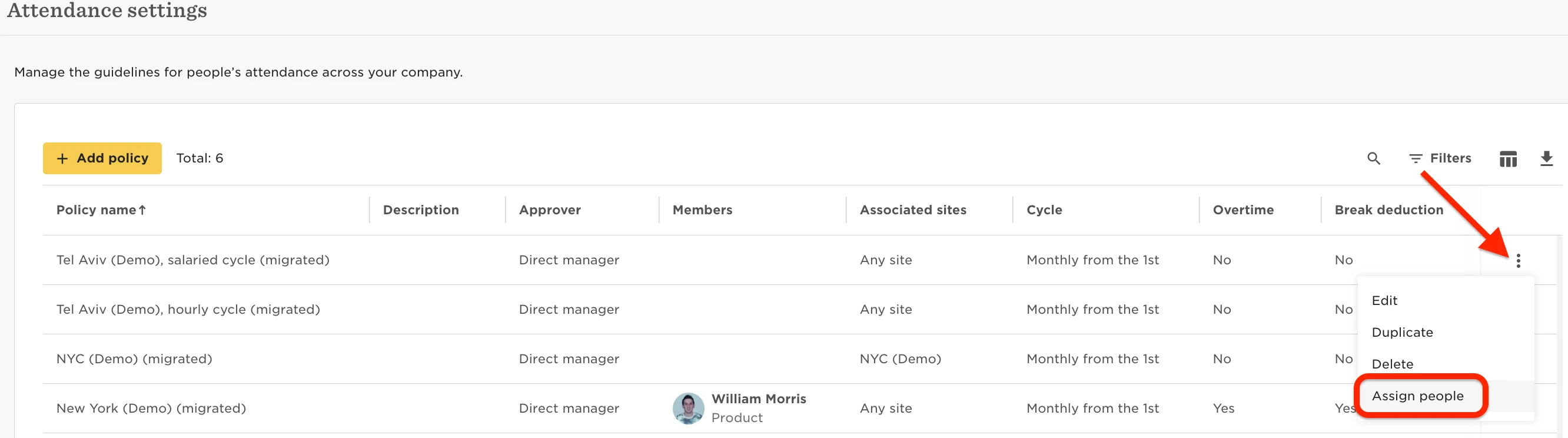
- Check the employee is included in the attendance policy. From the left menu select Time > Attendance Settings.
Click the three dots for the applicable policy > Assign People
- If the employee is added to a current cycle, but does not appear in previous cycles (or finalising cycles), you can simply add them to the cycle. Simply add the employee to the closed cycle and extend the cycle to allow the employee to submit their timesheet (or submit it on their behalf).

- If the employee was moved to a different Site, check all the above
- Inactive periods (long term leave). If employees have any effective inactive periods under the Lifecycle table, they may not have the relevant dates in the timesheet or even have missing cycles in the list.
- As employees are not expected to report attendance while on leave, make sure to apply the required changes in their profile:
