F.A.Q.

The functionality of filters/conditions in Tasks on Bob

  • Sep 13, 2023 10:12 AM UTC
  • Sep 16, 2024 9:22 PM UTC
  • 8 replies
  • 253 views
  • Translate All

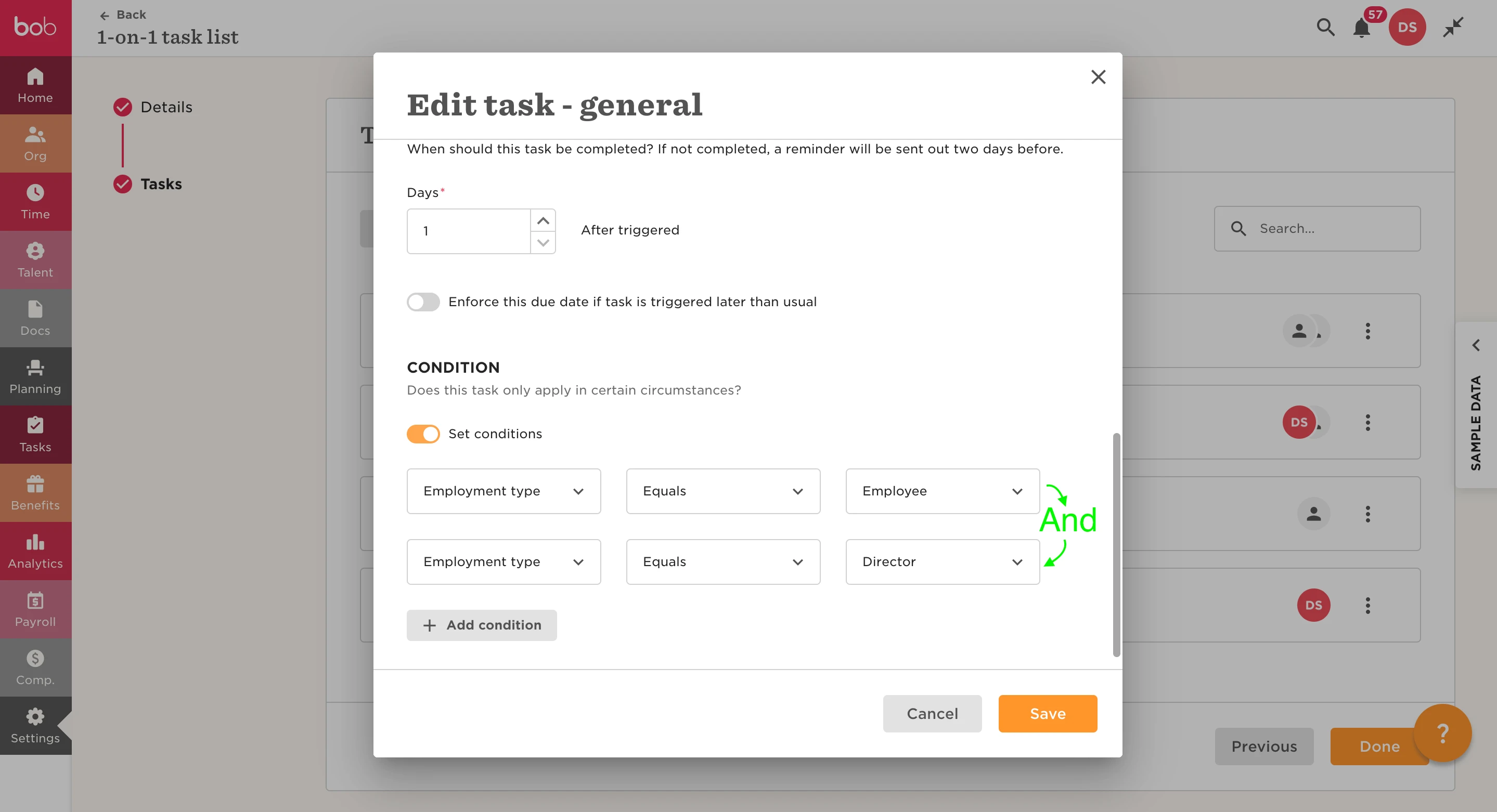
When we list conditions separately, they function as an 'And' condition.

In the example provided, the employee would need to meet both conditions, employment type equals Employee AND employment type equals Director.

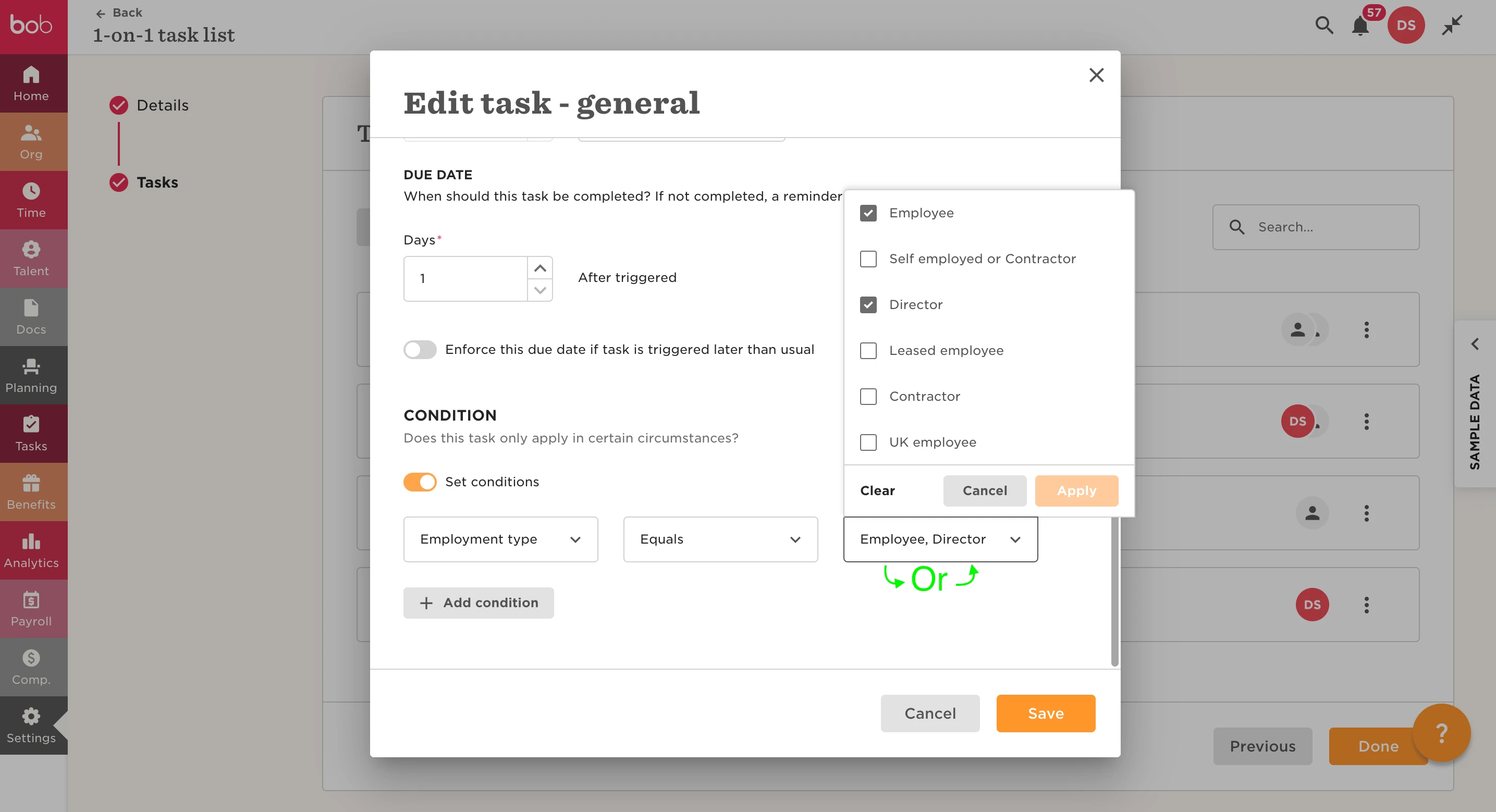
Whereas, in the second example, we can use an 'Or' condition by adding Director to the ‘Employment type equals’ Employee condition and then delete the Director condition.

The system will then read it as Employment type equals Employee (or) Director:
 

8 replies

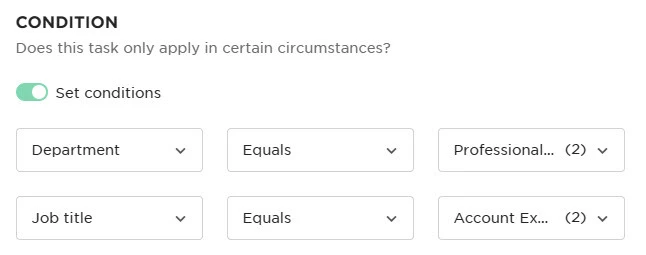
From the description above, it appears that the OR functionality only works if the field or group is the same.  I want the following to be Dept = Professional OR Job Title = Account Executive (see below).  Do I need to create two separate tasks - one for each condition - in order to get the OR functionality?


Translate

Lindsay Sinenberg
Bobber

Hi @Doris Friess! That would be correct. To ensure that you don’t have the AND condition setting, you would want to have multiple tasks to ensure the condition is in place for each item.
 

Translate

Hi @Lindsay Sinenberg. Does Bob have any plans to develop filters and give us the ability to filter by ‘OR’ conditions? The lack of OR filtering is having a detrimental impact on admin teams, for example, having to duplicate tasks or create multiple reports to find the full data wanted.

Translate

Lindsay Sinenberg
Bobber

Hi @Billy Jackson! I can confirm that this is a highly requested item with the product team but no update on timeframe as of now. I do advise reaching out to your CSM, Shanielle, and let her know of your interest in this for your admins! She’ll be able to provide any updates and check in with product.

Translate

To add to this could Bob review the functionality of the tasklist conditions.


It’s incredibly restrictive to only be able to trigger for time off and dates. It would be useful to trigger if fields are changed, or if criteria.

Translate

Netta Brodsky
Bobber

Hi ​@Sarah.Hardy  - thanks so much for adding your voice here! 🙏🏻

That’s a really interesting point, and we’d love to understand it better. Would you be able to share a bit more detail on what kind of field changes you’d want to trigger a task from? Maybe even a quick example or use case?

It would also be super helpful to understand the value this would bring to your team — how it would improve workflows or reduce manual work.

Translate

Hi,

It would be helpful to be able to trigger task lists based on field criteria instead of just dates or time off policies.

Issue: In our probation process we have a task list that triggers reminders to managers based on a probation end date and then if another field is updated we trigger a letter based on that field e.g. passed, extended, etc.

This works fine as long as the status field is updated within 7 days otherwise, the letter needs to be manually triggered. Instead it would be helpful to be able to trigger tasks in this way:

  1. Trigger probation task list when start date was 90 days ago (this would be a probation end date wouldn’t need to be recorded manually, instead a formula could be created for different probation end dates for different sites for example)
  2. Trigger letter when probation status updated to XXX

There are much better examples of where this would be useful than the above.

Limitations with the current method:

  • Date fields need to be maintained on the employee profile which is additional administrational effort.
  • Not all tasks should be triggered from an ‘effective date’ but rather from an action e.g. field changed from XX to XX. (I understand this can be added

I have used other HRIS systems where you can build a report with criteria and when that criteria is met a workflow is triggered for all that apply on a daily basis.


It would also be helpful to add criteria for approval flows e.g. if more than X send to X, if more than Y, send to Y or if Site equals X, ...

Translate

Jessica Lane
Bobber

Hi ​@Sarah.Hardy 👋🏻

Thank you for the feedback!

The ability to trigger a task list based on a change to an employee field has been requested previously and our team are aware of the desire for this functionality. 

They are reviewing this, and hopefully we will see this in future releases🤞🏻

Translate