
Setting up a Self Service flow to track and approve employee expenses

  • March 22, 2023
  • 21 replies
  • 1605 views

Fernando Silva
Bobber


Implementing a Self Service flow for tracking and approving employee expenses involves the following steps:

  1. Create Custom Fields: Set up custom fields where employees can upload their expense requests. Ensure that at least one of these fields is designated for document uploads so that employees can submit receipts.

  2. Verify Roles and Permissions: Review the roles and permissions settings to confirm that employees have access to view the custom fields. Ensure that the "All people — own data" permission group has the View option enabled but the Edit option disabled for the selected category in the workflow.

  3. Develop the Self Service Workflow: Integrate the custom fields into the Self Service flow  and assign the relevant approvers. This will streamline the process of tracking and approving employee expenses efficiently.

Detailed steps provided here by one of Bob’s amazing CSMs:

 

21 replies

Laura Blundell

Hey @Fernando Silva,


I was just talking to the Bob team about how we do this and they mentioned I should make a post to the community.


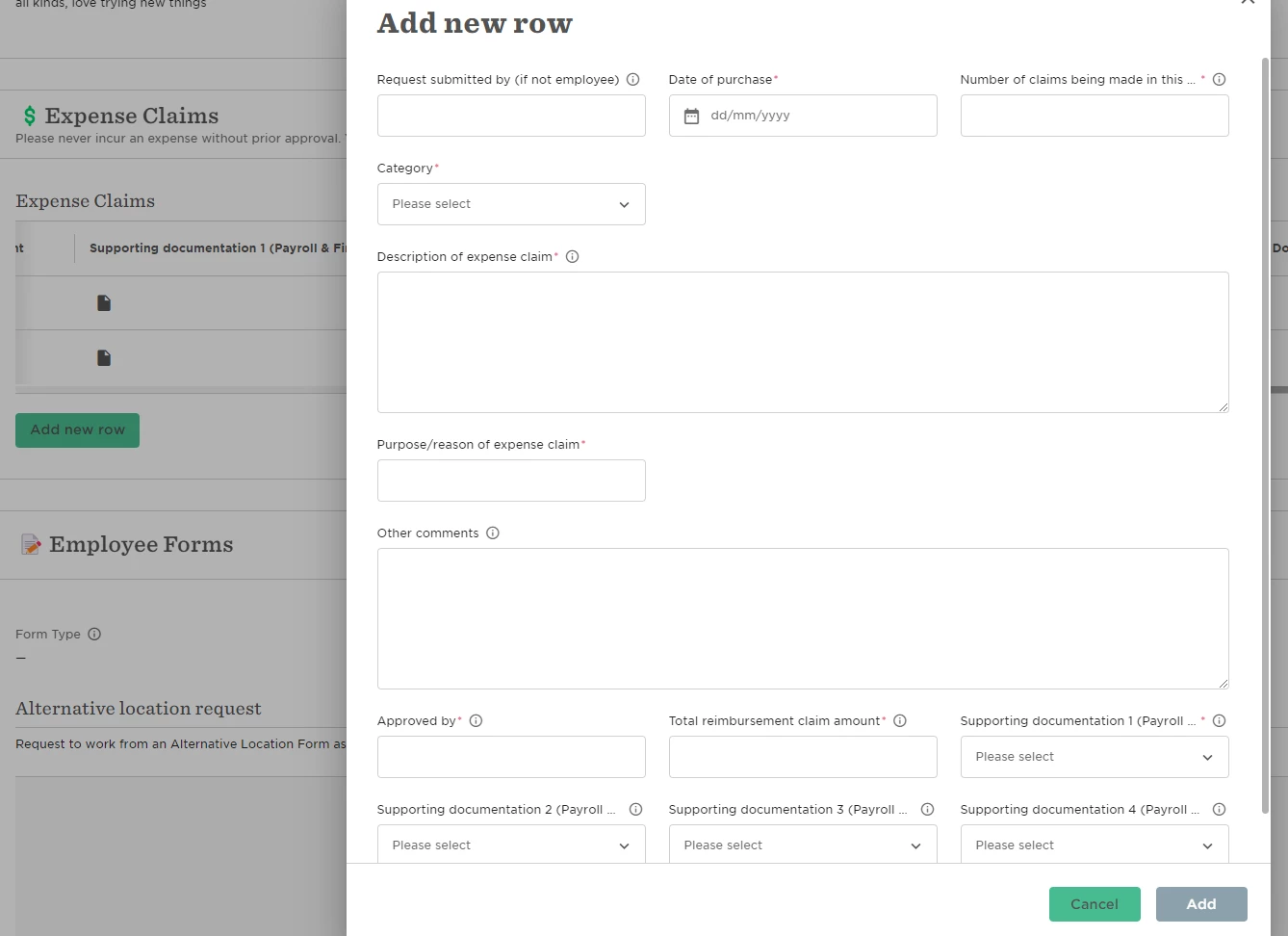
We have set up a custom category called Expense Claims and then a category table with the fields we need to be completed by employees (date, document load fields, expense type, cost, who gave approval etc). They can use one entry to do multiple claims. We then have an approval flow in place to go to their Manager, then our Head of Finance. 


A scheduled report is set up to go to our payroll team each week to check expenses and then add to the payr run/process accordingly. 


The main pain point in this process is that employees cannot add more rows to the table if there is an approval still pending. This can cause issues and hold ups for the employee. 


Hope this helps someone else looking for an option in lieu of an integrated expense claim process by Bob to payroll systems (which we would absolutely love!). 


Lindsay Sinenberg
Bobber

Thank you so much for sharing @Laura Blundell! This can definitely be frustrating for customers and I will be sure to add you to the feature request that is currently open with our Product Development team so there aware of your use case.

But I am glad you were able to implement this workaround Fernando provided - the custom fields you have created look great 😊


  • August 15, 2023

Hello, we are mid implementation with Bob and are struggling with the Expenses work around. As mentioned above, once an employee submits expenses they cannot create more until the pending one is approved. However, if they submit multiple claims in one go they all appear on the same approval, so if one needs to be rejected due to the receipt not being valid (for example) the whole batch is rejected and they would have to re do them all.

I know this is going to be a massive pain point for our employees, can anyone suggest a different work around? 🙏🏻


Lindsay Sinenberg
Bobber

Hi @Paula Wynn! Unfortunately there is no workaround to accomodate for this platform limitation. The submissions will need to be one at a time, until the first one gets approved and then submit the next item.

In addition to adding your company to the open feature request, I am going to loop in your account manager so they’re aware of your situation and hopefully they can check-in for any timeframe status updates!


Hi @Lindsay Sinenberg, we are currently working on the implementation and have to deal with the same problem! So I’d like to be updated about status updates as well.


  • November 17, 2023

Hello, we are mid implementation with Bob and are struggling with the Expenses work around. As mentioned above, once an employee submits expenses they cannot create more until the pending one is approved. However, if they submit multiple claims in one go they all appear on the same approval, so if one needs to be rejected due to the receipt not being valid (for example) the whole batch is rejected and they would have to re do them all.

I know this is going to be a massive pain point for our employees, can anyone suggest a different work around? 🙏🏻


Hi Paula,

I just wondered if you found a work around for the rejected expense reports?


JenLynchpin

@Lindsay Sinenberg Hi Lindsay, I just wanted to ask whether this feature request has been put in place now, or is still being worked on?

Thanks!

Jen


Lindsay Sinenberg
Bobber

Hi @JenLynchpin! Currently there hasn’t been any updates on timeframe for this feature request 🙁 But I went ahead and added your company to the request with Product so your CSM should be able to provide any future updates.


Amy Ward
  • April 11, 2024

Hi all, I am exploring a work around for part of this issue being that when one expense is in progress another cannot be submitted. So far its working in testing (not yet live), but thought i’d share in case it’s useful for others.

Which is to use this same table on a persons profile but set it up as an employee change flow; so the employee goes to ‘actions → update profile → Expense claim’ on their own profile and submits. They can do this as many times as they like even if there are other ones pending as its not a self-service flow. The box on their profile is still blank until approved; but at least they can submit more. 


Thank you for sharing, @Amy Ward!


harveymessenger
Bobber

Hi @Laura Blundell 

Great to hear how you are using the workaround for expenses.
One issue myself and my client has met is that delays in Approvals by Managers can mean that the date the entry is submitted to the ‘report’ can be delayed… Therefore the scheduled report each week may miss something that is yet to be approved? This is assuming the report looks at the date of purchase. How do you currently manage this? By the time the expense is approved it will then join the report that has already been submitted by Finance etc.


I hope that makes sense?

Thank you


FYI @Djoyce van der Burch 


Amy Ward
  • May 29, 2024

Hi @harveymessenger , Laura isn’t working in our team anymore but I have a look at the set up for you, we send the whole report (no time bounding, all entries ever) as long as they are approved. Payroll were then doing a check between this report and last report to see what was new to be paid. We have recently built in a new field payroll can edit where they put a yes/no to distinguish what has been paid so they dont need to do the report comparison. Too soon to say which is a better/less timing consuming effort.


harveymessenger
Bobber

Hi @Amy Ward , Thank you for explaining. That makes sense, I was thinking a similar thing with a report that covers all. Is the new field in the same expenses table? But yes I like the visibility of it all. 


Amy Ward
  • June 4, 2024

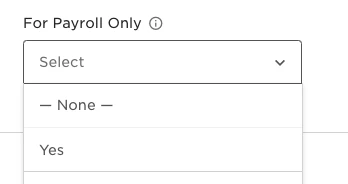
@harveymessenger yes it is - we have it as the SS - “For payroll only” the little “i” says “PAID” and then the only option is yes; so if any employee wants to mess around with it they will only be hurting themselves by saving ‘yes already paid’ when they submit. Once the line item is submitted for approval the employee can no longer edit that item so no risk of someone going back and taking away the ‘yes’ to be double paid.


Looking forward to seeing some development on expenses. We can’t see how the above solution would work for mileage claims. We have people using their own or company cars and claiming x miles at y rate. y depends on the car each person runs (HMRC mileage rates are different for elec/petrol/diesel company/private cars) and x obviously depends on the journey. Would be good to see a solution to that - I would expect a large proportion of UK companies to have this requirement.


JenLynchpin

@Keith Watson we use it for people to claim mileage, they have to do the calc themselves though and provide details of the journey.  It’s very clunky and I’m currently looking for an alternative solution for expenses in general.

I’m guessing there may be some kind of development once Pento is fully integrated as Payroll - it will probably be another expensive additional module to pay for though.  


This is an interesting topic.  When we were looking at the system, the guy doing the demo showed us an expenses template and implied it was standard.  I’ve just starting setting things up and couldn’t find them - so did a search and landed here.  Disappointed that it doesn’t appear to be something that already exists as standard!


Anton Phillips
Bobber

@Michelle MacClay Hey Michelle, 

Thank you for your feedback. We are not an end to end solution for expenses so it is not a default category on Bob. We integrate with a range of expenses tools like Rydoo, Spendesk and Pleo (full list here). 

With custom fields you can track many data points and create workarounds. 

Let me know how you got on with the expenses category and if you successfully attached a flow. 


@Anton Phillips  that’s really disappointing as the sales guy implied it was part of the package - something I made a point of clarifying with him.  


Hello,


Is someone willing to provide me insight in their expense flow set up, as I am currently working on my own set up for this flow? 

Looking for a kick start in this one, since I was under the impression this was standardized in HiBob. 


Looking forward to hear from you guys!

Regards,

Frank


@The HiBob Community Team is there any update on the main pain point as mentioned by Laura at the beginning of this thread?