
Pre-Filled Tables in Update Flows

  • July 5, 2025
  • 2 replies
  • 190 views

Anna Uriadnykova
Bobber

Expected Behavior for Employee Tables in People Data Updates Flows
 

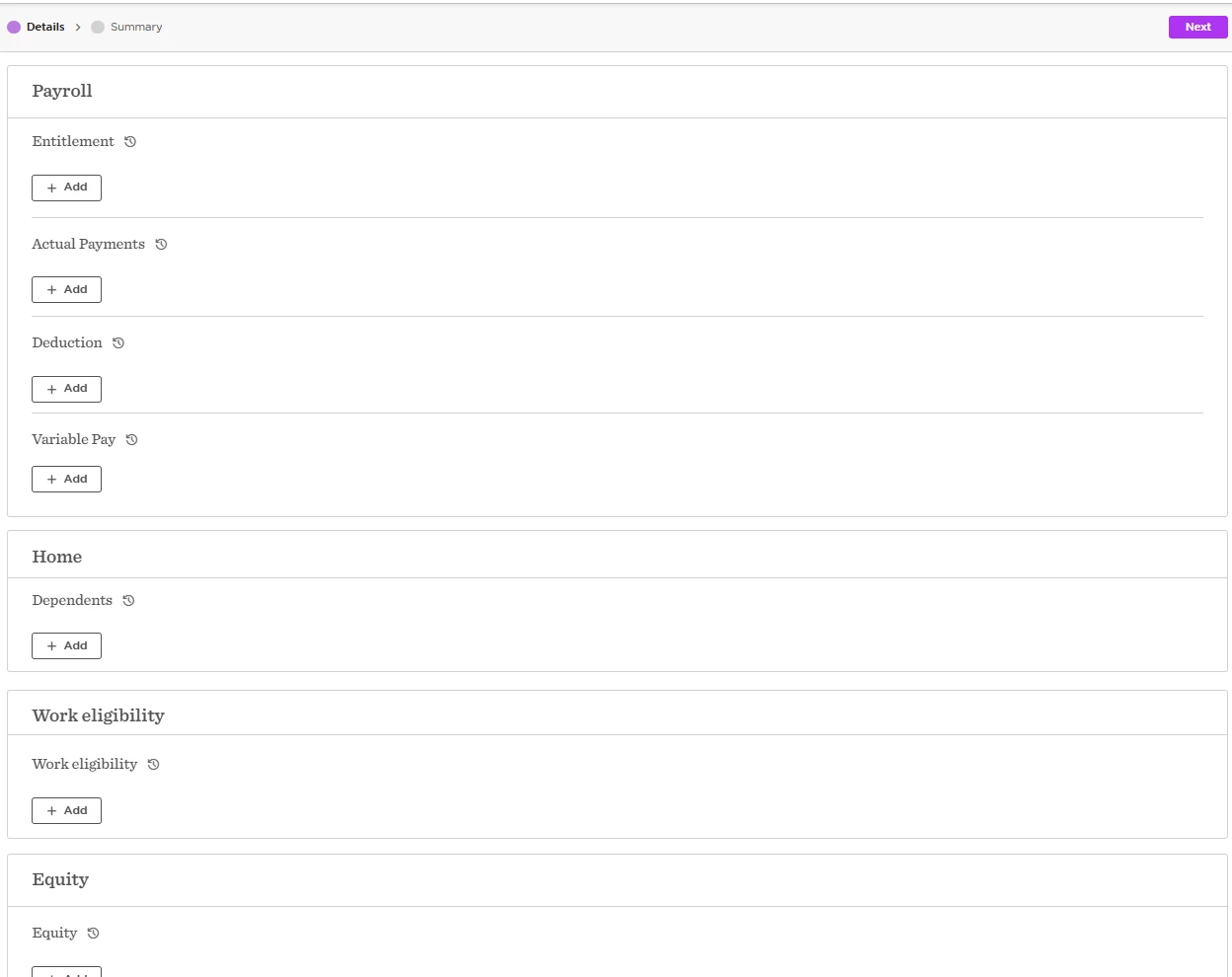
1. Tables that always start empty

These tables display a ‘+ Add’ button and begin blank each time you use the flow:

  • Variable Pay

  • Actual Payments

  • Deduction

  • Bank accounts

  • Dependents

  • Work eligibility

  • Entitlement

  • Equity

  • Training Info

These records are designed to be added as new rows in the table each time you use the flow.
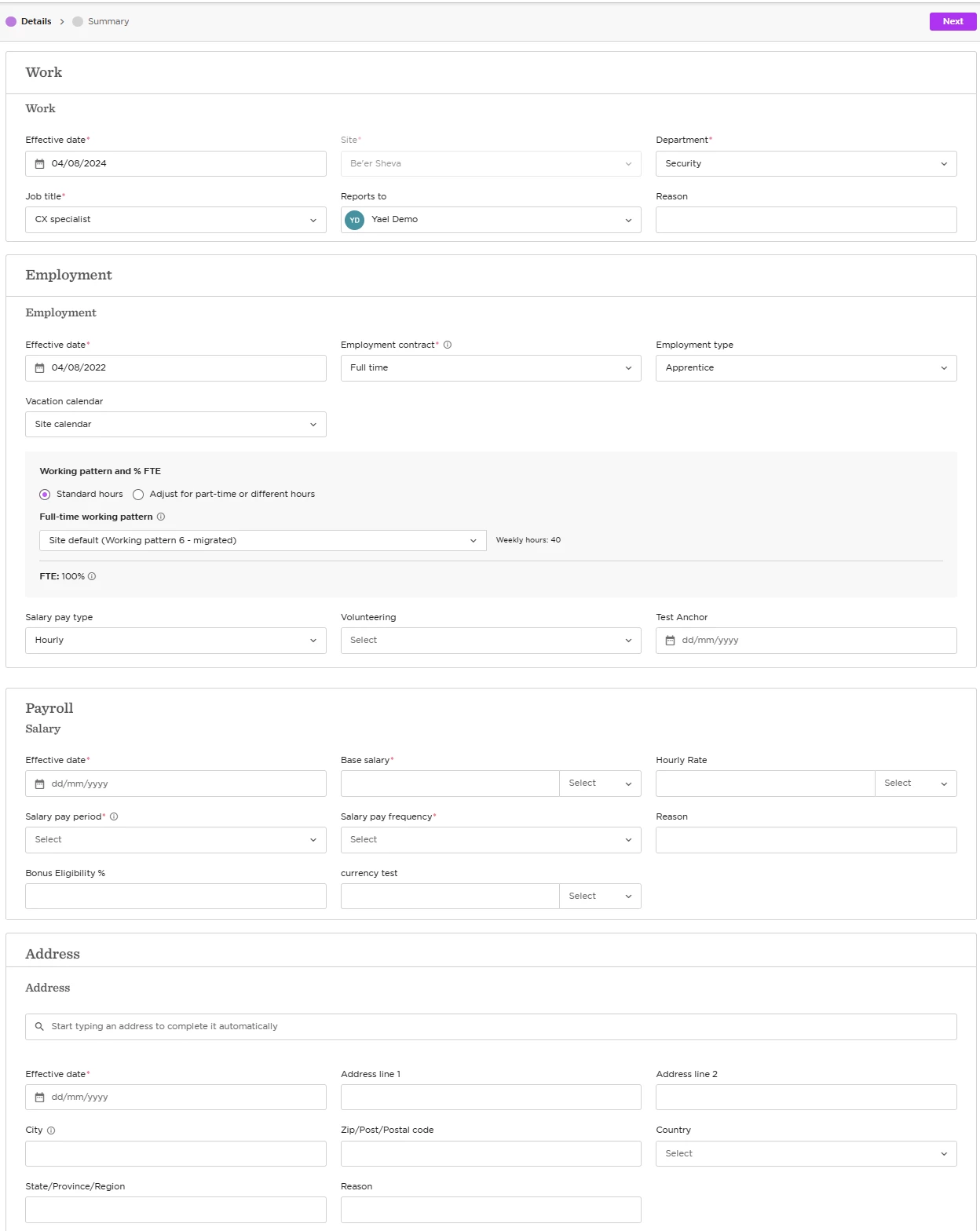
2. Tables that are pre-filled

These tables won’t show a blank form or a ‘+ Add’ button. Instead, existing data is auto-loaded:

  • Work

  • Address

  • Employment

  • Salary


Why Is This the Case?

  • The first set of tables can include multiple “effective” entries at once.

  • Historical tables, like Work, Address, Employment, and Salary, have only one row considered “effective” at a time.

When a flow begins, Bob fetches the current details from those historical tables and displays them for editing. Once you update the fields and select a new Effective date, Bob creates a new row in the corresponding table in the employee’s profile.

For the other tables, the system allows you to add multiple entries (via ‘+ Add’) during the same flow session, since they don’t rely on effective dates.

So, even though it may look like you’re editing an existing record, you’re actually creating a new one upon submission.

2 replies

LucyTaylorBW

Hi ​@Anna Uriadnykova !

This is really useful information - however, is there a way to add the current variable pay data into a flow? The reason for this is that we use it for our bonuses, and when these need to stop, or change, we can’t seem to give the HRBPs access through a flow in order to add an end date to these payments. Any ideas?

Is there also a way to create a historical table?  For example, we want to keep track of our cost centres, but finance need to update these so we can’t have the information in our employment or work tables. We have created a new table, but when we add a new line it does not automatically close the previous line, therefore leaving further manual work. We also can’t seem to “end” the date in a flow, to add new data. Can this be done?


Hi ​@Anna Uriadnykova !

This is really useful information - however, is there a way to add the current variable pay data into a flow? The reason for this is that we use it for our bonuses, and when these need to stop, or change, we can’t seem to give the HRBPs access through a flow in order to add an end date to these payments. Any ideas?

Unfortunately, I don’t have an idea how to solve this, so I just write to add that this is a very relevant question. We have the same issue. We’d like to be able to change/add end dates to existing bonuses, as well as for existing allowances and other benefits. And this should be done in an approval flow so we don’t have to run these approvals in emails.

Kind regards
Merete Lintrup,
HRIS, Matas Group