One-Time Actions for Email and Calendar Event Tasks

  • Mar 22, 2023 2:59 PM UTC
  • Sep 17, 2024 9:38 AM UTC
  • 4 replies
  • 138 views
  • Translate All

Email and calendar event tasks can't be canceled as they are a one time task, actioned outside of Bob. For example, an email can't be recalled, and a calendar event can't be deleted from someone's calendar by Bob.

4 replies

  • May 30, 2023 1:11 PM UTC

Hi @Pedro Catarino ,

Apologies for bringing this thread up so long after it was posted, but I was wondering if there is any solution to this one?

I have recently taken full ownership of HiBob here at my company and we have over 2000 tasks that are showing as Incomplete, Triggered, Scheduled and while trying to tidy them up (some were from the implementation over 2 years ago), I ran into this problem.

In the grand scheme of what needs to be done, it’s not too big a deal but would be good to to be able to clear this list if possible especially as some of these tasks are sitting with ex-employees.


Thanks,

Steve

Translate

Hi Steve, hope you’re doing great!👋


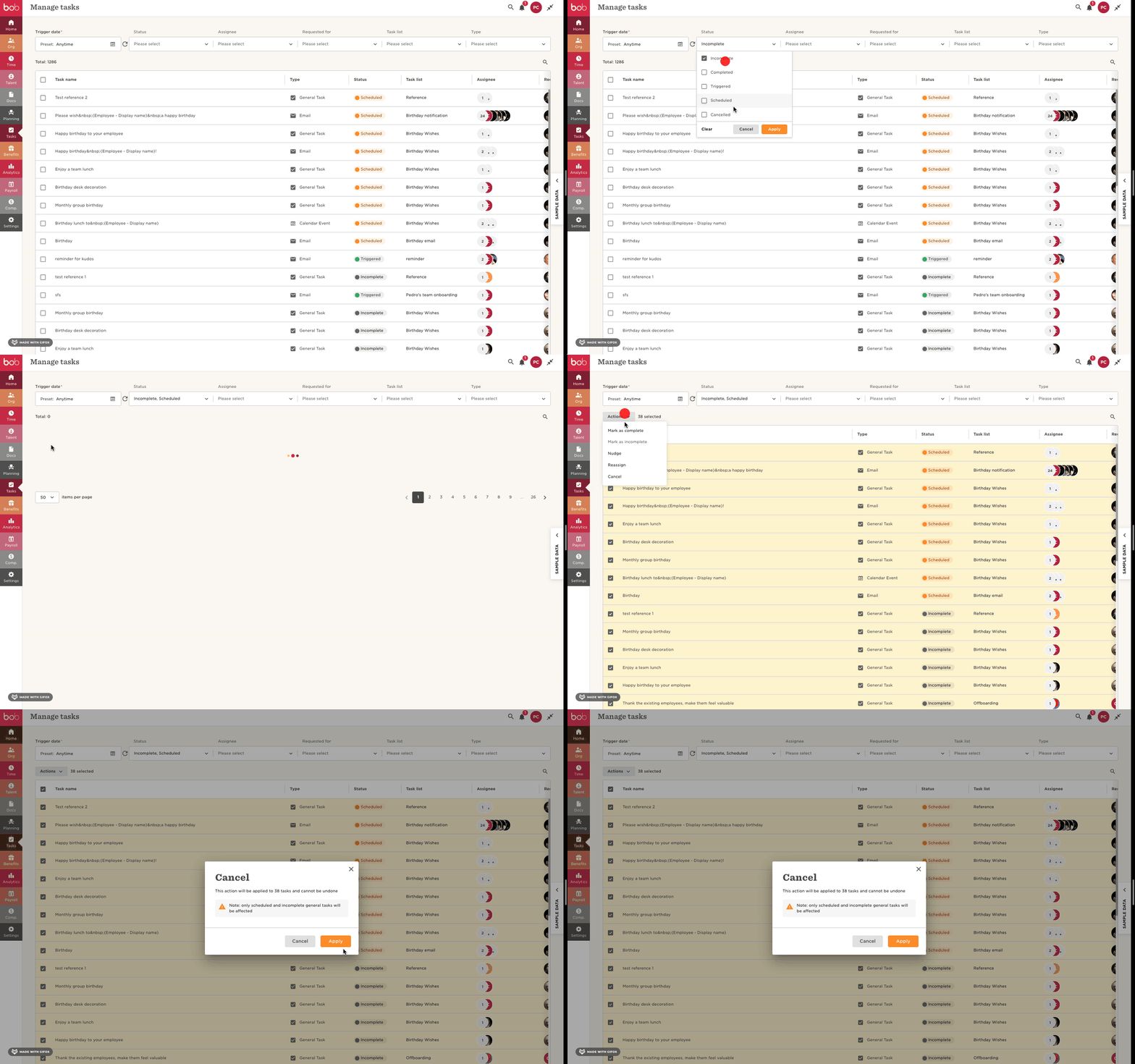
The Manage tasks feature is a log of every task that has ever been triggered in your account. It’s not possible to delete them from it, but we can definitely cancel them, so they no longer appear has pending tasks. To do this, we need to head to Tasks > Manage tasks > you can use the filters at the top to find the tasks you want to cancel, I suggest selecting the status and looking for the specific terminated requesters > select the relevant tasks > Actions > Cancel (keep in mind that on Incomplete or Scheduled tasks can be cancelled):


There's also a great article from our amazing Help Center about managing tasks.

If there’s something specific related to your company, that you want to discuss, please feel free to open a ticket.


Hope this helps! ☺️

Pedro

Translate

  • May 30, 2023 1:59 PM UTC

Hi Pedro,

Thanks for the quick and informative reply!!

The steps you’ve highlighted are definitely what I needed in order to clear out the older tasks that shouldn’t be there. The issue I’ve got now is that I can’t “cancel” any task that’s showing as Triggered even if it’s in the past.  The only workaround I’ve found for this one, is to log in as the employee and then to mark the task as complete - it’s quite a manual process though and I’m assuming there’s no way around this.  

Happy to raise this with Support if there’s something that can be done behind the scenes!


Thanks,

Steve

Translate

Hi Steve, 


Triggered tasks can’t be cancelled, as they are one time actions. Email, 1-on-1 and Calendar event tasks are 1 time actions, once they are sent it’s not possible to recall them, therefore, their status will always be “Triggered”, as it reflects exactly what happened to them. This relates to the fact the Manage tasks feature is a log of the requested tasks’ lifecycle.


This is expected behaviour from Bob ☺️

Pedro

Translate