New employee invitations process explained - pre-onboardings & invite emails.

  • August 17, 2023
  • 10 replies
  • 1196 views

When creating the new employee’s profile in Bob, you can choose to send them the pre-onboarding invitation immediately or schedule it to be sent on a later date.

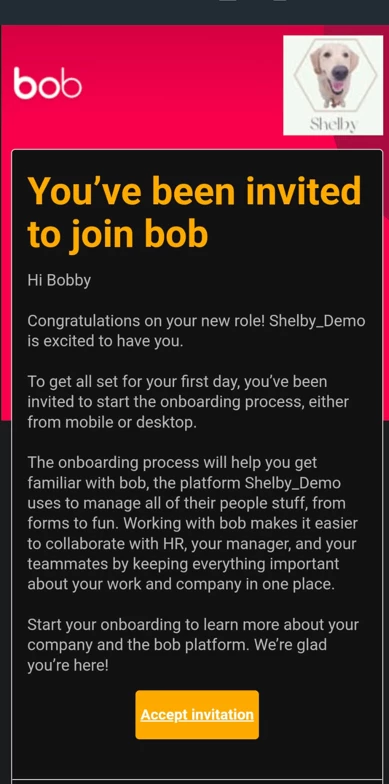
This invitation is sent to the new employee’s personal email, and it will include the Employee Onboarding flow where new hires complete their details in their Bob profiles and complete any file upload/e-sign/Read&Approve request as per the flow’s settings.


The invitation sent to the new hire's personal email looks like this:
 

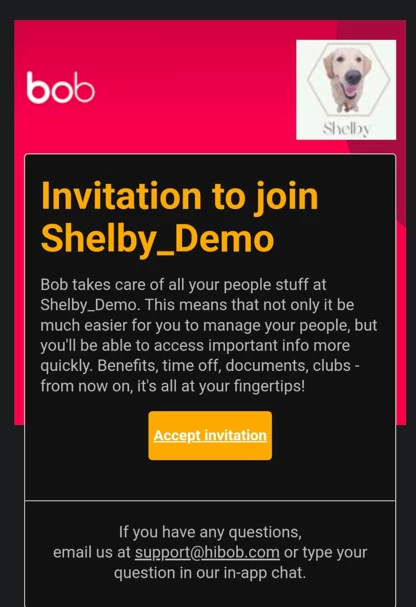
On the employee’s first day, the employee will receive an invitation to their work email in order to activate their Bob account. They won’t be able to access their Bob account without activating it first by clicking on the link in the second invitation email.

The second invitation email looks like this:
 

10 replies

  • July 15, 2024

@Naama Oron I am going to set this up soon but wanted to know exactly which fields display when you introduce them to teammates/manager etc? It’s a bit difficult for me to test in the live system so if you can help that’ll be great.


Netta Brodsky
Bobber

Hן @HannahB Thank you for this great question!

The information that will appear includes the team members' names, their job titles, and their profile pictures.

Actually, you can navigate to Flows > New hires and onboarding > Onboarding > then click the three dots next to the relevant flow and select Preview. This way, you can see the details that the new employee will see.


Amichai Goore

Thanks for explaining this @Naama Oron.

If we add an employee to bob after his start date, which emails will be sent and to which email address?

Thanks.


  • July 18, 2024

Hi @Amichai Goore I believe the start date emails will be sent to the work email address


Hi, how can I check if the initial invite has gone to the new starter’s personal email address. I thought I had requested an invite to go a week before start date, where and how can I check this on BOB


Johnny Barnett

Hi, how can I check if the initial invite has gone to the new starter’s personal email address. I thought I had requested an invite to go a week before start date, where and how can I check this on BOB


I don’t believe there is a way to check what email address an invite has been sent to, however, if you go to Analytics > Reports > Create New > Employee Pre-onboarding it will showcase the below headers allowing you to check whether or not an invite was sent and what status their pre-onboarding is in


You can also see if an invitation has been sent by going to the new hire’s profile on Bob.


  • January 26, 2026

Hello, is it possible to send a new preonboarding invitation link if the initial link has expired or does not work anymore?


Johnny Barnett

Hello, is it possible to send a new preonboarding invitation link if the initial link has expired or does not work anymore?


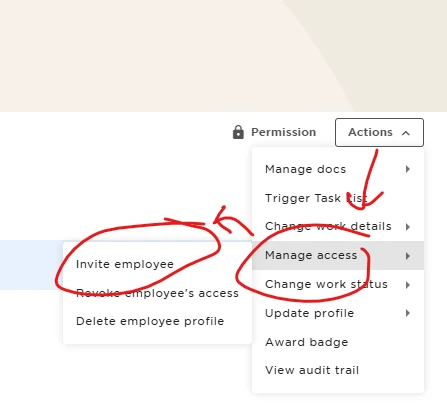
Yes, you can resend the invitation by navigating to the new employee’s profile and clicking


“Actions” > “Manager Access” > “Invite Employee”


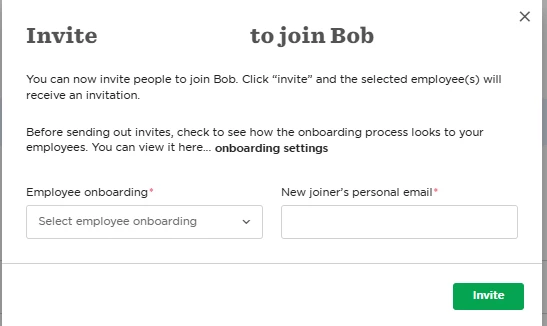
This will then bring up a pop up that allows you to update the invitation email, and the onboarding flow.


  • January 27, 2026

Hello Johnny, thank you for your reply. 

Can you confirm the response you provided is for the pre-onboarding invitation sent to his personal email and not the invitation to Bob sent to his professional email since the new joiner/hire will only arrive in two weeks?

I was aware of this steps but thought this was only for day 1 to get access to Bob. 

Appreciate your help,

Thanks


Johnny Barnett

Hello Johnny, thank you for your reply. 

Can you confirm the response you provided is for the pre-onboarding invitation sent to his personal email and not the invitation to Bob sent to his professional email since the new joiner/hire will only arrive in two weeks?

I was aware of this steps but thought this was only for day 1 to get access to Bob. 

Appreciate your help,

Thanks

Hi,

I can confirm. If the person is in their pre-onboarding stage, the pop up will look like this: 


This allows you to update the personal email address for the person as well if an incorrect one was initially entered. They only become “Active” once their start date has arrived, this will trigger the pre-onboarding invitation.