


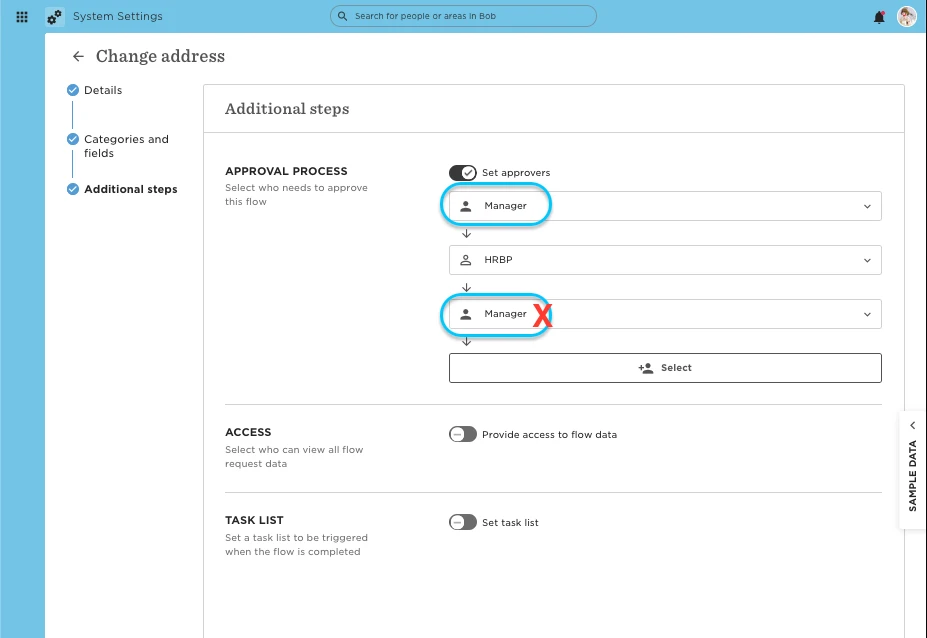
In Bob, you can’t configure the same person to approve a People Data Update flow twice.
This is expected behavior:
-
If the same individual appears as an approver in multiple steps, Bob automatically consolidates those steps into a single approval.
-
The system is designed this way to avoid redundancy, no matter where the approver sits in the sequence.
Workarounds for two-step confirmations
If you need the same person to take action twice, here are two options:
1. Split the approval into two flows
-
Create a first flow that routes to the manager (or other approver) for initial approval.
-
Once completed, HR or another role can trigger a second flow that routes back to the same person for final confirmation.
-
This gives you two distinct checkpoints while staying aligned with how Bob processes approvals.
2. Use a task for the second “approval”
-
Keep the manager’s approval step as usual in the flow.
-
Add a task list in the flow, assigned to the same manager (e.g., “Review and reconfirm details”).
-
While technically a task (not an approval) it still requires the person to take a second action before the flow closes.
For more on how to set these up, see:
Mastering flows
Mastering task lists