

"Days" in tasks Include Both Workdays and Weekends

  • March 22, 2023
  • 22 replies
  • 397 views

Fernando Silva
Bobber

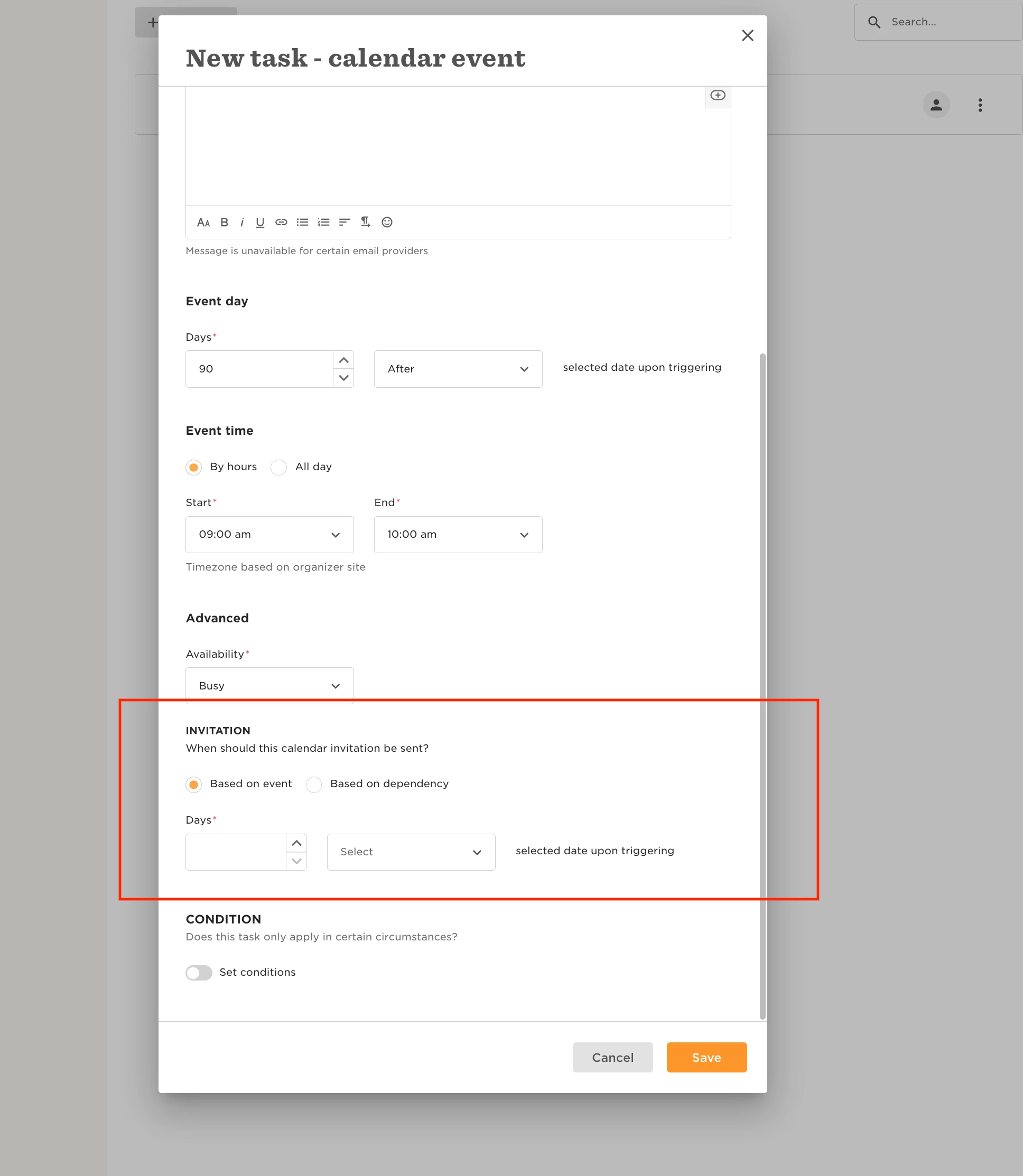
Example scenario: When I trigger a calendar event 90 days after the anchor start date of a new employee, how can I be sure that it won't schedule it in the calendar for a non-working day?

Check out the help article to answer this question, or continue reading below.


Currently, the calendar event will trigger after the X select days, regardless of whether it is a working or non-working day. Nevertheless, you can also set when the invitation for this will be sent, I'd suggest setting for it to be sent sometime prior to the actual event so if the event day falls on a non-working day the organizer can confirm or change its date.



This topic has been closed for replies.

22 replies

Nicole Gibson

We have this same issue. :/  Following to see if someone else has found a work around.


Lindsay Sinenberg
Bobber

Hi @Nicole Gibson ! Feel free to submit a ticket to our support team using this link and we’ll be able to check on the settings to troubleshoot further. 
When submitting the ticket, please provide the task list name and the name of an employee where this is happening 😊


Marco Schenkewitz

Hi, are there any Updates/solutions to this topic? :) 


Lindsay Sinenberg
Bobber

Hi @Marco Schenkewitz! The current workaround is to set when the invitation will be sent and setting it before the event date so it can be changed by the organizer if needed. But if you reach out to our support team, we can check the setup and troubleshoot further.


Ella North

Hi, just wondering whether there is an update on this or whether you still have to send the invite and manually change?


Thanks


Nothing yet, sorry, @Ella North. I’ll add Venquis to the feature request.


Hi!

Could we please be added to the feature request too?

We have calendar event tasks set up with managers as organisers for probation meetings and 1 month / 3 month check in meetings. 

Sometimes these are being scheduled for a weekend/non-working day.

It would be great if we could set it to “working days” only somehow based on the working pattern of the organiser.

Thank you.

Katrina 


Jessica Lane
Bobber

Hi @Katrina Williams 👋🏻


I have added you to the FR now! 😊


@Jessica Lane  hello!

Thank you! 😊


Hannah Simmons

If we could be added to the feature request for this too that would be great - having this fall on a working day would be really beneficial for us!


Hello could I please be added to the feature request as well? This is a major limitation for me auto-scheduling events, and having a working day only check-box or similar would allow me to automate so many events! 


Hi @Jessica Lane, Please add me on the fr as well!

Also, would be great to have a possibility to create recurring meetings, such as bi-weekly 1:1s at once instead of creating meetings one by one.

Our managers would like to use Bob for 1:1s for documentation but it’s not efficient if there’s no option for recurring meetings.


Maital Terdiman
Bobber

Hey @Laura Bergman 

Adding you to the FR

Also, I can see that you have commented a few minutes after your post here so you know that we have recurring 1:1s available


Would like to be added to this FR please. I’ve had a lot of complaints from people about being notified on weekends. We legally can’t notify people outside of working hours, so this is an issue.


Can i please be added to the FR as well.


This is a functionality that is highly requested! 

Thank you in advance


Tomas Desiderioscioli

Hi, we’d like to be added to this Feature Request. It would be great to take full advantage of this functionality!


Please can we be added too. Thank you.


Hi ​Jessica Lane, ​@Lindsay Sinenberg 
Are there any news on this? I can see people are asking about it for over 2 years…
Thanks


Netta Brodsky
Bobber

Hi ​@Sahar Shoham  Thanks for checking in! 🙏🏻

Unfortunately, there are no updates on this feature at the moment. To stay informed about this or any new feature releases, we recommend keeping in touch with your CSM, who can provide the latest updates.


Hi there,  this has recently become an issue for us too as we set up more and more tasks.

Given Bob knows our working pattern already, it seems a bit weird you can’t just select working days for these meetings to fall.  Meetings will get missed and not rearranged because I’m sure managers will be belligerent about it!

So please do add me to the feature request too.

Thanks so much :)


Hello, can I please be added to this. I am currently submitting a ticket with support and have been asked to provide information on why I need this feature and how it would help. The answer is - a lot! 


Maital Terdiman
Bobber

Thank you ​@Alison Malcolm 

Feedback like yours shared with our team really helps shape the future of Bob. We've added this to our internal product feedback for consideration. While this doesn’t guarantee immediate development, your CSM is the best person to stay in touch with for updates or any progress that may occur down the line. They can also help explore alternative solutions in the meantime.

In the meantime, you can check out any recent release notes here.