


Quick answers to common questions about how Data Retention policies work in Bob and what to expect when configuring them.
1. Why can’t I find certain fields (like Start Date) for anonymization?
The data retention feature focuses on anonymizing specific PII fields, so only a predefined set of employee data fields are available for anonymization. For this reason, fields like "Start Date" are intentionally excluded to preserve accurate historical records, reporting, and compliance requirements. This ensures audit trails, employment history, and regulatory data remain intact.
You can review the full list of unsupported fields here: Unsupported fields for anonymization
More fields may be supported over time as capabilities expand. If you would like to follow-up on the product roadmap, feel free to reach out to your CSM.
2. Can I apply different retention periods to different document types?
Yes. As per 2026 October release, Folder Granularity has been released. You can now determine how long documents in specific folders should be retained after termination. This feature is available within the policy "Personal Files > Documents" step.
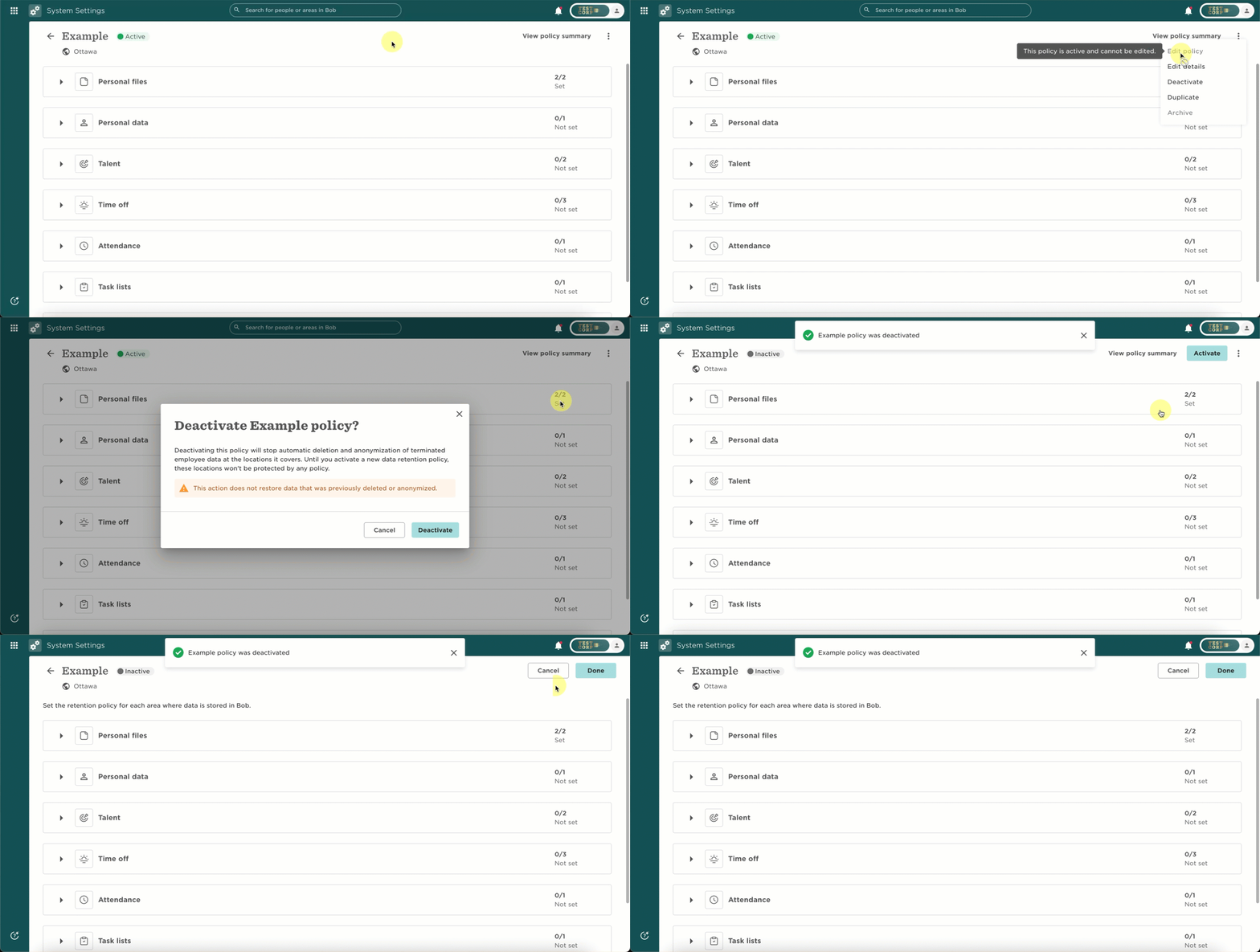
3. Can I pause a data retention policy temporarily? You can pause a policy by deactivating it and reactivating it later. This applies to the entire policy and not to individual employees. Once paused, it stops data deletion for all users included in that policy.
4. Is there a way to track deleted records for compliance?
There isn’t a dedicated compliance report for deletions, but you can still track activity using:
- Analytics reports: anonymized users appear as scrambled data, for audit purposes.
- Retention report: shows active policies, changes, and timestamps
- Employee audit trail: it shows logs/deletion/actions with timestamps
These can help support audit and compliance needs.
5. How often do data retention policies run?
Once activated, policies run automatically every 24 hours. No manual action is needed. It will capture all users from that Site who have been terminated retroactively, as long they have been terminated within the defined retention period.
6. Why can’t I edit a policy?
If the Edit option is greyed out, it means the policy is active. You need to deactivate the policy first so you can then Edit. This helps maintain data integrity and compliance.
7. Can I assign multiple retention policies to the same site?
No. Each site can only be part of one active data retention policy at a time. If a site is already assigned to a policy, it will appear greyed out when you try to add it to another.
If you have any follow-up questions, feel free to reach out to the support team. We are always available to help.