Sometimes you may want a report to return results that match one filter or another. Since filter lines in Bob’s reports (and more) use “AND” logic, this isn't possible directly. However, you can achieve the same result by using reverse logic and excluding the values you don't want.
Each filter line in a Bob report is evaluated using an AND boolean operation, meaning the results must satisfy every filter you add.
When you add a filter using a list field, you can select multiple values within the same filter line. In that case, the results only need to match one of the selected values, but it is still treated as a single filter.
If you need the report to behave as though different filter lines are connected by OR, you can instead exclude the values you don't want.
Example:
An Admin wants to generate an Audit report that includes only changes made to categories A, B, and C. Their Bob instance contains six categories: A through F.
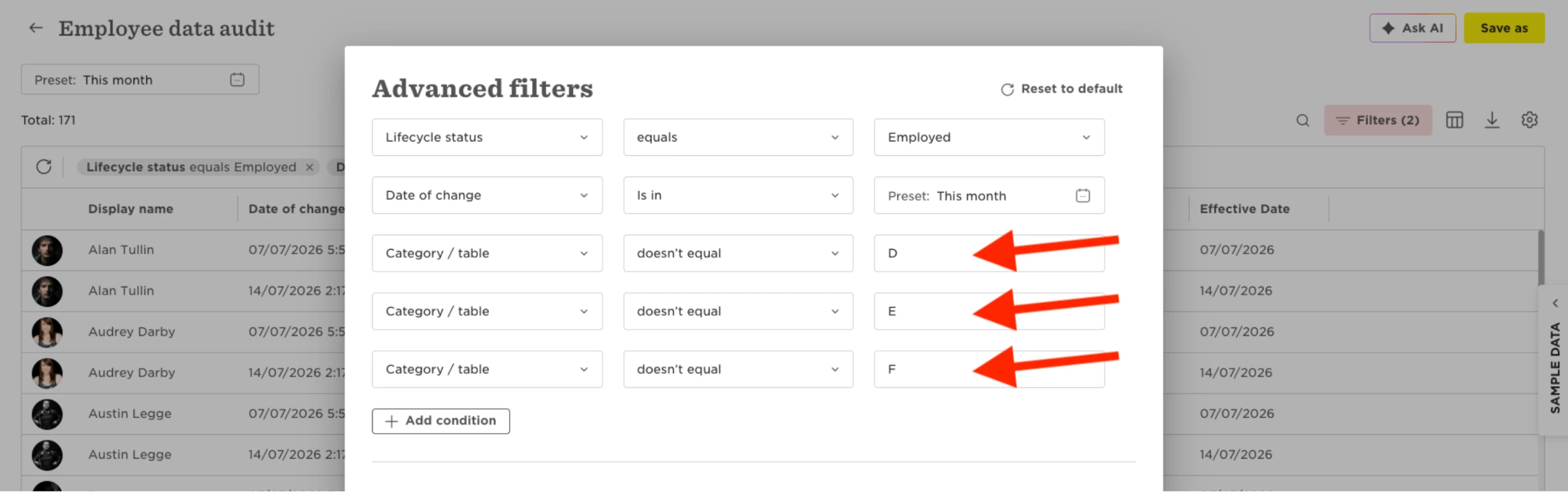
Instead of trying to filter for A, B, and C, they can exclude the remaining categories by adding these filters:
- Category / table doesn't equal D
- Category / table doesn't equal E
- Category / table doesn't equal F
Because all three filter lines must be true, the report excludes categories D, E, and F, leaving only changes made to A, B, and C.