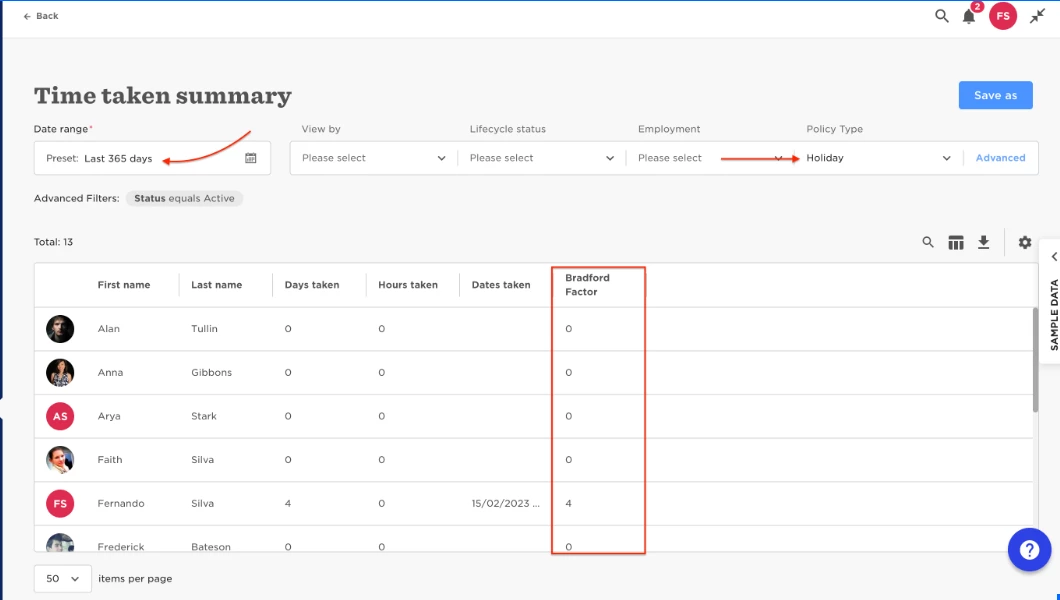

Absences report with Bradford factor.

  • July 21, 2023
  • 3 replies
  • 261 views

Fernando Silva
Bobber

You can find this information in the Time Taken summary report, it has a column that will who's you the Bradford factor for every employee, you can also set filters for Policy type and date range.
 

  • Analytics  
  • Reports  
  • Add new  Report  
  • Use a template  
  • Time taken summary,


3 replies

  • February 21, 2025

Hi there,

Replying to an old thread but my query is about the bradford factor.  Is there a way in the reporting function to show which employees are part time and/or have less than 12 months service?  Thinking about the pro-rataing of scores/triggers.


Maital Terdiman
Bobber

Hi ​@Fran Derd 

You can report for duty 📊 using Bob’s custom reports!

Here’s how to slice and dice your data:
1️⃣ Head to Analytics > Reports and utilize the time taken summary report mentioned above.
2️⃣ Pick the right columns: Employment status (for part-time folks) & Start date (to track tenure).
3️⃣ Advanced filters: Start date is less than last 12 months, & Employment type equals “Part time”

Now you’ve got a tailored report that works full-time to meet your needs! 🚀 


Adrian Espiritu

Hey, is anyone able to help me with dealing with Bradford factor for compressed hours employees? Their entitlements are in hours, not days, but I know the Bradford factor calculates based on number of days. Anyone able to share any workaround on this to reflect the correct BF? Thank you.