Workaround for end of probation period review

  • August 17, 2023
  • 21 replies
  • 2639 views

Considering that the feature Employee Lifecycle Feedback is only avilable to gather feedback from the employee and not the manager, there is a workaround that you can use from the Performance Review feature:

  • From the top left, click on Bob products
  • Select Talent 
  • You will find in the left menu the option Performance
  • Select Manage cycles
  • Click on the already created cycle or create a new one on + New Cycle

You can create a Performance Cycle with a manager review type (call it for example "end of probation period") and leave it open for a long period (you can extend it as much as you want):
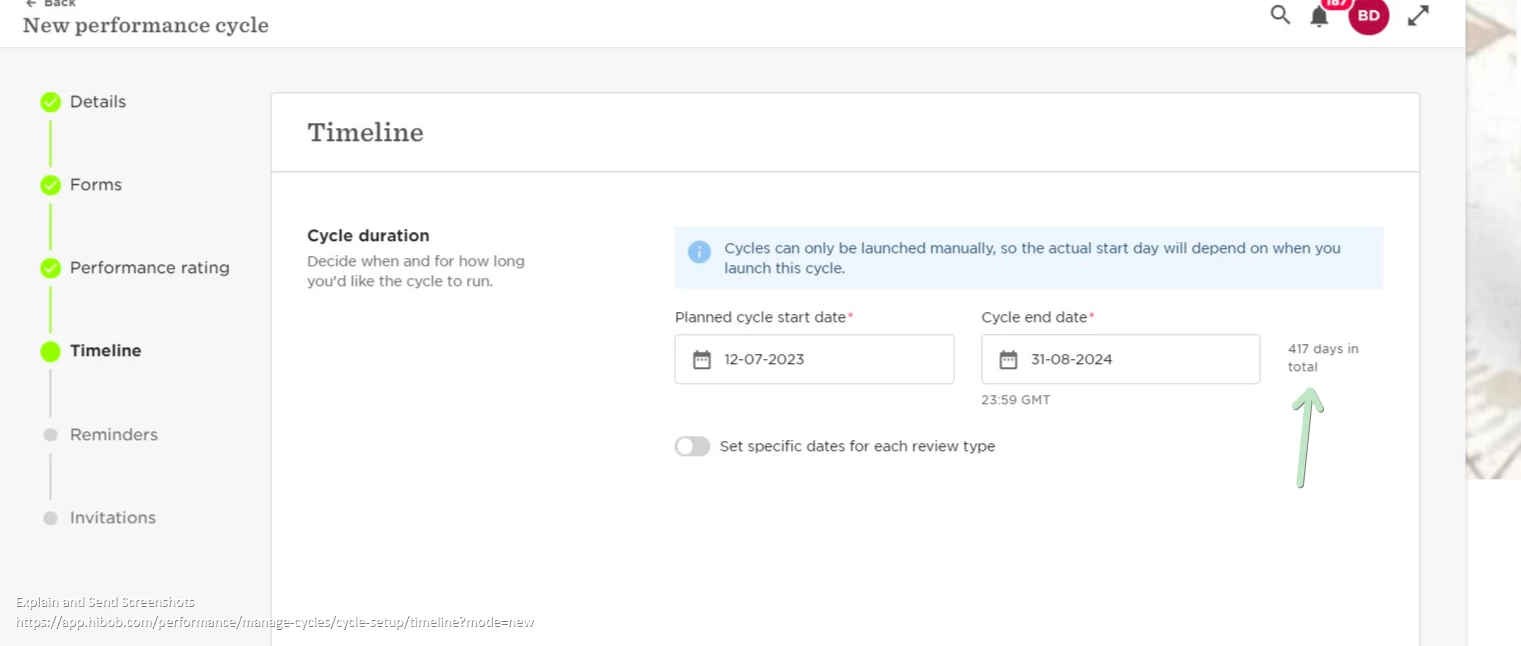
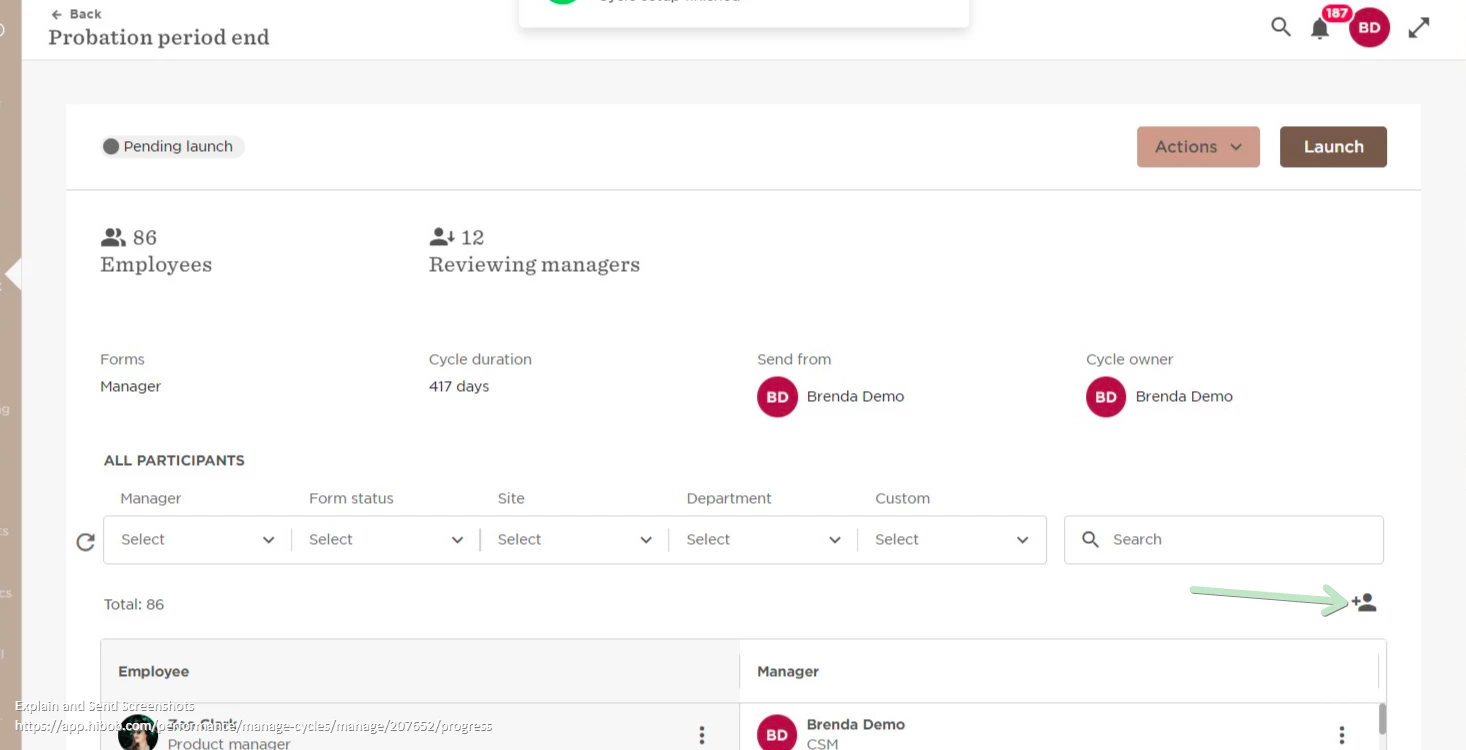
Then, every time you have a new employee that reaches the end of probation date, you'll need to manually add them to the cycle.
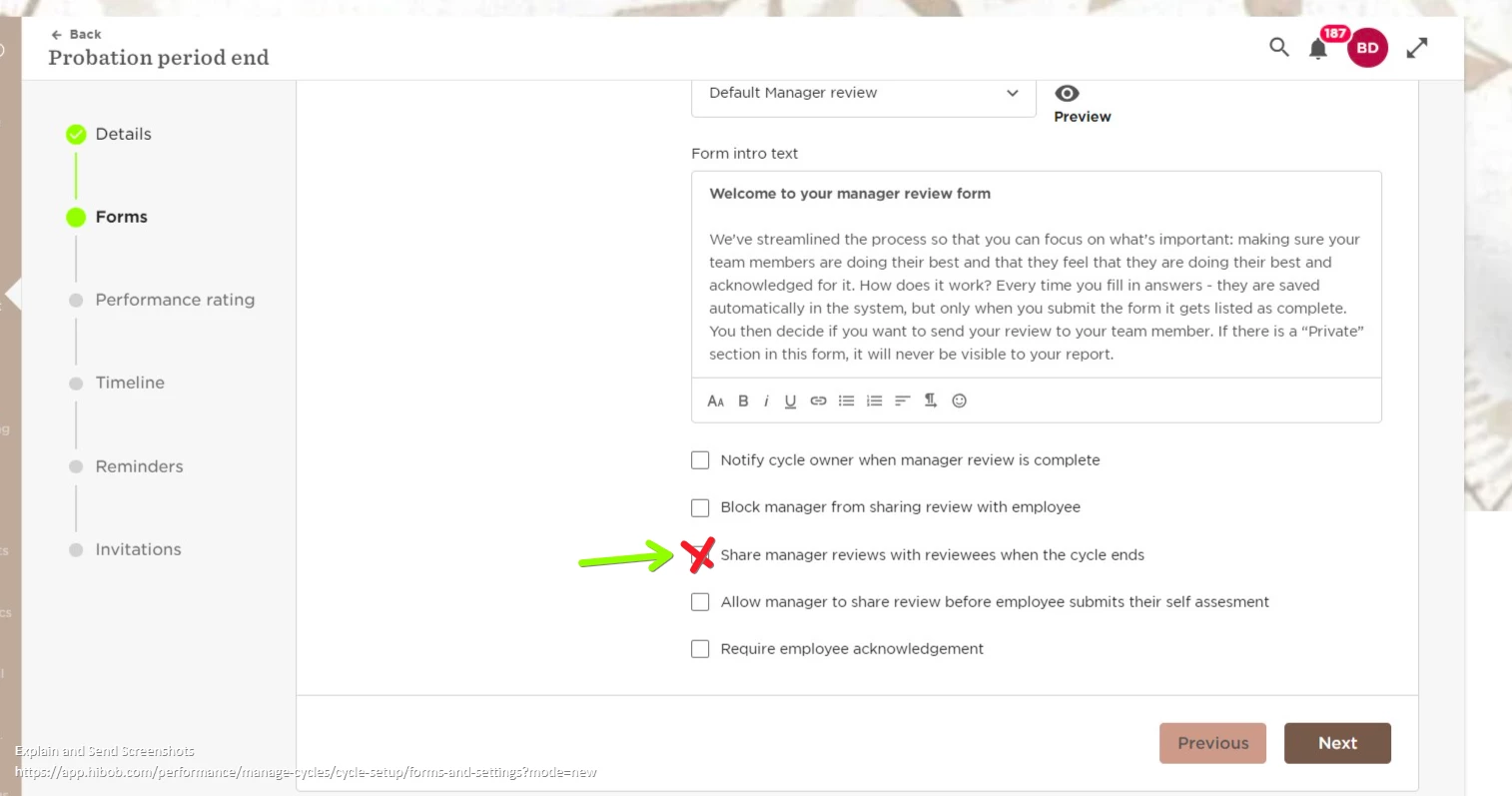
If you'd like to share this with the employee, please do not select the option to share it when the cycle ends, because the cycle won't end as this will always be extended in order to add new employees:
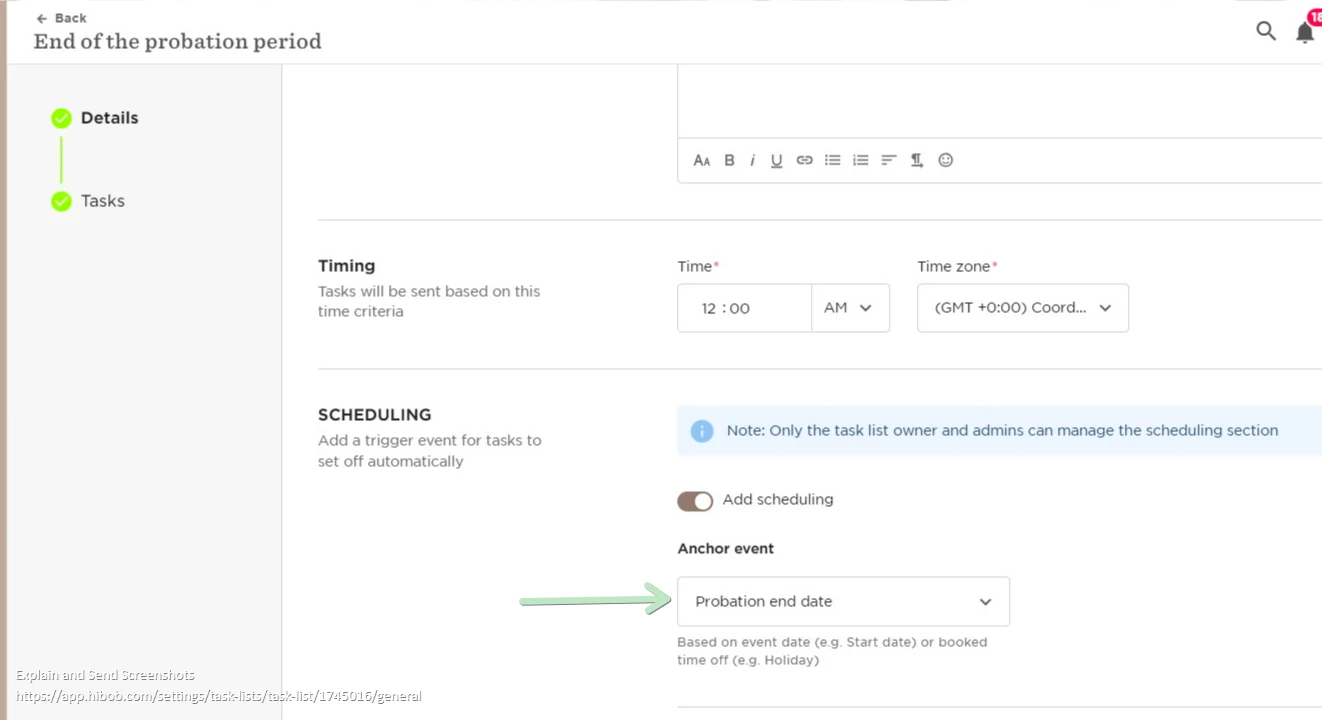
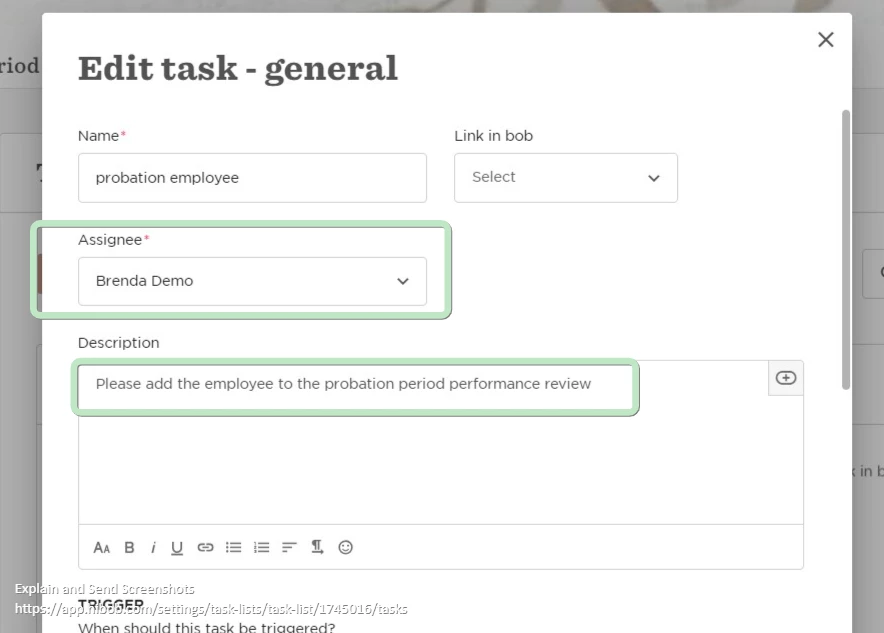
In order to remind this, you can create a task list and set the end of probation date as the anchor event so every time any employee is close to this date, a reminder is sent to you to add the employee to the performance cycle:
Hope that this helps!

21 replies

Chanelcarise

Hello @Brenda Grimberg 

We’ve decided it’ll be beneficial for us to use the same process you have instructed above for our Probation process.

The only stumbling block we’ve come to is the ‘Reminders’ section. As we’ll be keeping the cycle open for a year, these reminders won’t be sent out at the right time, especially as we continue to add other employees at different dates.

Was there a workaround of this for you by any chance?

Thanks!

Chanel


  • November 27, 2023

Hi!

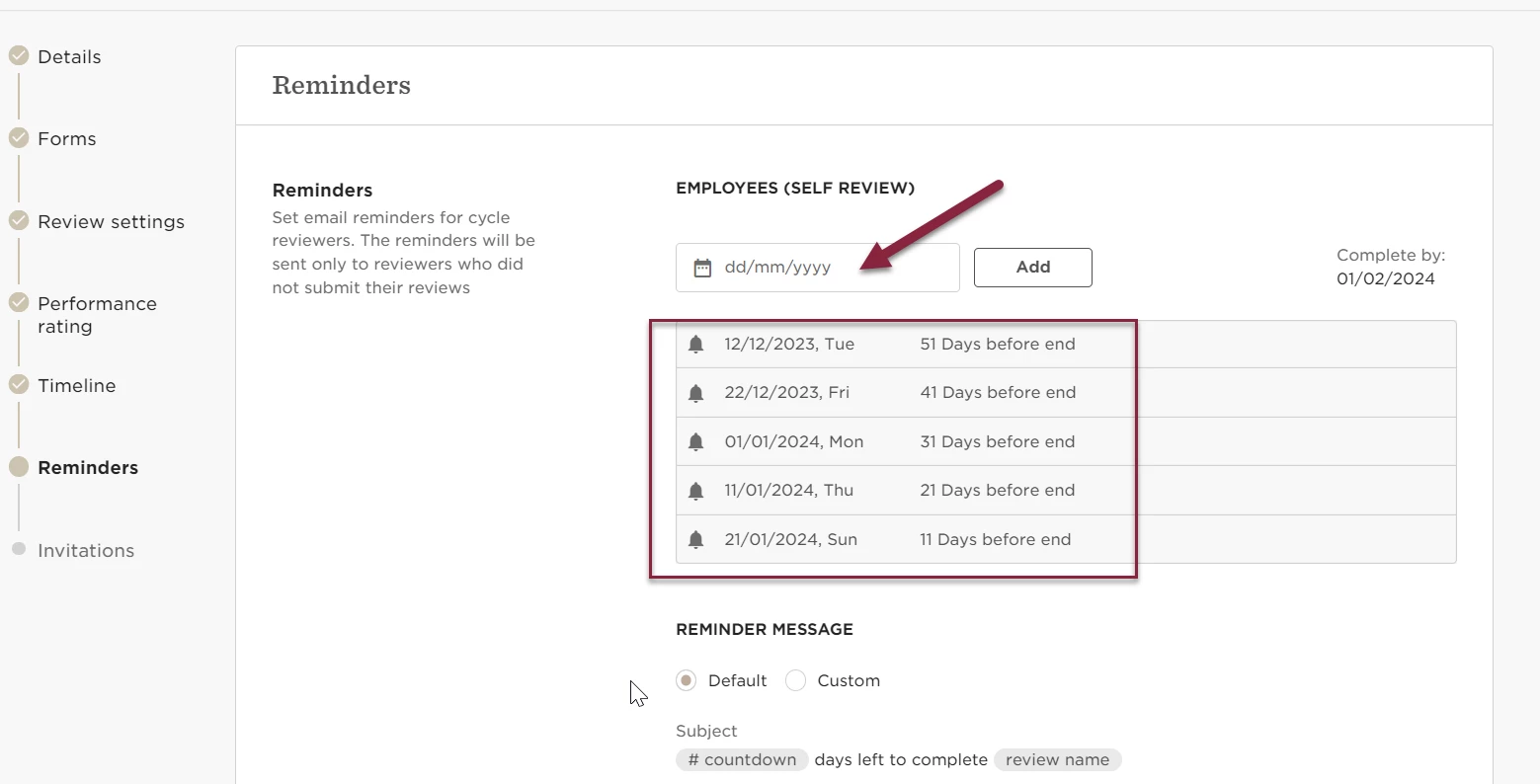
Please note that you can always add new reminders and those will be sent for those employees that did not submit their review only.

Also, when you setup this, you will mark the amount of reminders you want but then once the cycle is running you can edit those and add specific dates as well


Hope you find this information useful


Just an alternative for those interested…


Instead of a performance review we have employee feedback forms set up for managers to reflect on how onboarding is going at 30 and 90 days and then end of probation. The employees have them scheduled into their onboarding tasks (+a day 7 one).

We have set a task for HR to drop them in at the different intervals.. same amount of manual work, different mechanism for obtaining feedback.

The results come to HR for review so that if there are things they can assist with or if there are any red flags from either newbie or manager to go chase down. :) 

Can’t wait for employee feedback forms to be useable in tasks with an assignee option. 


We also chose to use employee feedback forms for probation period review self evaluation! It helps to know how onboarding is going collectively. (As an HR-dept-of-1 managing reviews for 200 employees, if there’s a manual step involved anywhere I can say with confidence that it will get missed! 😅)

For the manager feedback side, I created an e-signature pdf form with a triggered task to send it out just before the probation period date, along with a task reminder for the manager to set up a performance review meeting. 


Hi there,

I’m new to the talent module on Bob and trying to set up the probation review flow. As the person above I’m a team of 1 mananging the process for a large number of employees so any advice about an easy process that is automated as much as possible would be brilliant.


I have set up the form templates - is it possible to manually send a form?


thanks

Annabel


@Annabel Miller 

Hiya! You can set up a whole Task List for probation reviews Auto-scheduled and tied to Start Date, including task list items for yourself and/or the manager.to check in with your new hire. 

I have a short task list set up with a General Task for the manager (reminding them to schedule a 1:1 with their new hire), an Employee Feedback form for the new hire to do their Self-Review and answer questions about their onboarding, and a eSign Request that is the “Probationary Check In Form” for both the manager and new employee to sign when complete. 

It’s not as perfect as a Review Cycle, but it has been working pretty well for us so far!


Hey all 

Just an update - this works so well for employees, but for managers there is an issue - they can only complete it for one person, so if they have more than one join their team around the same time it doesn’t work :( 

Looking at moving the manager reviews into the performance cycles, or an esign like others have done but would love for this to change down the track so that they are all in the same place and easier to administrate than the performance cycles….ie scheduled.

Or perhaps they can be added to tasks to auto schedule :) 

Thanks Bobbers


Just an alternative for those interested…


Instead of a performance review we have employee feedback forms set up for managers to reflect on how onboarding is going at 30 and 90 days and then end of probation. The employees have them scheduled into their onboarding tasks (+a day 7 one).

We have set a task for HR to drop them in at the different intervals.. same amount of manual work, different mechanism for obtaining feedback.

The results come to HR for review so that if there are things they can assist with or if there are any red flags from either newbie or manager to go chase down. :) 

Can’t wait for employee feedback forms to be useable in tasks with an assignee option. 


Hey @Carlie Herbert - are you sure that’s the case? What’s the actual issue/how doesn’t it work? 

I’ve found that you can just add employees to an existing cycle and it will automatically add their manager. We’re looking at implementing this for our probation cycle so I’m currently exploring different options!


hi @Louise Connolly we are using the lifecycle feedback not the performance reviews for check ins through onboarding so they can be automated through tasks.

For managers, the issue is that they can only be doing one at a time, so if they have one open their name cannot be found in the dropdown to be added to another.

Our workaround is to duplicate the form with the employee’s name in it then issue it. then they are all in one place. Rather than have an open cycle.

It is working for us for now as it automates at least half based on start dates and tasks, where are performance reviews aren’t linked to individuals. We are only a smaller company so manageable.


Hey! 

We have moved our End of Probation Review on Bob as a separate cycle in Performance tab. I have one Probation extension and I realized, that I can’t add the same employee to the existing cycle (I want the manager to complete the second review after the probation got extended). It seems I need to create another cycle for the extended Probation Reviews? Is there any solution I’m not aware off? 


Maital Terdiman
Bobber

Hey @Barbara Michalak,

This will need to be created in an additional ‘second probation review’ cycle.. (for the meantime) 🤞🏼


PaulinaLipinska

Hey all! 

Are there perhaps new enhancements planned for this? So the surveys can be assigned based on roles and managers can fill them out for their direct reports based on ELF and not performance cycles? 

We just hit that wall and missing a lot of easy automations here to make the process pleasant for all parties involved :) 


Maital Terdiman
Bobber

Hi @PaulinaLipinska 

This is on our teams radars, no official dates just yet but stay tuned 🤓


PaulinaLipinska

Ok, waiting impatiently then :D 


Hi ​@Maital Terdiman any update on this please? 🙏


Jessica Lane
Bobber

Hi ​@Pascale Maurel 👋🏻


We unfortunately do not have an update to share on this just yet. 

Hopefully we can see it on the roadmap for future updates soon🤞🏻


Just another suggestion to add of how we’ve been managing probation reviews (although I think I may switch to the approach suggested at the start of this thread of an open ended cycle).

Currently I have a draft probation review cycle saved in review cycles. I have a probation task list linked triggered two weeks before probation end date, reminding me to launch the cycle.

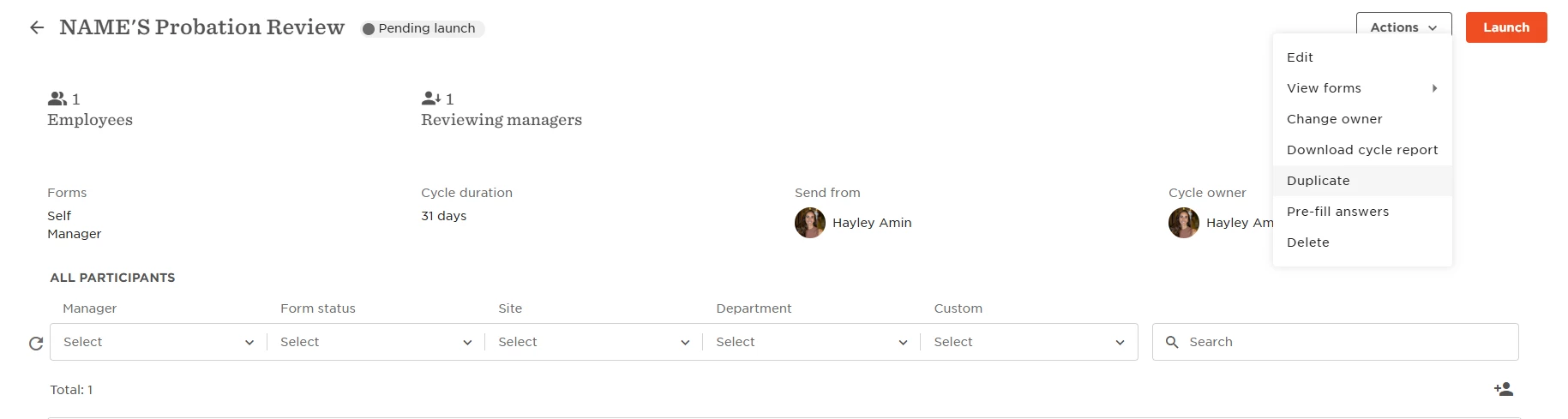
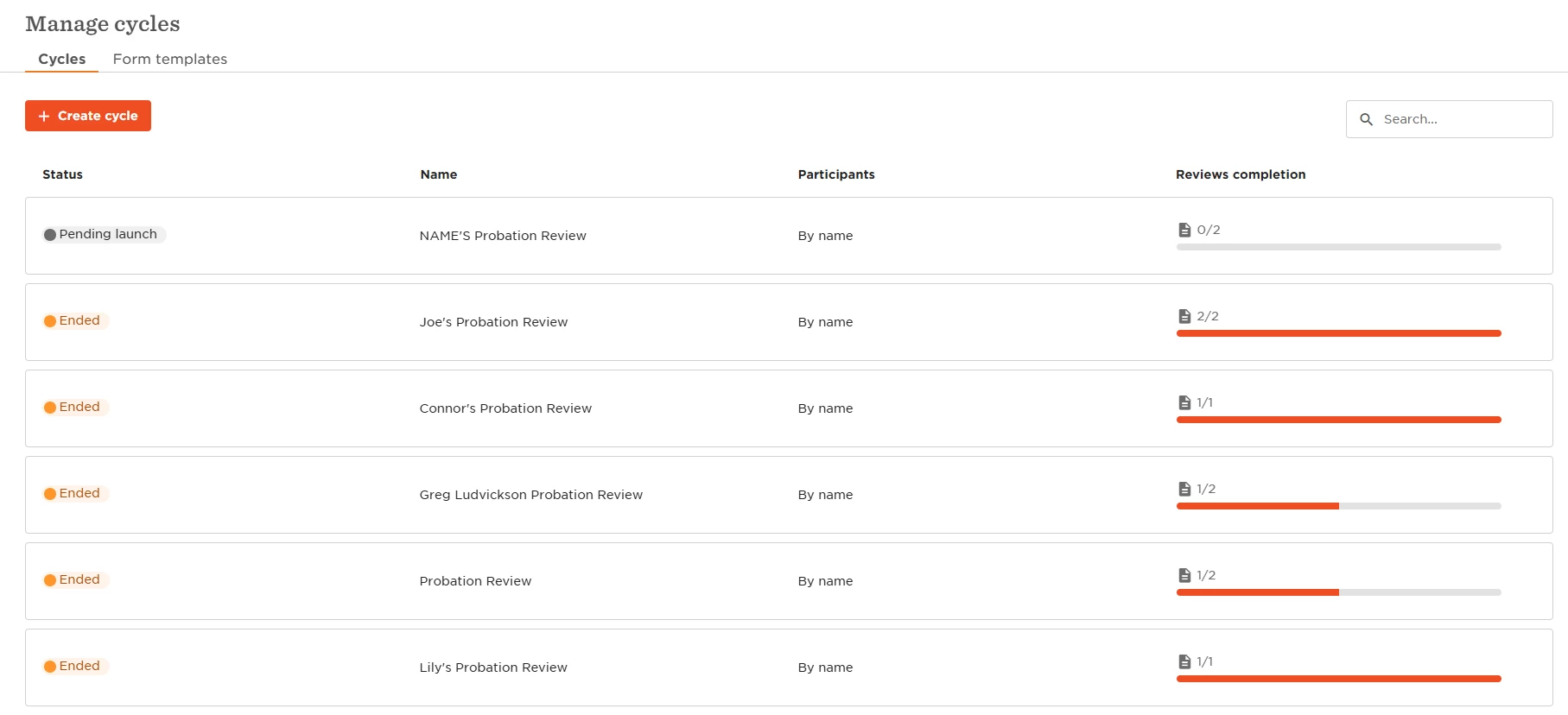
I then ‘duplicate’ the ‘draft probation review cycle’, change the employee to the person that needs to be reviewed, and launch the cycle. I do this for each employee. This way you can set all the reminders and click share at end of cycle. It works perfectly, the only downside is that it creates a long list of completed review cycles, so other ones like our performance reviews can get lost in the list!
 

Cycle to duplicate, that is always there at the top of my Manage Cycles page
Duplicate and change employee from myself to require person, and name the copy with their name

​​​​​
How it appears on completion

Hope that helps!


  • December 3, 2025

Has anyone here mastered this yet? 


We followd these steps and it’s a huge mess… https://help.hibob.com/hc/en-us/articles/33906371252753-Set-up-your-probation-process?#01JSV9CXC05YJTSQJHEDHBHN91 


The form needs to be triggered by the manager, and they don’t understand what they are doing. Then the results are nowhere to be found on the employees card. 

The probation notes are not working correctly etc. 

I don’t understand why these lifecycle forms cannot be used to survey the managers only. 

Any news on this, I don’t know how many hours we have spent on trying to set this up, first as cycles that need to be triggered manually (or add people to them manually), then as flow and forms and it’s just so complex that we are giving up on this system!


mateo.strbic

Hi ​@Jessica Lane,

Are there any updates on this?

It would be useful to have this process set up through Bob properly, rather than trying to fit it within the performance or employee lifecycle feedback apps, which don't have sufficient capabilities for this.


  • April 20, 2026

I’ve set this suggestion up. However, once I create the cycle, even if I select to add people only ‘by name’, it still adds everyone to the cycle. I don’t want to launch the cycle to everyone, just a specific person. How do I remove them?


I would also love to see improvements in this area - it’s so manual and feels a huge gap in the platform, none of the workarounds are ideal!