
Inviting peers to performance review

  • May 31, 2023
  • 19 replies
  • 1305 views

By default, only managers and admins can invite peers in performance. The reviewee can do it as well, but only if set up in the cycle.

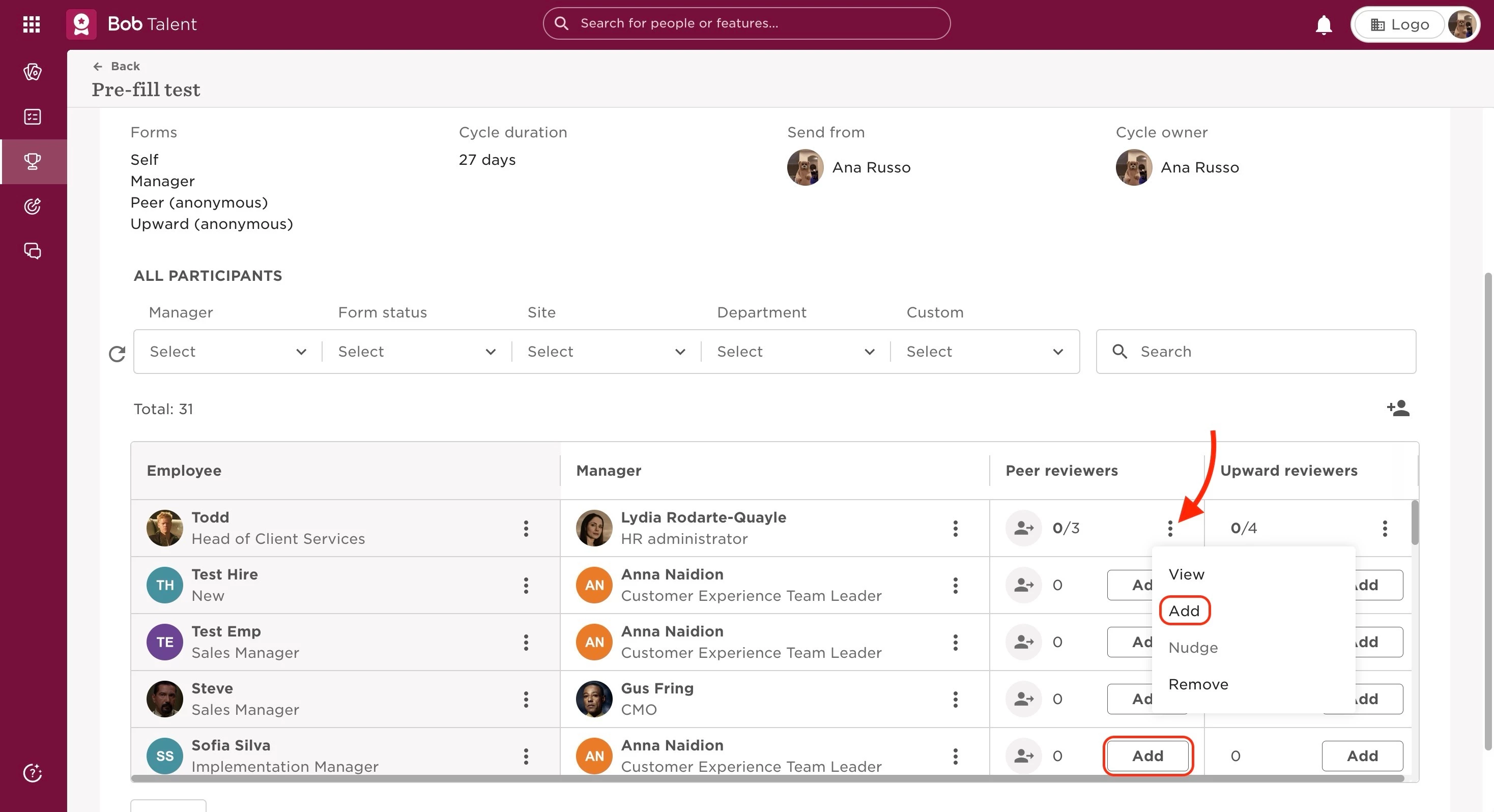
For managers and admin, from the Manage cycles page:

  • Go to the top left, and click Bob products
  • Select Talent 
  • You will find in the left menu the option Performance > Manage cycles
  • Select the intended cycle
  • In the Peer reviewers column, click on the 3 dots next to the review you want to invite peers to, or simply click on the Add button
 

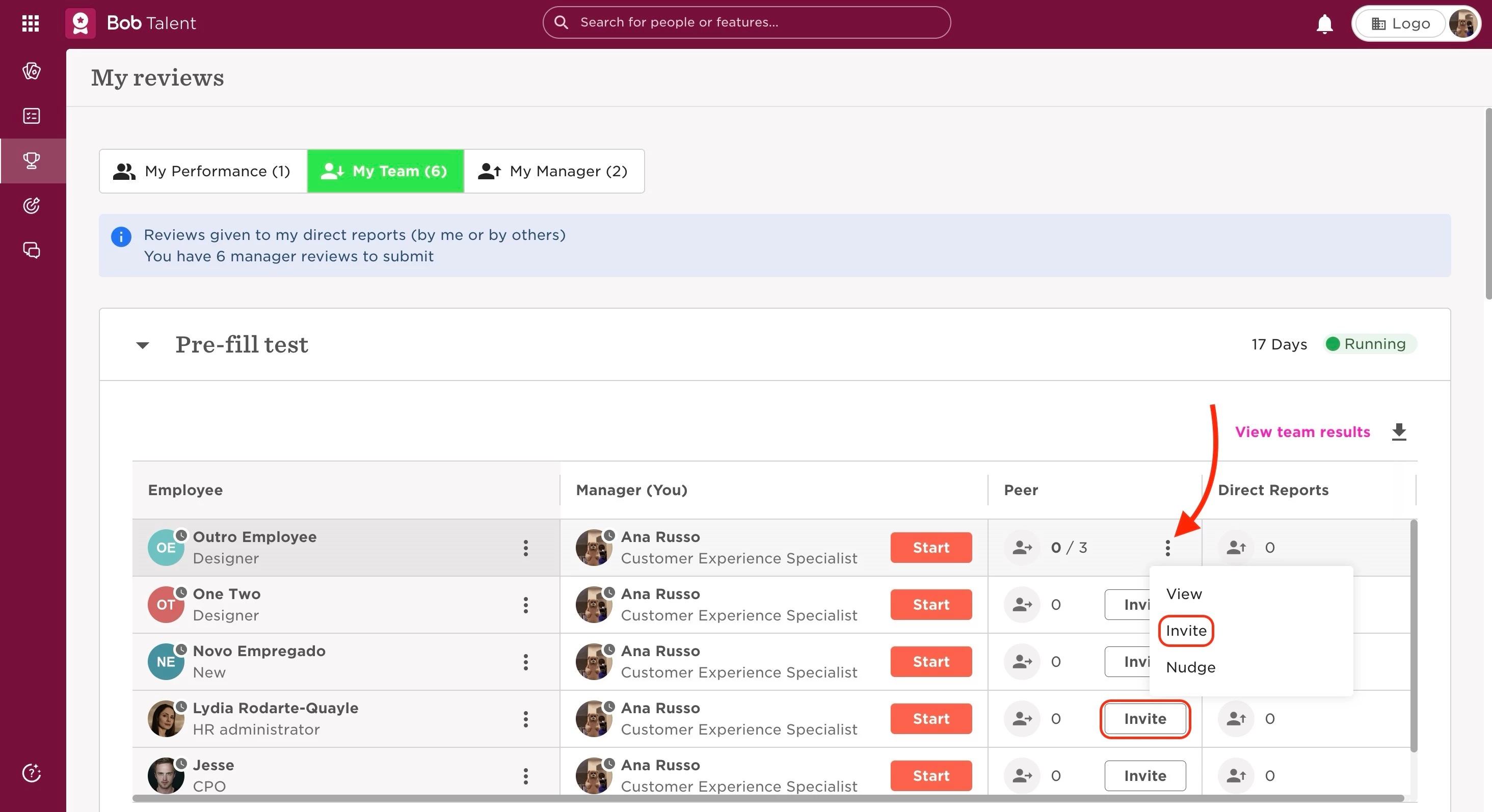
For managers, from the My reviews page:

  • Go to the top left, and click Bob products
  • Select Talent 
  • You will find in the left menu the option Performance > My reviews
  • Go to the My team tab
  • Select the intended cycle
  • In the Peer column, click on the 3 dots next to the review you want to invite peers to, or simply click on the Invite button



19 replies

Hi @Customer Experience Team


We are currently setting up our upcoming review cycle and we would like managers to select peers for their team members. Is it correct that, even though we’ve selected a cycle duration in the future, managers can only invite peers when the cycle is launched? And if we do, it will launch immediately start so the upcoming startdate gets lost?
 

Hope you guys can help! 


Kind regards Nicole


  • September 11, 2024

@Nicole van Wijk After testing it in our environment, I can confirm that managers can invite the peers before the launch the of the cycle too. This is of course in the scenario after the main cycle has been launched, where peer cycle is launching after the manager’s and self.

In the screenshot below you can see that the cycle dates for all the reviews are different  and the Manager was able to invite peer before the peer cycle date:


Keep us posted of any further queries. 🤳🏼


Hi @Pranhita Sharma,


Than you so much for clearing that up! :) 


I have been testing peer reviews in a 360 leadership review and I have a question that you may be able to help me with. When a peer review is launched and reviewees are allowed to invite peers - do manager and reviewee receive any notification to invite reviewers? It does not seem to be the case but maybe I missed something in the settings? O would be grateful if you can share your experience and how you solve this? Our model is that reviewee and manager should agree on who should be invited and once they agree the reviewee invites them. In the previous platforms we used it was possible to set up “nomination” stage where reviewee would nominate peer reviewers and once the deadline passed, the manager would review and make adjustments, then confirm, which would trigger the invites. In hiBob it seems that peer review invites can be done but the instructionms have to be provided from outside of the platform - is this correct?


  • October 30, 2024

@Urszula Kawa You are correct, no notifications are sent to the managers or reviewees to select ‘peers’. The discussion on who should be invited us usually discussed in their 1-on-1s i.e. externally.


Hi, hoping someone can help! Does anyone have any advice on best practice on how to select reviewees for Peer and Upward feedback? We are unsure whether the Line manager or HR should select. 


Thank you!


Hi, I would recommend that the employee selects first and then the manager reviews and approves or modifies the choice. Including employees in the process increases perceptions of fairness in review processes. Line managers may not remember or even have full insight into who their direct reports collaborated with closely over a period of time so it is good to give the individuals the opportunity to make first draft. Then, managers review and add/ remove reviewers to mitigate the risk that the reviewee only selected “positive” reviewers.  I hope this helps.


Hi Urszula, Thanks for this.

Do you have any guidance on how many peers should give feedback per employee?

And for upward feedback, some managers have 15 direct reports while others have 2; should each employee be giving upward feedback when there are so many direct reports? Or is it best to select a number of employees per manager, and if so, what is the best practice in choosing those?


Hi, when it comes to guidance for how many peer reviews - it’s hard to give any numbers. I’ve seen some articles recommending 3-5. It may vary vastly depending on the role. What I would actually recommend is to limit the amount of feedback any given employee is required to provide and e.g. say that if they get more than 3 requests they only need to respond to the first 3. We’ve seen some people receiving enormous amount of peer feedback requests in the past and it was creating bottlenecks. This solution also incentivises ICs/Managers to send those requests fast to get input.


For upward feedback - we actually ask all DRs that have worked with a manager in question for at least several months i.e. have enough experience to provide meaningful feedback. But this is because feedback is big part of our culture so we want to bring it to life this way and have managers also model how they receive feedback.


Hello! Perhaps someone can help me with my question.

Is there a way to limit the number of peer reviews that can be requested? E.g. you can only request 2 peer reviews during performance review cycle. Thanks! 


Maital Terdiman
Bobber

Hi ​@anastasiia_relive 

Currently, there is no way to set a limit on the number of peer feedback requests that can be assigned to an individual within the performance review


Hi!  I’m trying to use the Anonymous Peer review feature for a manager training program.  I want to be able to include the person’s manager(s) as part of the peer review process.  But the manager doesn’t show up in the drop down and there isn’t an option to include them.  Is there a way for Managers to get a peer review form?  Is there a setting I can switch to be able to send it to them?  


THANK YOU!!


  • May 7, 2025

@ildi.conrad Manager will have their dedicated review and cannot be under peer review. The alternative solution will to let the managers do the review and not share with employees after completing. 


We tried to test how the line manager chooses any of the employees within the organisation to do the 360 review for the reviewee, but there was no option for the line manager to do, does anyone know how to do it? Thank you. 


Hello! Does anyone know if it’s possible to adjust the peer-review form per employee? I’d like that employees are requesting specific feedback- but they can choose themselves about which topic. It seems like the forms are fixed and for everyone the same. Thank you! 


Maital Terdiman
Bobber

Hi ​@Fransis de Vries 

This is not an available feature.

Indeed the forms are fixed per review that is set, as in whether it be: Self, Manager, Peer, Upward 


Hi there,

My cycle has launched and the set-up is complete from what I can see. Is someone able to help me figure out what I am missing - currently our managers are unable to pick reviewers for their team and I can’t seem to sort out what the blocker is. 


Thanks


  • December 17, 2025

We set our employees up to be able to invite their peers to the review and set a limit of 4 and an anonymity threshold of 3.

My question is, once the employee sends an invite, is there a way for the Peer to decline it if they prefer not to respond? Or is there a way for an employee to uninvite one of the Peers once the invite was sent?

I don’t even see that I can remove the invite from the admin side, since they are anonymized, i.e. Peer 1, 2, 3

Anyone know if this is possible or if I need to adjust a setting?


Hi, can external people be used to write peer reviews? For example, we have a contractor that we haven’t added into Bob, and I’d like them to leave a couple of reviews for people they’ve been working with. 

Thanks


