How to troubleshoot fields not auto-populating in new hire flow from any ATS integration (Greenhouse, Comeet, Lever, TeamTailor, Hire API (third-party/custom ATS))

  • Jul 23, 2024 8:29 PM UTC
  • May 13, 2025 10:31 AM UTC
  • 4 replies
  • 420 views
  • Translate All

When fields are not auto-populating in the New hire flow, our troubleshooting pattern is the following:

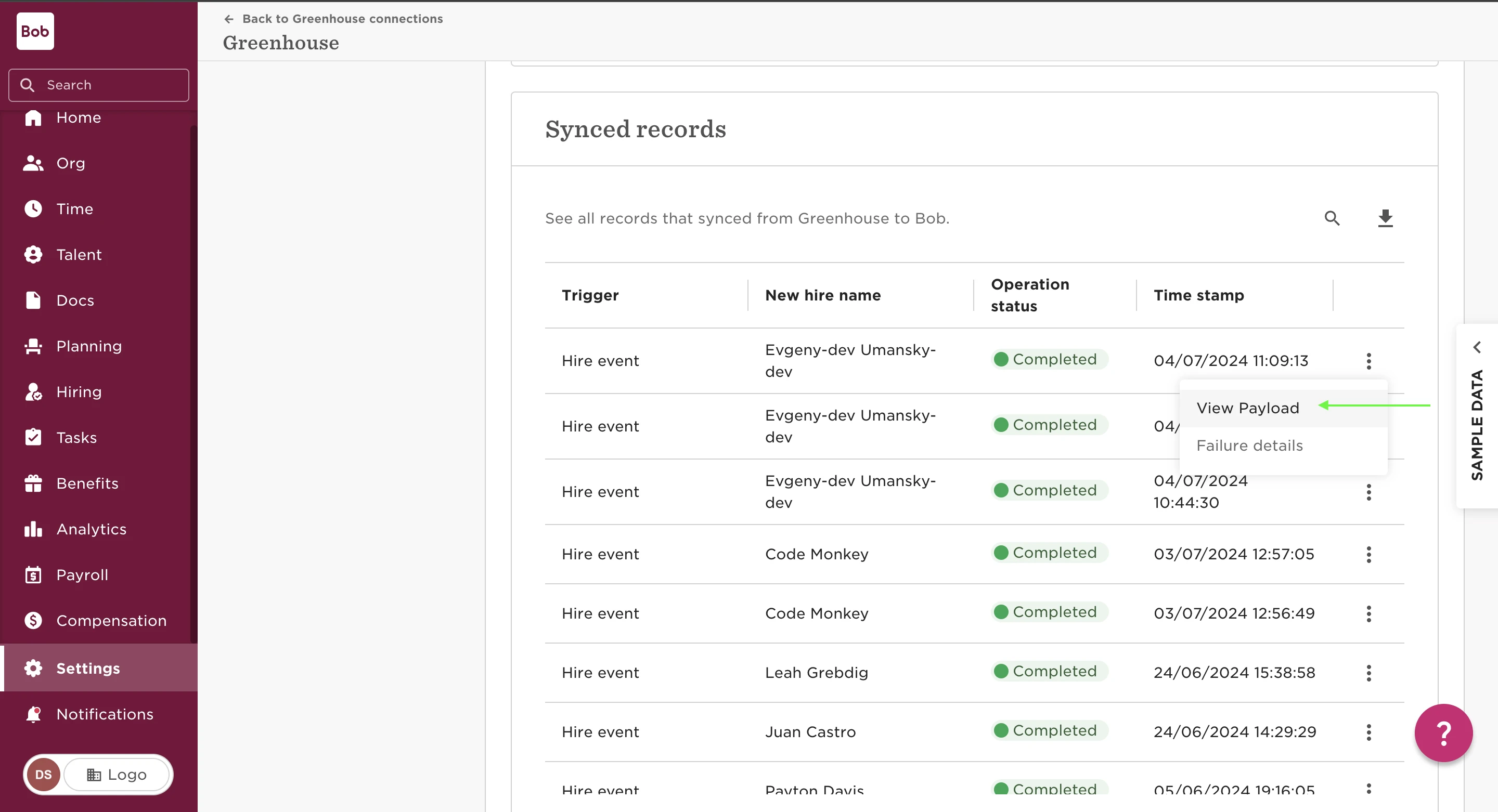
  1. Check the payload in the synced records of the candidate to ensure that we received the data from the ATS, we can paste the payload in a JSON Viewer

  • Please note: if the fields are not appearing in the payload then this means either the correct fields are not mapped in the data mapping section in the ATS in Bob and/or the field configuration needs to be checked in the ATS side of the integration with the ATS support team.
 

2. Ensure the fields are added to the new hire flow we are using to create the employee's profile in:

  • Settings > Flows > New hire flow > Categories and fields.


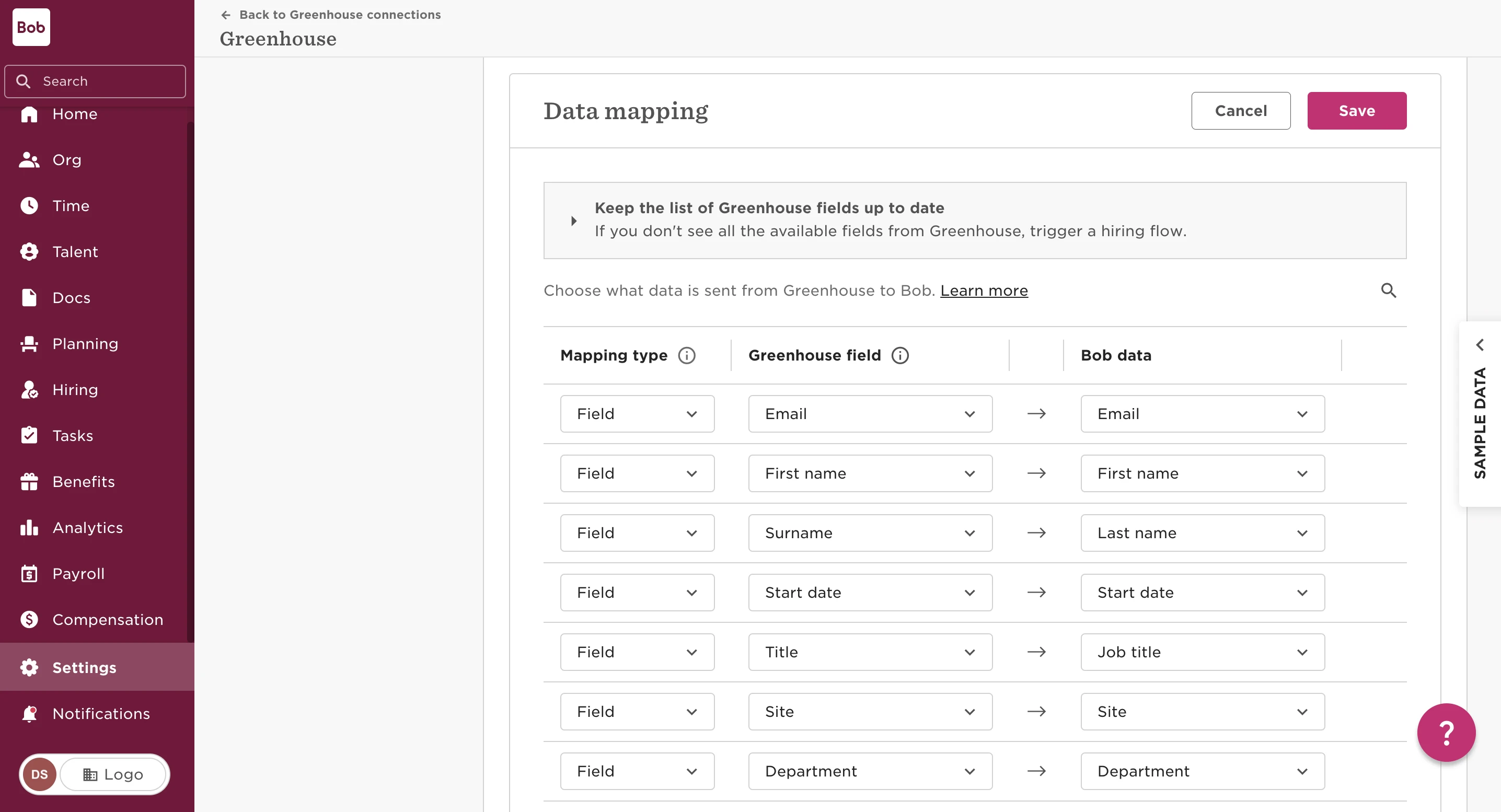
3. Ensure the fields are mapped and the correct field is mapped if you have duplicated fields in the ATS. We can check this in Bob by navigating to:

  • Settings > Integrations > ATS name > click connection > Data mapping > click pencil to edit:
 

4. This step only applies to list/drop-down fields in Bob e.g. Site, Job title, Department: Check if the value that is being sent from the ATS matches a value in the list field in Bob. This must match exactly e.g. if the Job title in the ATS = "Account Manager.123" then in Bob there needs to be a "Account Manager.123" Job title.

  • Employee reference field: ensure the email in ATS matches an employee’s email of a Bob user

    • Field example: Reports to

  • Currency type: For currency number + currency type to populate, please ensure the field in the ATS is also a currency field. A number field will only sync over the number to New hire flow in Bob

    • Field example: Base Salary


4 replies

When fields are not auto-populating in the New hire flow, our troubleshooting pattern is the following:

  1. Check the payload in the synced records of the candidate to ensure that we received the data from the ATS, we can paste the payload in a JSON Viewer

  • Please note: if the fields are not appearing in the payload then this means either the correct fields are not mapped in the data mapping section in the ATS in Bob and/or the field configuration needs to be checked in the ATS side of the integration with the ATS support team.


2. Ensure the fields are added to the new hire flow we are using to create the employee's profile in:

  • Settings > Flows > New hire flow > Categories and fields.


3. Ensure the fields are mapped and the correct field is mapped if you have duplicated fields in the ATS. We can check this in Bob by navigating to:

  • Settings > Integrations > ATS name > click connection > Data mapping > click pencil to edit:


4. This step only applies to list/drop-down fields in Bob e.g. Site, Job title, Department: Check if the value that is being sent from the ATS matches a value in the list field in Bob. This must match exactly e.g. if the Job title in the ATS = "Account Manager.123" then in Bob there needs to be a "Account Manager.123" Job title.

  • Employee reference field: ensure the email in ATS matches an employee’s email of a Bob user

    • Field example: Reports to

  • Currency type: For currency number + currency type to populate, please ensure the field in the ATS is also a currency field. A number field will only sync over the number to New hire flow in Bob

    • Field example: Base Salary


Do you happen to know why the “Hiring Manager” field could be having trouble to populate? Even if the email of the user in Lever is the same as in HiBob?

Thanks

Translate

Maital Terdiman
Bobber

Hi ​@Priscilla Alba 

Sharing this here:


Translate

Do you happen to know if the issue is resolved as we can really make the best use of the integration?

Assuming no as there are no updates in any of the threads. 

Translate

Harshil Boparai
Bobber

Hi ​@Iliya Uzunov Thanks for checking in again :) I’d recommend checking in with your CSM, as they would be able to provide a full insight into the issue and offer any potential workarounds. 

Translate