

You can retrieve a complete list of job titles in Bob using your browser’s developer tools as a quick workaround.
While this isn't a built-in feature today, we’ve shared the feedback with our product team for future improvements.
To get the job titles from Bob using DevTools:
-
Open Developer Tools:
-
Press
F12or -
Use
Ctrl + Shift + I(Windows) /Cmd + Option + I(Mac), -
Or right-click on the page and select Inspect
-
-
Go to the Network tab
-
Refresh the page to load data
-
In the filter bar, type
lists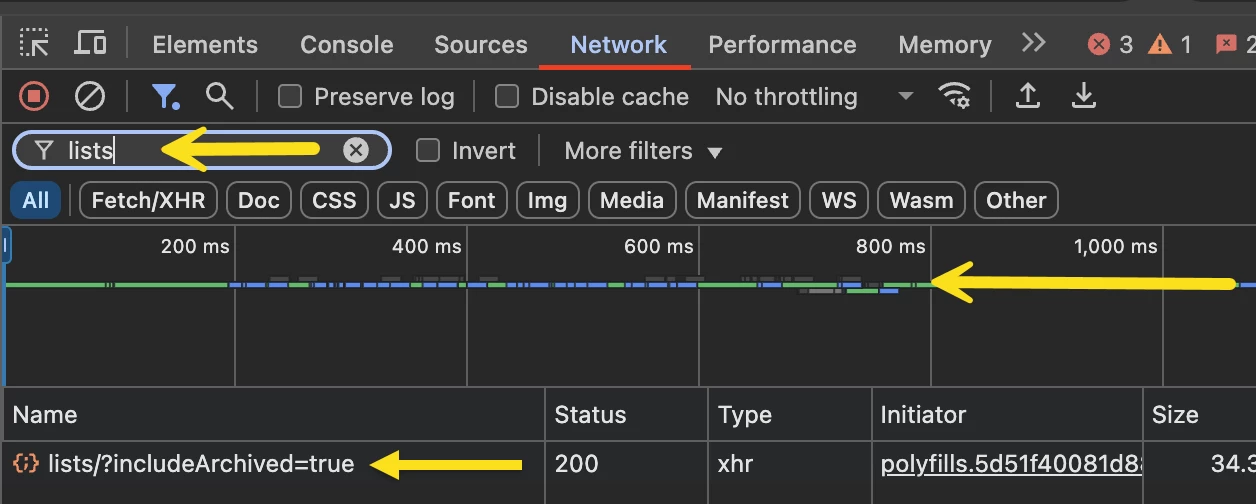
-
Find the request called
lists/?includeArchived=trueand click on it -
In the Preview tab, search for
Title -
Expand the
Titleobject and find thevaluesfield -
Right-click on values and choose Copy object
-
Paste the copied data into a Google Doc or Word document
You’ll see the full list of job titles in raw format
You can use an AI tool to extract just the text values—or ask your IT team to help clean it up.
Prefer to use the Bob API instead?
Check out this post for a method using the GET /company/list endpoint: List of all Job titles in your Bob instance via API
Not sure which method to use?
Here’s a quick comparison to help you choose:
| Method | Best For | Pros | Considerations |
|---|---|---|---|
| Developer Tools | Anyone who needs a quick list without setup | Fast and easy—no special access needed | Raw data format may need cleanup |
| Public API | Admins or IT teams comfortable with API tools | Clean, structured data that can be reused or integrated | Requires a service user and token setup |