
Employees fail to be updated in Azure AD

  • Mar 31, 2023 6:03 PM UTC
  • Sep 17, 2024 9:11 AM UTC
  • 3 replies
  • 167 views
  • Translate All

Follow the next steps:

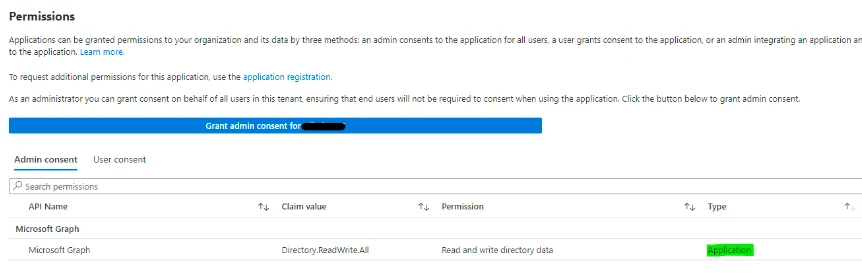
  1. Check the Type of the permissions in to Application permissions instead of Delegated permissions > Directory.AccessAsUser.All - As in the screenshot with green highlight
  1. Make sure the user that is relevant for updating the employees in Azure is granted with Admin privileges. 

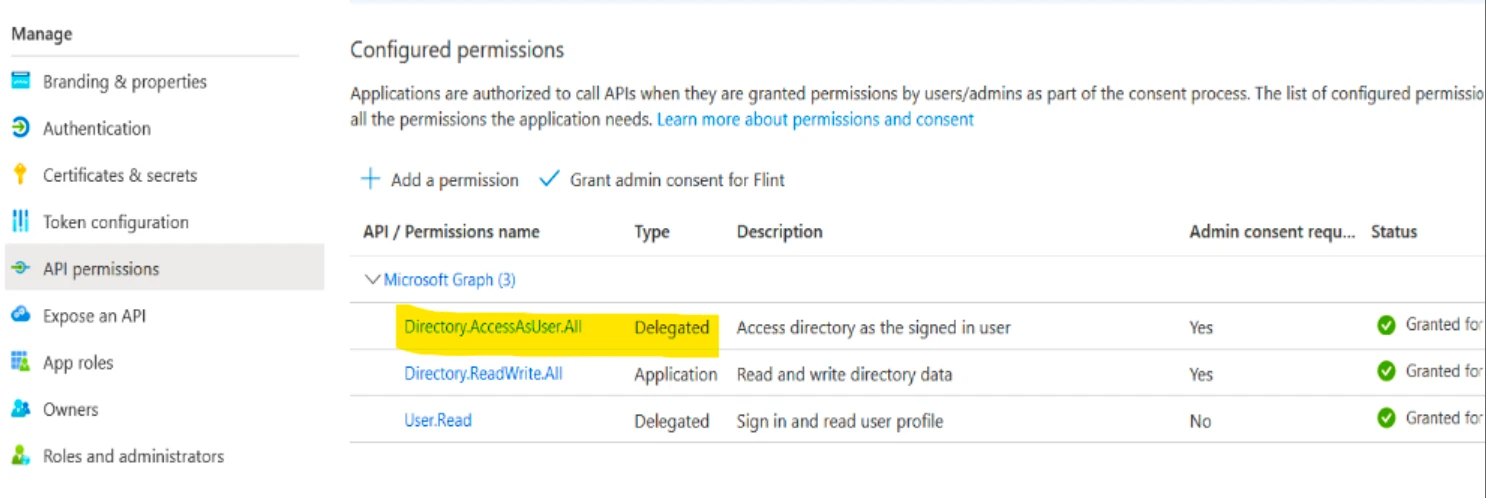
  2. In Azure provisioning it is required for Global Admins to add another permissions dedicated for admins: Delegated permissions > Directory.AccessAsUser.All - As in the screenshot with a yellow highlight down below and also Microsoft Graph permissions reference guide.
If all of the above is done, and no change I suggest opening a support ticket to MS team regarding this, as the integration with Bob is set according to the MS integration guides and looks like they've configured everything properly on both sides.

3 replies

Just to note - the extra permission you mention in this article is not mentioned in the set-up guide for provisioning (the Directory.AccessAsUser permission). If this is needed, can it be added into the core article? 

Translate

Following up to my own response - Having gone through the set up guide again, I don’t believe it’s correct and unless anyone has a good understanding of enterprise apps and permissions then they’re going to get stuck. 

To get this working, I’ve had to assign the following API permissions as application permissions (not delegated). 

  • Directory.Read.All
  • Directory.ReadWrite.All
  • User.EnableDisableAccount.All
  • User.ManageIdentities.All
  • User.Read.All
  • User.ReadWrite.All
Translate

  • Apr 28, 2025 8:51 PM UTC

Bumping this as this contains relevant information to anyone encountering and issue with the integration.
 
After encountering issues with the integration, I have found this documentation by Microsoft regarding the permission that is recommended by the main article: https://learn.microsoft.com/en-us/graph/permissions-reference#directoryreadwriteall

Microsoft’s note on the permission (if you don't want to click the link above): "Directory permissions grant broad access to directory (Microsoft Entra ID) resources such as user, group, and device in an organization. Whenever possible, choose permissions specific to these resources and avoid using directory permissions.
Directory permissions might be deprecated in the future."


The API permissions is planned to be deprecated (as it deems not secure enough), and instead we should use the following permission to ensure the connection works properly: User.ReadWrite.All
I’ll note that if you want to enable/disable and delete users you’ll probably also need User.ManageIdentities.all (for deleting users) and User.EnableDisableAccount.all

Translate