

Quick breakdown of the different ways to import and update people data—and how category fields differ from table fields.
People Import: Understanding 'Import People', 'Update People', and 'Import Table'
-
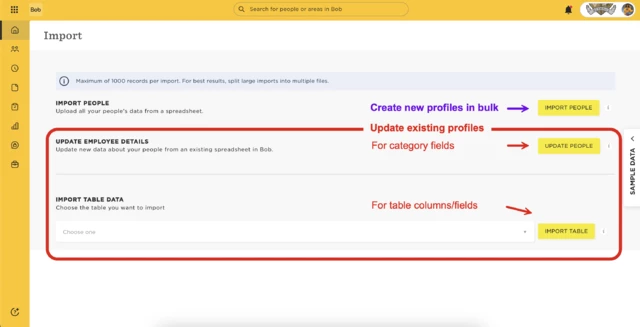
Import people is used to create new profiles in bulk.
-
Start with the basic fields only. Once the profiles are created, you can add more data using the other import options.
-
-
Update people is for updating data in category fields for existing profiles.
-
Import table lets you import data into table columns for existing profiles.
-
You’ll choose the relevant table from the dropdown.
-
Depending on the table, you can either add new rows or replace existing ones.
-
Category Fields vs. Table Columns: What’s the Difference?
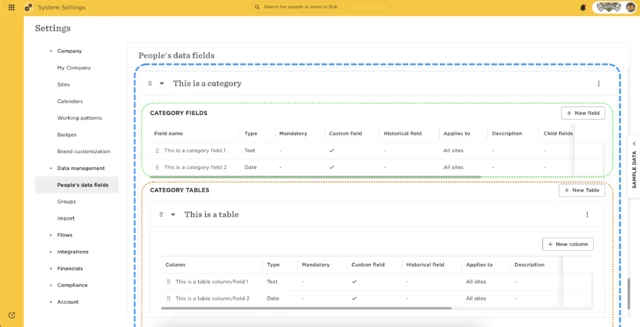
Each category (aka section in a profile) can include two types of fields:
-
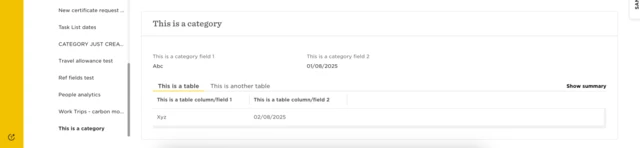
Category fields are standalone—like “Work email” or “Location.” These appear at the top of a category.
-
Table fields are part of a table inside the category. Their data is row-based and structured, like in a spreadsheet (e.g., salary history, past roles).
By understanding the difference between these import options and field types, you’ll avoid common import errors and keep your people data clean and organized.