Linking Birthdays/Anniversaries to Google Calendar

  • March 7, 2023
  • 11 replies
  • 426 views

In order to do this Go to:

  • Time  
  • People's Time Off  
  • click on the three dots in the top right corner of the page  and select "Sync with external calendar"
  • select the Everyone tab the birthdays and work anniversaries will show up for you to link it to your external Calendar
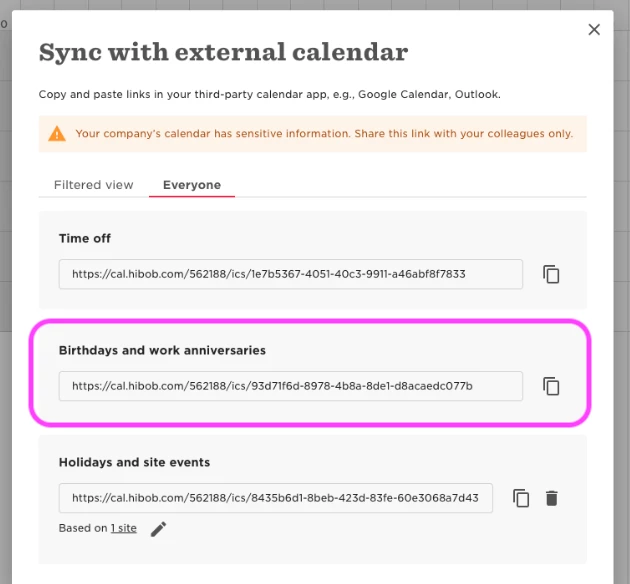


Note: These links will appear only if your HR Admin has generated them in the My Company page

You can read more in this help center article. 

11 replies

  • April 5, 2023

Does this still work? I can’t seem to find the Events tab.


Lindsay Sinenberg
Bobber

Hi @Truman Lahr!
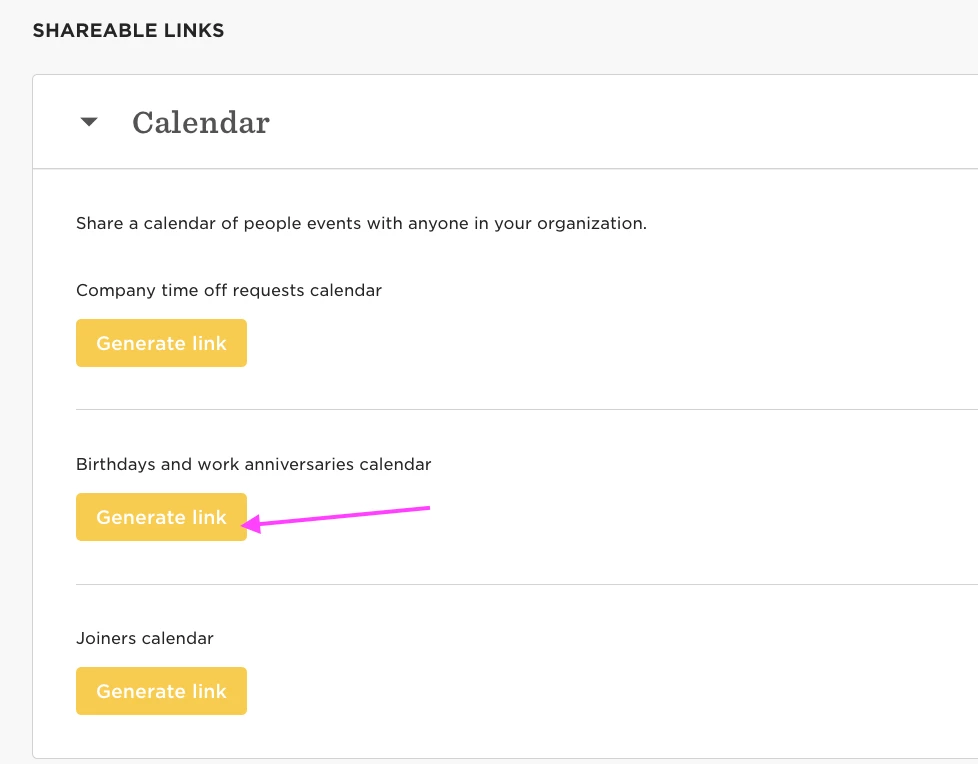
This is still active. The events tab will appear only if your HR Admin has generated the Birthdays and anniversaries link. 

This can be accomplished by navigating to Settings> My Company> scroll to the Shareable Links section> click Generate Link for the ‘Birthdays and work anniversaries calendar’

Example below showing this:


  • Bobber
  • June 28, 2023

Hi,

I’m Jeremy and I’m a Product Education writer at HiBob, responsible for all the Time off and Time and Attendance help center articles (among others).


Just to let you know, this functionality changed a little bit with a recent product release. You can still sync birthdays and work anniversaries from the time off calendar to your Google calendar, but the pop up is slightly different.


For all the info check out this up to-date-help center article: Sync the time off calendar with your external calendar  


Thanks @Lindsay Sinenberg and @Hannington Morgan for taking the time to explain how this works.


Hi @Jeremy Last @Lindsay Sinenberg @Hannington Morgan,

I followed the instructions in the help article you referenced more than 24 hours ago, but I’m still not seeing anything in my external calendar (Outlook on the web and Outlook desktop client). One policy is set to Public, but that isn’t appearing either. The other policies are set to private so they’re not viewable by others who don’t need to see it. But that will make it so that it can’t be synced with an external calendar, correct? If so, is there another way to ensure that only certain people can see the booked time off and sync externally?

To clarify - the time off entries aren’t appearing in the calendar, but the calendar name is showing in the left panel.


Lindsay Sinenberg
Bobber

Hi @Molly Shelton! I definitely suggest reaching out to our Support Team and let them know an example of an employee and the public request that is not visible and they can troubleshoot further 😊

Note: if the visibility of requests was changed in the time off policy settings, this will only apply to requests moving forward. It will not apply retroactively to requests that have been made in the past.


I am guessing you can not restrict this to team’s only? I see you can check the box for sites.  But teams would be more useful


Karen Stewart Longest

Hi @Vicki Bacon,

I’m not sure if this helps for you but what we do is run a task list tied to the events date for birthday and anniversaries. This is because not all of our employees would like to celebrate their birthdays. For birthdays, if they have not consented to their birthday being celebrated, it does not trigger the task list. If the only want HR to recognize it, then it only sends an email from HR that day but does not let the manager know anything. 

For those that do consent to birthdays and for anniversaries, it sends an event request and the manager can forward it to who they would like on the team. It also sends reminder emails to the manager to celebrate the special day and for any service award years (1,3,5,10,15,20,etc), it will send an email to the employee to pick their gift out of the catalog. 

It was fairly easy to set up and allows us to customize things a bit more. 

Best, 

Karen


Netta Brodsky
Bobber

Hi @Vicki Bacon , you are right; currently, it is possible to choose to display by sites but not by teams.

And the workaround in this case is indeed as @Karen Stewart Longest  mentioned (thanks for the detailed explanation!).

You can try to set up this workaround, and if you encounter any additional technical questions, our support team will be happy to help.


Hi team^
Is it possible to sync specific anniversaries with external calendar? For example, I need to see in calendar employees with anniversary = 3 and 5 years


Maital Terdiman
Bobber

🎉 If you are want to sync specific anniversaries to your external calendar, ​@Kseniia Letovalseva , here’s how to celebrate smart:

  1. Head to Time > People’s time off

  2. Filter the calendar to show only the employees you want - in your case, it will be with employees with a tenure of more than 3 years

  3. Click the three dots (top right) > Sync with external calendar

  4. Choose what to include (anniversaries, holidays, etc.)

  5. Hit Generate link > Copy

  6. Paste it into your calendar of choice (Google, Outlook, etc.)

Now no milestone gets missed! 🎂📅✨


  • October 8, 2026

Can you generate link for birthdays on Team level - only for your own directs, not for the whole company?