How to view Company Goals

  • May 14, 2025
  • 11 replies
  • 493 views

With the latest Goals update, the visibility over Company Goals has been slightly changed but rest assured that all the Company Goals are still there.

To view Company Goals:

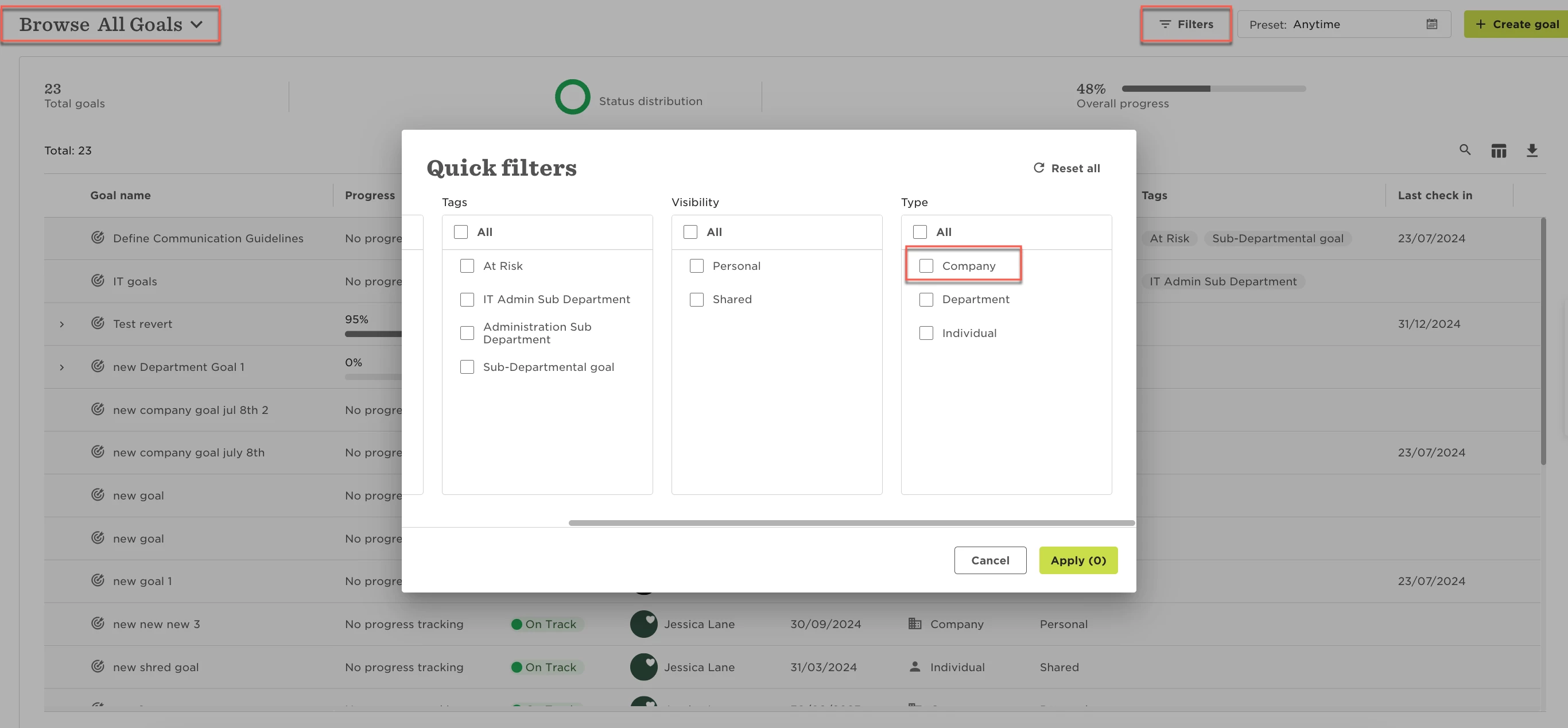
  1. Go to Goals > Browse Goals

  2. In the visibility dropdown, select All goals

  3. Use the filter:

    • Type is Company

This filter will remain applied on the All goals page until you manually change or remove it.
 

This topic has been closed for replies.

11 replies

Hi,

We're really struggling with this change, as the user experience has significantly declined since the latest release. It was much easier to navigate before and the difficulty in accessing Company Goals and our custom Functional Goals is particularly disappointing.

Is there any chance this could be made available through the "Browse goals" drop-down? That would greatly improve usability.

Thanks in advance!


LucyTaylorBW

Hi - I have the same request as above. Is there a reason this was removed from the browse goals drop-down? Can it please be re-added? 


Adding INSTANDA to this request - it’s strange that you can see People’s Goals, Department Goals, but not Company Goals in that top level dropdown menu. 


This has caused a lot of confusion in our user base as well, as we ask all employees to align to a company level goal, foregoing using department goals at this time.


Please add this option back to the regular “Browse” left hand menu!


Jessica Lane
Bobber

Hi ​@Lauriane Boisnière , ​@LucyTaylorBW , ​@Amanda Standidge 👋🏻

Thank you for your feedback here! I will be happy to pass this along to the team for consideration.


Joy Whittaker

@Jessica Lane it’s the same for us, overall we love the new goals interface but the additional steps required for users to see company goals has introduced a friction point. 


We do not like this change, why has this been implemented?  This has caused great confusion in the team who struggle daily to find our company goals, whereas before it was in the drop-down menu list under personal goals. this is a pointless and ineffective update, can this can be reversed 


Maital Terdiman
Bobber

Hi ​@Lisa Wilson 

Sorry to hear about your frustrations here, I am sharing the below thread, please have a look at ​@Noam Cohen Or message for some more insight and understanding


Joy Whittaker

@Maital Terdiman I can see the section about custom goal levels and dynamic hierarchy, is this the section you’re referring to?

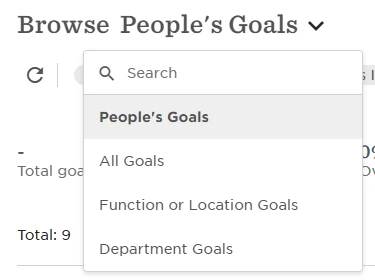
We’ve started to do a bit of testing around the custom goal levels, and it seems strange that Bob will create a Browse picklist option for the custom level (“Function of Location Goals”), and has one by default for Department Goals, but there is not one for Company Goals:


We’re also finding that when we browse People’s Goals, company goals assigned to that person are also appearing here unless we filter them out. I can kind of see the logic here, but this means that in order to check whether our company goal owners have set any personal goals, we again have to apply filters to each user’s account (applied by either the user or an admin using login as).

It would be great if the Browse Goals dropdown included Company Goals as an option, and for People’s Goals to show only individual goals (personal or shared).

Overall I think the new UI is great and will definitely be useful when we expand on the custom goal levels more, but this friction point around Company Goals is quite frustrating, especially for users who aren’t in the system as often as HR.


Jessica Lane
Bobber

Hi ​@Joy Whittaker 👋🏻


Thank you for sharing the feedback! I will be happy to pass this along to the team for consideration. 😊


It’s super important that people can easily find, understand, and connect with the company goals. This is something employees consistently highlight as important, it's come up in eNPS surveys, performance reviews, and other feedback channels. Right now, though, the goals are really hard to find - today it took us almost 10 minutes to locate them. That’s not great. Could you please look into a solution that makes them more visible and accessible?


Harshil Boparai
Bobber

Hi ​@Ave Kruusalu Thanks for sharing your feedback - It definitely helps us shape the future of Bob. We appreciate your insights! The best next step would be to share this directly with your CSM. They’ll ensure the full context is captured and keep you informed as things develop.