


The field's previous permissions are not carried over automatically when you move it, so when you move a field to a different category, you can choose how permissions apply to the field in its new location.
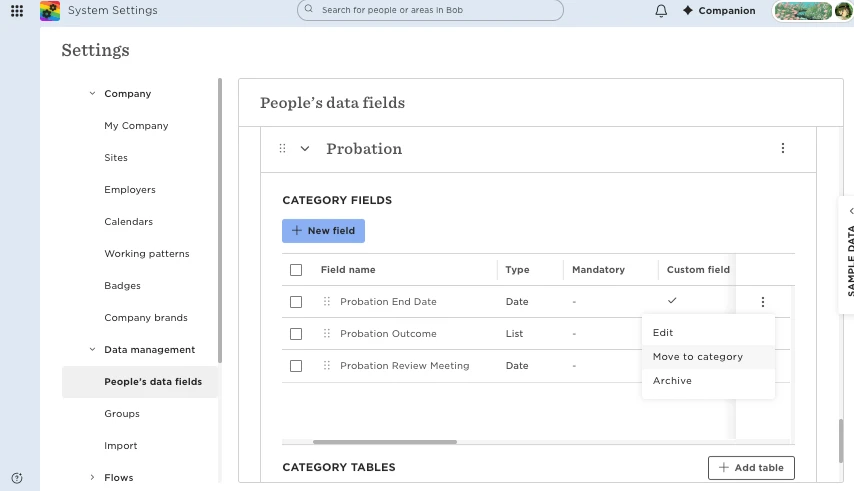
- Go to System Settings > Data management > People's data fields.
- Find the field you want to move.
- Click the three-dot menu > Move to category.
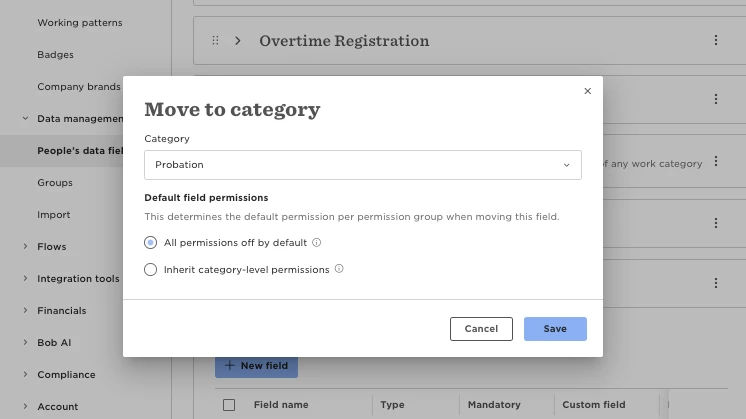
- Select the new category.
- Choose one of the following permission options:
- All permissions off by default: No permissions will be given to the field. An admin will need to set them afterwards.
- Inherit category-level permissions: The field will use the permissions of the new category. If the category has mixed (Partial) permissions. If the category has Partial permissions, you’ll need to set the field permissions manually.
Note: If you cannot move a field to another category, it is because the field is a default system field or part of a default category that cannot be moved. These limitations are inherent to the system design, and alternative methods such as archiving or masking fields may need to be considered instead.