


Have you ever added a value to a historical field and it doesn’t show?
Or came across an effective date that seems wrong?
Historical fields use effective dates to decide which value is currently shown on the employee profile.
For example, if today is 20th of August and you have these records:
- 1 August
- 20 August
- 21 August
The field will show the 20th of August Policy because 20 August is the latest effective date that has been reached.
The value dated 21 August is already saved in the history, but it won’t be shown as the current value until 21 August.
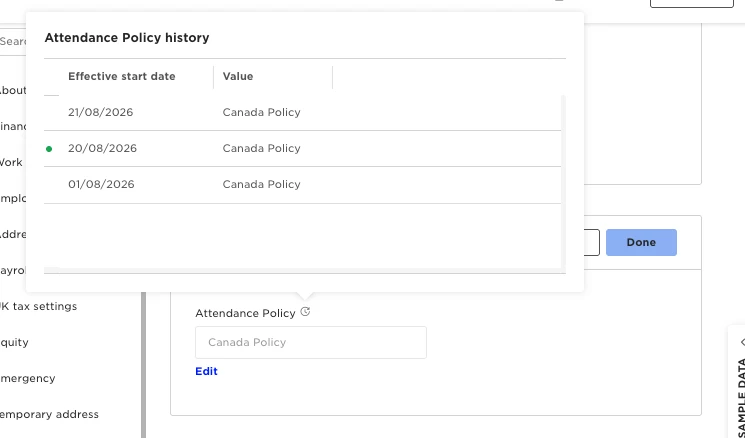
The same applies when you update a historical field through a flow. If you select a future effective date, the new value is saved but the employee profile continues to show the current value until that date is reached.
Each record needs a different effective date. If you try to add another record using a date that already exists, Bob won’t save it and will ask you to choose a different date.
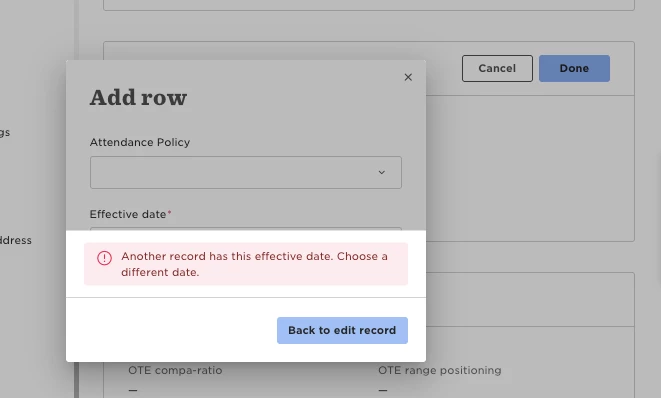
So, when a historical field doesn’t show the value you expected, check its effective date first. A future-dated value will only become the current value when that date is reached.