F.A.Q.

End effective date in tables

  • June 4, 2025
  • 17 replies
  • 397 views

The End of Effective Date field can be found in tables within employee's profile, such as work, employment, or lifecycle tables, ensuring a seamless timeline without gaps or overlaps.

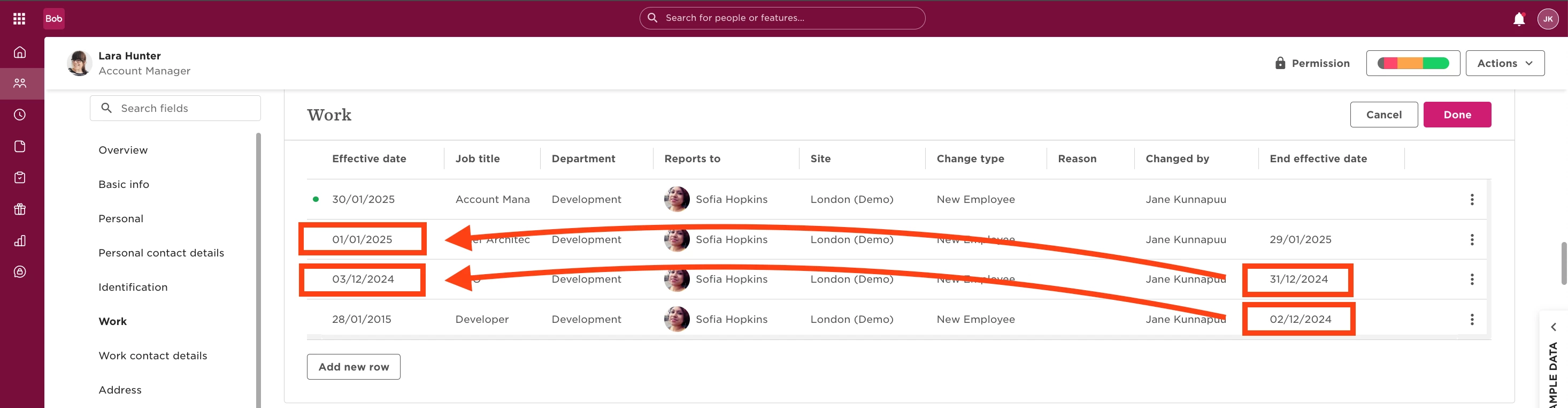
The End of Effective Date is tables is automatically set to the day before the Effective Date of the next row.

Since it’s system-generated, no manual adjustments are needed, it simply reflects the next row’s Effective Date. As shown in the table below, this pattern applies consistently across all rows.

 

17 replies

  • June 11, 2025

Hi ​@Jane Künnapuu , but we need this to be manually adjusted!

E.g. Working student stops his contract on 30.11., and starts the permanent contract on 01.01.

How can I reflect this?

Thank you

Sandra


Jessica Lane
Bobber

Hi ​@SandraL 👋🏻

You could reflect this in the employees work history by changing their employment type  (from ‘temporary’ to ‘permanent’ for example) and adding the relevant effective date. 😊


  • July 1, 2025

@Jessica Lane if you tell me, where and how?! See screenshots. I am not able to add an “end effective date”?

Neither in “new row”, nor in “edit row”!

Thank you


Johnny Barnett

@Jessica Lane if you tell me, where and how?! See screenshots. I am not able to add an “end effective date”?

Neither in “new row”, nor in “edit row”!

Thank you

When you add a new row, it will automatically set the end effective date as the day before the new one.

For example, in your case, it would be add a new row with the permanent contract on 01/01 and it will populate the end effective date of the previous entry with the day before.

In your case, there is a two month gap which unfortunately Bob does not support from what I can tell as the idea is that when someone is Active on Bob they are employed thus wouldn’t be a gap.


  • July 1, 2025

and why does bob then have an “Original start date” if there cannot be a gap?!


Johnny Barnett

and why does bob then have an “Original start date” if there cannot be a gap?!

The original start date field exists so that if you were to terminate someone, for example, if they were made redundant, and later rehired them, the history remains. So, the start date would populate with the most recent start date, and the original start date is populated with when they first joined the company. 

For your employee example, you could terminate them for the month where they are not working, and rehire them on Bob under the new details using the Rehire functionality which can be found under “Change work status”. It is important to note that the Rehire action can be used on any employee for whom a Termination flow has been triggered, irrespective of whether the termination date has passed or it is coming up in the future. 

Rehire an employee – Bob Help Center


Hello there,

I am also facing the same issue. We cannot edit the effective end date when there is a gap between two employments, that’s a shame as it does not reflect the exact contractual relationships of the employee. I hope that is something that Bob will put in its roadmap. Many thanks!


  • July 24, 2025

@Johnny Barnett As the re-hire is in the past, how can we NOW solve the issue, please? 

Best,

Sandra


  • August 13, 2025

Hello, can we set the "end date" in the Variable Pay table to have the same behaviour as those other "end of effective date"? 


Maital Terdiman
Bobber

Hi ​@Camila Sá 
The "end date" in the Variable Pay table does not automatically behave like the "end of effective date" in other tables such as work, employment, or lifecycle tables. In those tables, the End of Effective Date is system-generated and automatically set to the day before the Effective Date of the next row, ensuring a seamless timeline without gaps or overlaps.

However, in the Variable Pay table, the end date is manually set and affects reporting, as entries with past end dates are excluded from current reports. Therefore, the automatic behavior seen in other tables is not currently applicable to the Variable Pay table.


I’m evaluating whether we should archive the end effective date in Work to make the data set cleaner. However, I’m concerned that some data in Analytics might still rely on this field for calculations.

How can I ensure that it’s safe to archive the end effective date without impacting reports or metrics?

My understanding is that the lifecycle is calculated automatically, and by archived end effective date in outer tables only applies to that specific table. Is that correct?


LucyTaylorBW

Hi ​@Camila Sá 
The "end date" in the Variable Pay table does not automatically behave like the "end of effective date" in other tables such as work, employment, or lifecycle tables. In those tables, the End of Effective Date is system-generated and automatically set to the day before the Effective Date of the next row, ensuring a seamless timeline without gaps or overlaps.

However, in the Variable Pay table, the end date is manually set and affects reporting, as entries with past end dates are excluded from current reports. Therefore, the automatic behavior seen in other tables is not currently applicable to the Variable Pay table.

Hi ​@Maital Terdiman ,

I am just checking if there is a way we can get the end of effective date to be system generated to ensure that it is automatically set to the day before the effective date of the next row in custom tables? For example, we want to keep track of our cost centres, but finance need to update these so we can’t have the information in our employment or work tables. We have created a new table, but when we add a new line it does not automatically close the previous line, therefore leaving further manual work. We also can’t seem to “end” the date in a flow, to add new data. Can this be done?


Netta Brodsky
Bobber

Hi ​@LucyTaylorBW - Thank you for your question! 🙏🏻
When it comes to custom tables, unfortunately, this functionality isn’t currently supported - the “End of Effective Date” can’t be automatically generated.

That said, I’ve passed your feedback along to our Product team so they can consider adding this capability in future updates.


Hello, ​@Netta Brodsky  is this something that HiBob has in its product roadmap for 2026 maybe?

“When it comes to custom tables, unfortunately, this functionality isn’t currently supported - the “End of Effective Date” can’t be automatically generated.”

We really need the End Effective Date in custom tables to be able to “understood” by the platform, aka to have the green dot next to current/today’s row. 

At the moment for example if I have a Custom Category with Effective and End Effective dates, I can’t generate a report about TODAY as it doesn’t understand what is still valid today from all the rows and what is in the past and we end up with every report including ALL of the rows of the custom table.

I mean, why have a manually entered End Effective date in custom tables if the platform can’t understand it as such?

Thank you,


Joy Whittaker

@Jane Künnapuu is there any way to automatically end work and payroll records at termination?

We are trying to run reports for historic data, e.g. salary data, but if we run this from the Salary table then there are no end dates for terminated employees.

Where an employee left the company and then returned at a later date on a new contract, the Salary table data instead shows a continuous salary record from the last employment period up to the new.


Hello! Just want to chime in that we do not see an easy way for us to report on a lengthy gap in employment. We have a re-hire who initially termination over a year ago. When he was rehired, his last effective dates  were changed to the date before his new Start Date. This caused a lot of problems with our payroll integration. 


Any advice?


Hi - checking in to see if there is an update on this one? We are just rolling out Bob and have the exact same issue with employees who were rehired after a significant “gap”. It seems bizarre that the system cannot accurately record these gaps in employment.