

If an employee completed onboarding but is redirected back to the onboarding flow when trying to log in, this guide will help you resolve the loop and restore access.
When this happens, the system doesn’t recognize onboarding as fully completed, so the employee is repeatedly redirected instead of gaining access to Bob.
How to fix the onboarding loop
Follow these steps to reset the employee’s access and send a clean invitation:
1. Go to the employee’s profile.
2. Click Actions → Manage access → Revoke access.
3. Fully revoke their current access.
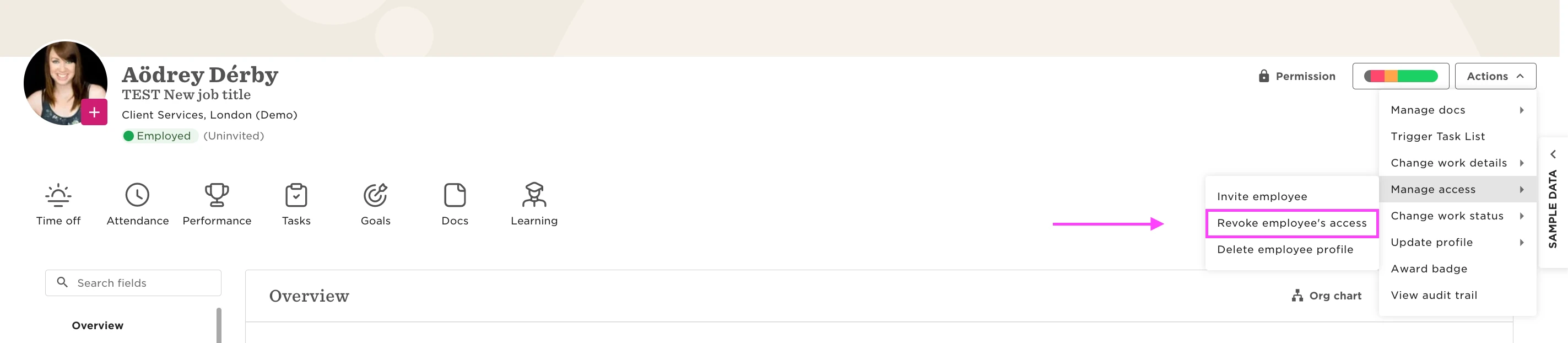
Once access has been revoked:
4. Start the reinvitation process.
5. Make sure the onboarding template toggle is turned OFF.
This step is critical — the onboarding template must be disabled.
6. Send a new invitation email.
What the employee needs to do
Before logging in again, ask the employee to:
* Clear their browser cookies and cache.
* Use the new invitation link from the most recent email (not an older link).
This should bypass the onboarding redirection and allow them to access their account normally.
Why this happens:
This loop usually occurs when onboarding is technically completed, but the session isn’t properly finalized.
Common causes include:
* Starting onboarding on one device and finishing on another.
* Switching browsers during the process.
* Interruptions while accepting the initial invitation.
* Cached data conflicts between web and mobile app sessions.