

The Salary Pay Period field uses predefined values that can’t be edited, but you can use a custom field if you need different wording in an offer letter.
Salary Pay Period is a system default field in Bob. Its list values can’t be edited, renamed, or removed, so you won’t see the Manage List option for this field.
For example, if your offer letter uses the Salary Pay Period variable and you want Annual to appear as Annually, you can create a custom list field with your preferred wording instead.
To set this up:
- Go to Settings > Data Management > People’s Data Fields.
- Create a new custom field in the relevant category.
- Set the field type to List.
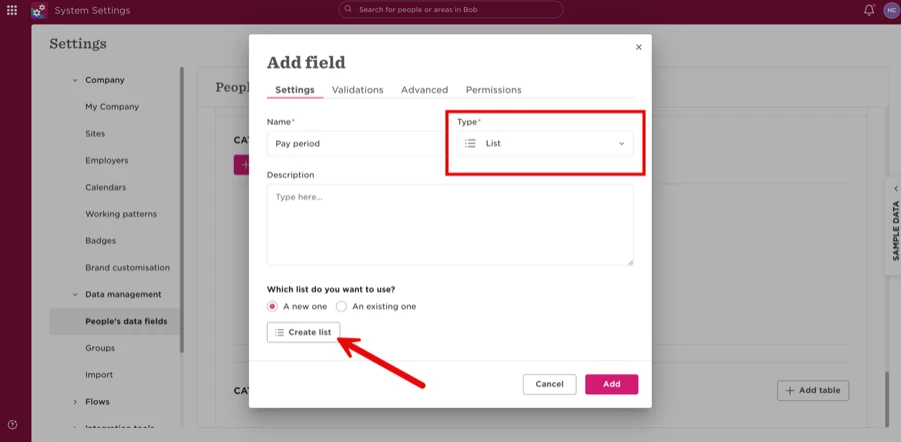
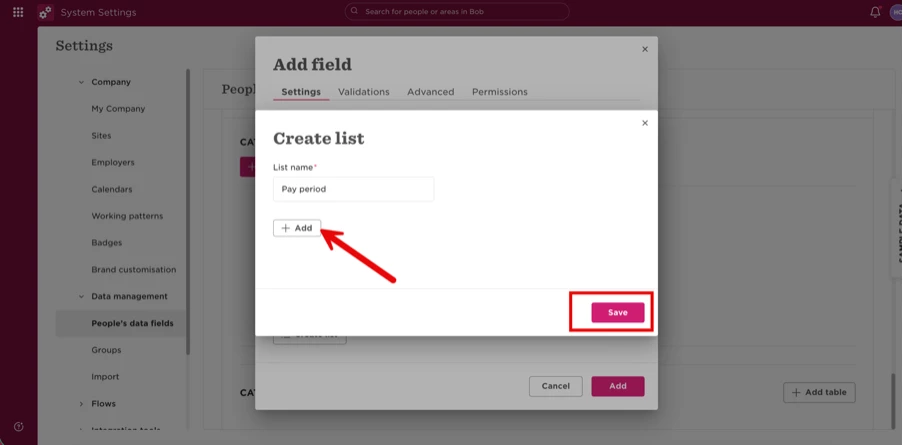
- Add your preferred values, such as Annually, Monthly, Weekly, and Quarterly.
- Populate the new field with the appropriate value for the relevant employees.
- Replace the default Salary Pay Period variable in your offer letter template with your new custom field.
This lets you control the wording displayed in your offer letter without changing the system default Salary Pay Period field.