

Deleting an employee file.

  • Mar 31, 2023 5:38 PM UTC
  • Sep 22, 2024 7:52 AM UTC
  • 4 replies
  • 342 views
  • Translate All

To delete an employee’s file, you can do this from within their profile on Bob.

Actions > Manage access > Delete employee’s file
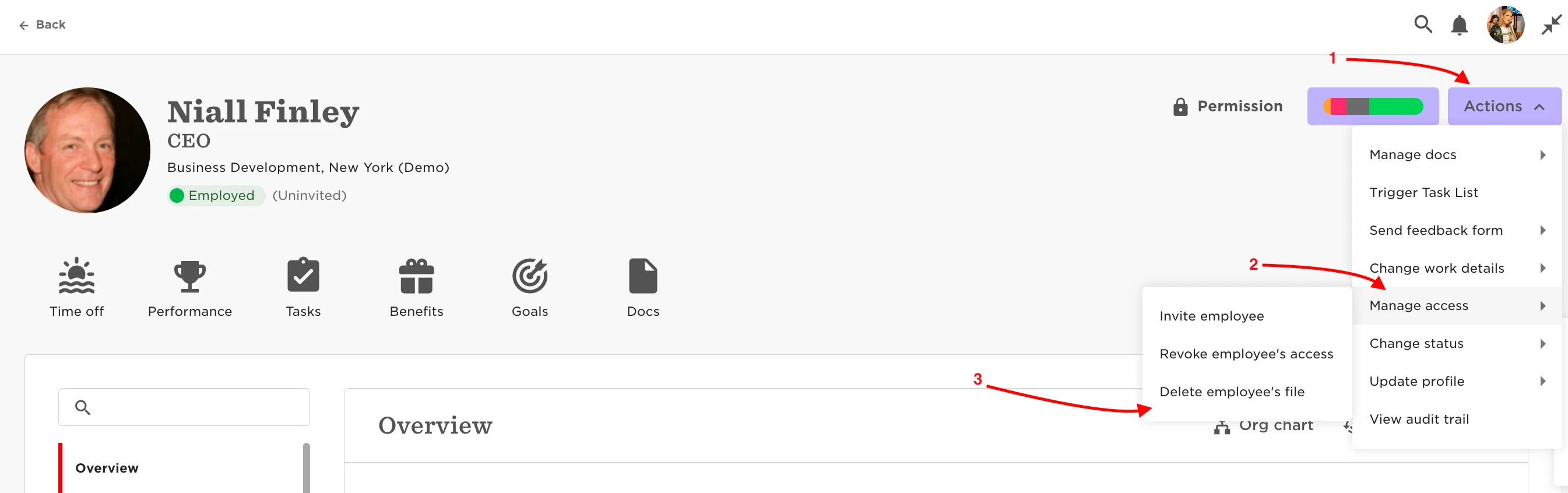
WARNING NOTE: This process is irreversible. This action will permanently delete the selected employees and is ONLY used if a mistake has been made.

If somebody leaves, you should keep them on file and set a termination date instead. Always follow local employment & data laws.

4 replies

Hi Thanks for this,

Does this notify anyone? Like the manager?

The employee’s start date and I only want them back in the system when I am actually sure they will start instead of periodically shifting the start date.

Thanks!

Translate

Lindsay Sinenberg
Bobber

Hi @Olutomi Wole-Fasanya! 
No, this won’t have any notification associated with it.
If the user will be hired and the start date is just getting pushed back, I suggest maybe not deleting the profile. That way you don’t have to create it again a 2nd time and go through all of the steps to fill out the profile. But that is completely up to you!

Translate

Hello ​@Lindsay Sinenberg , is there a way to download a report with the deleted employees? 

Translate

I’m having so much trouble terminating employees - I follow the workflow but then they are still showing as active.  We’ve just had a restructure so I don’t want to use the normal workflow and get the manager to do anything - I’m Head of P+C and want to manage the full process myself. Can anyone help please?? 

Translate