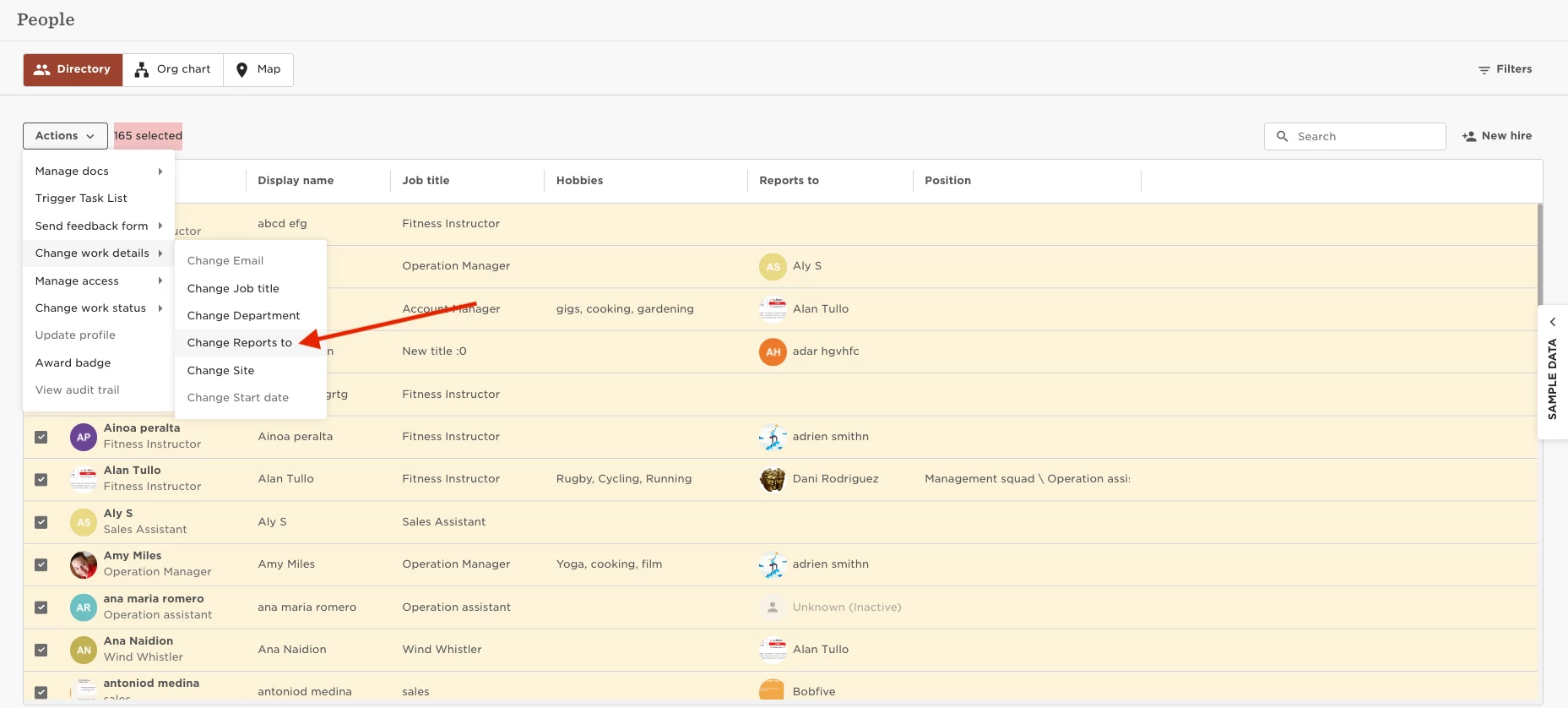
Changing Manager in bulk.

  • August 9, 2023
  • 4 replies
  • 259 views

Paula Fernandes
Bobber

To make this change, go to:

  • Org  
  • People  
  • Directory  
  • Select the employees  
  • Actions  
  • Change Work details  
  • Change Reports to


There's also a great article from our Help Center on People directory that you might find helpful.


4 replies

If I follow this process, will my approval flows and task lists still populate? 


Maital Terdiman
Bobber

Hi ​@Jessie Chung 

If you have a specific flow that is linked to the updates, you will need to carry this out via the Actions → “Update profile” option for the flows, followed by the task list to trigger

💪🏼


Hello, 

How does this work if I just want to update my current row in the work table (since multiple were added incorrectly)?

The process shared above requires an effective date, which would be different for everyone requiring the change. 

Thanks!


Netta Brodsky
Bobber

Hi ​@Tabitha Payne  👋

If the effective date is different for each employee, you have two options:

  1. Manually update each employee’s profile and set the correct effective date individually.

  2. Use a Work table import to update all records at once - Import table data

Just note - when importing, you’ll need to include all required fields in the Excel file, so depending on the number of employees, manual updates might actually be quicker.