

Bob supporting Matrix organisations: Here's a short guided tour...

  • Jun 22, 2023 8:58 AM UTC
  • Oct 8, 2025 6:25 AM UTC
  • 20 replies
  • 1090 views
  • Translate All

Matt Scrimshire
Bobber

I’ve created an explainer video to demonstrate options for Bob to handle Matrix organisations. This seems to be a common scenario in my customer-base so I’ve pushed Bob to it’s limits based on what I’ve learnt.

There's three key things I've come across:

  • Creating the relationships (employee reference field, uploading to populate that data)
  • Defining the permissions for the Matrix leaders
  • Tracking what Groups people are in (optional).

I've put together a video to explain: https://hibob.zoom.us/rec/share/-iPujzdb9aLna_rlYjlTNDzAA08gw7gEWJTbXHw5r7l-bWhQpeiIilrgxw7bf4rM.MH6ml94BLBHGOoZ7
Passcode: n=331WK*

20 replies

Hi @Matt Scrimshire ,

I would like to be able to watch the video but the PW doesnt work.

Maria

Translate

Matt Scrimshire
Bobber

Hey @Maria Zaragoza,

Thanks for your interest. I tried the Password and it worked for me. Here it is below:


n=331WK*


I’d love your thoughts on what I missed or what more we can do to support your matrix structure as they can be varied in my experience.

Have a great weekend,

Matt

Translate

Hi @Matt Scrimshire! 

I have tried to follow your video to set up different “project groups” in Bob. In your video you showed us how you chose “squad leaders” in the org. chart., but I can’t seem to get this option. How did you change or add on options to the “realtionships” in the org chart? 

Translate

Matt Scrimshire
Bobber

Hi @Susanne Marie Sølvberg,

Why you can’t see it yet… Employee Reference Fields

Squad lead is an ‘employee reference’ field that I created. You can create an employee reference field in the Employee Profile and then you need to populate it for each person. This is best done via an ‘update employee details’ import. 

Before you Start...

Before you start to create this think about how often these project groups change and is this mandatory that everyone is in a project group or not. 

How to create and import the data

To do the import easily you’d need to go to the directory and export a spreadsheet that has all employees and a unique identifier for them. You may need other fields to help identify what ‘Squad’ (or the name you use for your project groups) someone is in.

Open the extracted spreadsheet and add a new column titled ‘Squad lead’ (or use your term). Populate this column with the appropriate name for the squad leaders. If you sort the spreadsheet right then this should be a simple copy and paste job for 95% of the cells apart from the squad leaders. See my next point... 

IMPORTANT POINT: if you want to view this in the org chart then you need to avoid cyclical relationships. This means, put simply, that you can’t have Dave reporting to Jane, and Jane reporting to Jyoti, and Jyoti reporting to Dave. So keep in mind who is the squad leader and who do you want them to report to. It may be that the squad leaders have no-one higher than them in this secondary structure.

Once you have the squad leads set then you are ready for import.

How to use this new field

You will then have this option to view in the Org chart and this new relationship that you have created in Bob can be used in many other places, such as for:

  • Performance reviews,
  • Compensation events,
  • Task Lists,
  • Flows,
  • Approvals,
  • Anywhere where you see ‘roles’ as an option

This whole process is why Sandbox is a great tool, as you can test this all out and refine any processes that support this secondary structure before launching it.

I hope that helps.

Translate

How can i setup these relationship fields? for example the HRBP Role?

Translate

Jessica Lane
Bobber

Hi @Thomas Krakowiak 👋🏻 


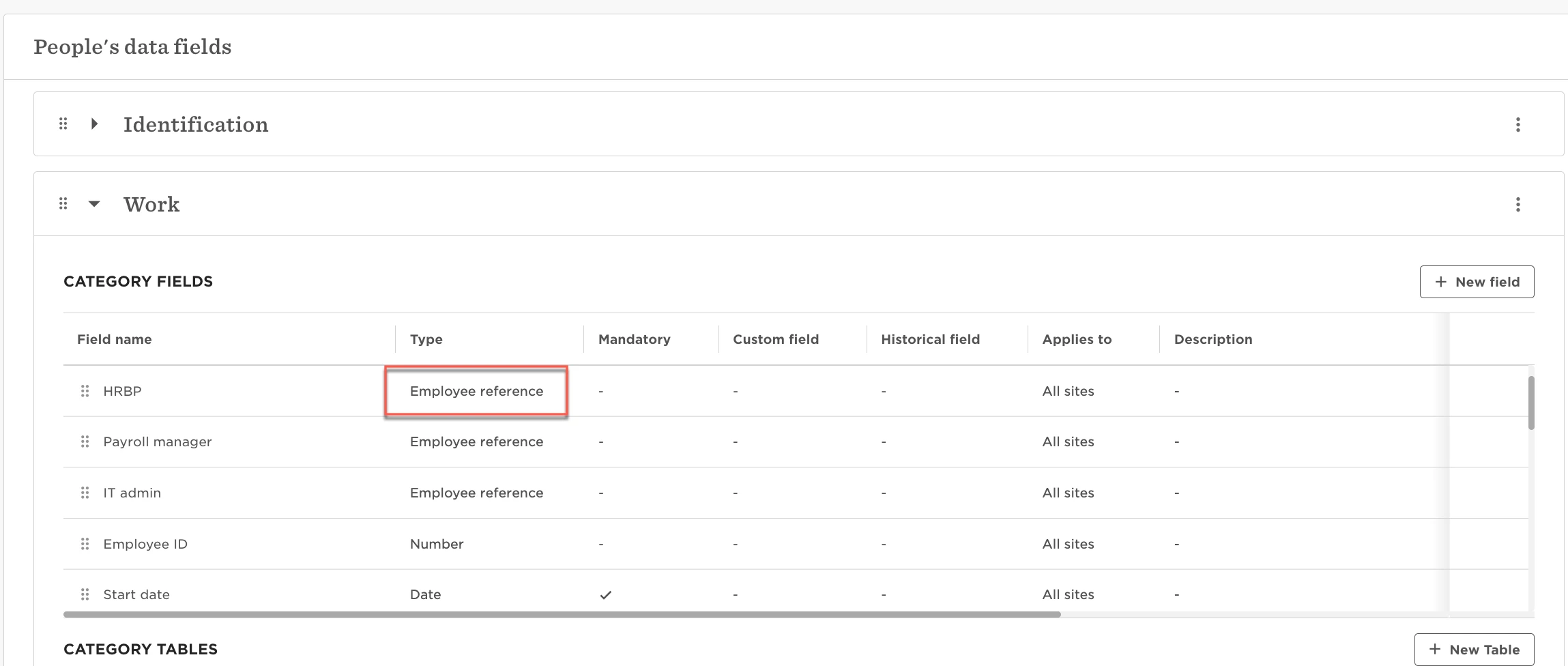
These fields should be created as ‘employee reference’ field types:


Translate

Matt Scrimshire
Bobber

Hi Thomas,

There are 3 stages to this to make it work really well:

  1. Create the field
  2. Populate the field
  3. Set it up for easy long-term maintenance 
  1. When you go into ‘People’s data fields’ in the settings area of Bob you can create new fields and you need to select ‘Employee Reference’ as your chosen type. While you are there you can also tailor ‘Who can appear in the employee reference list dropdown?’. In the case of HRBP you could use Bob’s Filters to only allow people with the Job or Job Title of HRBP to appear in the list. This reduces risk of error when you move to the next stage which is to populate the field for everyone. 
  2. Population for the whole business might be best done via spreadsheet. You can easily export from the directory, sort the data and then copy and past in large groups before reimporting. One thing to be aware of is to not create cyclical relationships if you want to see these relationships in the Org Chart. So avoid Jane being the HRBP for Jacinda, Jacinda being the HRBP for Joao, and Joao being the HRBP for Jane, if you get me.
  3. Now I add the HRBP field to the New Hire Flow so that you easiily keep the data intact for new starters, too.

These roles can then become really powerful in task lists and other useful areas like Performance Reviews, Compensation Processes, etc.

I hope that helps,

Matt

Translate

Hi Thomas,

There are 3 stages to this to make it work really well:

  1. Create the field
  2. Populate the field
  3. Set it up for easy long-term maintenance 
  1. When you go into ‘People’s data fields’ in the settings area of Bob you can create new fields and you need to select ‘Employee Reference’ as your chosen type. While you are there you can also tailor ‘Who can appear in the employee reference list dropdown?’. In the case of HRBP you could use Bob’s Filters to only allow people with the Job or Job Title of HRBP to appear in the list. This reduces risk of error when you move to the next stage which is to populate the field for everyone. 
  2. Population for the whole business might be best done via spreadsheet. You can easily export from the directory, sort the data and then copy and past in large groups before reimporting. One thing to be aware of is to not create cyclical relationships if you want to see these relationships in the Org Chart. So avoid Jane being the HRBP for Jacinda, Jacinda being the HRBP for Joao, and Joao being the HRBP for Jane, if you get me.
  3. Now I add the HRBP field to the New Hire Flow so that you easiily keep the data intact for new starters, too.

These roles can then become really powerful in task lists and other useful areas like Performance Reviews, Compensation Processes, etc.

I hope that helps,

Matt

Thank you!

Translate

@Matt Scrimshire @Jessica Lane, thank yall 🙌!!

Translate

  • Mar 5, 2025 9:55 PM UTC

This is great, thank you!  One question / clarification… if i was to set someone up as a mentor for an employee, they would not be able to do 1:1s with said employee... Only the ‘manager’ can do that?  I ideally want both the manager and mentor to be able to carry out 1:1s but I am assuming from the video that is not possible (and there’s currently no plans)?

Translate

Maital Terdiman
Bobber

Hi ​@LisaS 

Currently 1:1s are only available for Managers with Direct reports 🤓

Translate

Kris Van Acker

Hi ​@LisaS 

Currently 1:1s are only available for Managers with Direct reports 🤓

We also have a matrix organization where People Leads are the evaluators of employees and those are quite often not the same person as the Direct Line Managers. And because of this 1:1s (hard-coded) limitation we (very unfortunately) cannot use this functionality.


Are there any plans of extending this to other ‘relations’ than the Direct Line Manager. If not yet, can we have a feature request for that?


Thanks in advance!


Wkr,

Kris.

Translate

Matt Scrimshire
Bobber

​@Kris Van Acker thanks for coming back to us on this. Yes we have plans to open up the 1-on-1’s to allow anyone to create a conversation with anyone else. We are aiming (with the usual caveat with any software that things can be delayed) to release this before the end of the year.

Translate

  • May 25, 2025 10:40 PM UTC

Thanks for this ​@Matt Scrimshire . Can I please confirm that while we can give squad leaders access to the same employee data as their traditional line manager, things like approvals and flows, performance and salary review processes would all be sent to the primary manager? So for performance reviews we would need to add the squad leader as a dotted line manager still? And only one person would be responsible for tasks and flows (unless we set then squad leaders up as a group?)


Translate

Matt Scrimshire
Bobber

Hi ​@ChristieB, for the finer details of your setup it may be best to check with our CX team but I’ll share my thoughts here:

For each of approvals, flows, tasks, compensation events you can choose who, in-terms-of type of manager, receives notifications and is involved in the decisions.

For performance reviews the primary manager is always the lead but a dotted line manager can see and be involve din the process, dependent on how you configure setup and permissions. 

Only one person is responsible if that is how you configure it. You could have a 2-step approval, for example, tat includes both roles.

Translate

​@Matt Scrimshire We also need dotted line/secondary manager ability to conduct 1:1s. We’d be okay with it being opened up to everyone beyond secondary managers, but need that as a minimum for our semi-matrix style org.

Translate

Matt Scrimshire
Bobber

​@Staci Harvatin, we hear you. That functionality should launch in the next couple of months. 

Translate

Hi ​@Matt Scrimshire  is the above functionality available yet? thanks (video is really helpful!) 

Translate

Matt Scrimshire
Bobber

Hi ​@Jennifer Dolan, yes 1-on-1’s functionality is now opened up. There is a permission setting that now governs who can have 1-on-1’s with whom. 

Translate

​@katymurphy1 

Translate