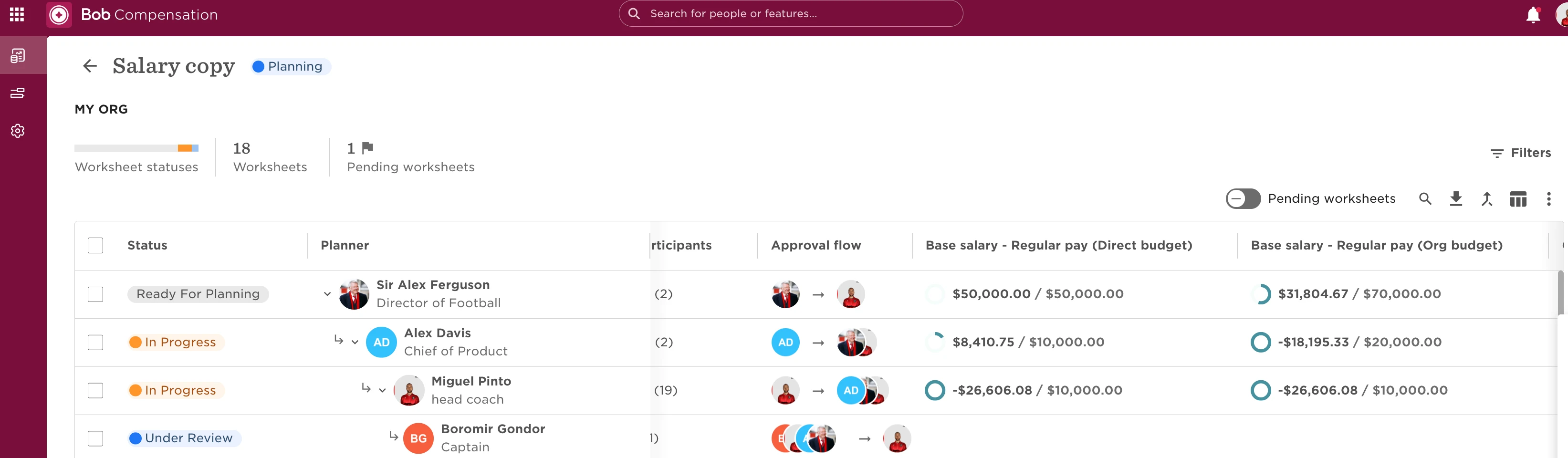
In compensation events, you’ll see two types of budget columns, Direct budget and Org budget, each reflecting a different level of responsibility and scope.
What’s the difference?
-
Direct budget
This is the budget assigned to a Planner for their direct reports only. It appears in that Planner’s worksheet and reflects the amount they’re responsible for managing. -
Org budget
This is the total budget available to a Reviewer, combining:-
Their own Direct budget
-
The Direct budgets of all Planners reporting to them
It provides a broader view, including all direct and indirect reports in the Reviewer's org.
-
Where you’ll see them
These appear as labeled columns in worksheets (e.g., Base salary (Direct budget), Base salary (Org budget)), depending on your role:
-
Planners see and manage the Direct budget
-
Reviewers see the Org budget for oversight across multiple worksheets
Why it matters
-
Planners handle compensation decisions for their immediate team
-
Reviewers oversee total budget usage across their org
-
Knowing the distinction helps avoid overruns and ensures accurate planning
💡 Tip: Use the budget widget and column picker to track allocation progress, adjust views, and monitor remaining amounts.
Example:
Sir Alex's Direct budget is 50K USD, while his Org budget is 70K USD as it aggregates the budget given to his direct reports, Alex and Miguel.