Compensation event - Update people's profile changes

  • August 10, 2023
  • 1 reply
  • 329 views

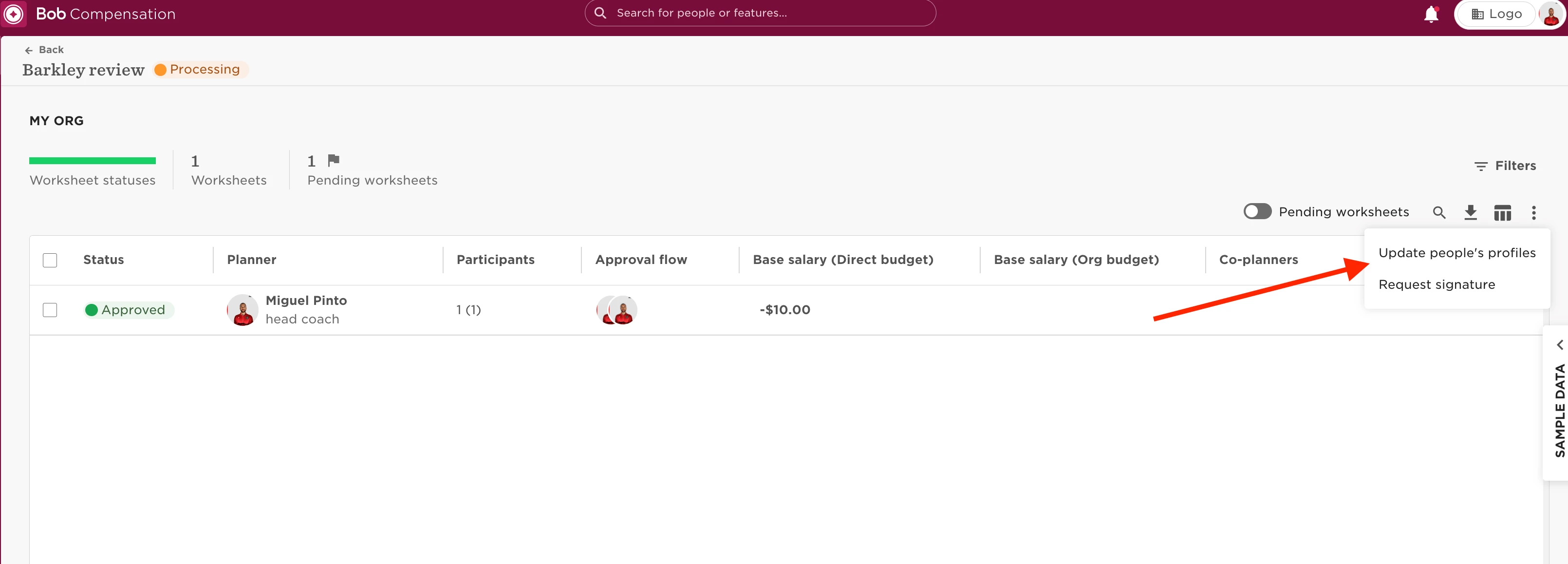
When finishing a compensation event, you will have the option of “Updating people’s profiles”. What this action does is immediately update all changes made in the compensation event in the profile of all the employees in the event.

This action cannot be undone or reverted.

To do this:

  • Click on the 3 dots at the top right of the event;
  • Update people’s profiles:


1 reply

Hi! When you do this action (and the new salary effective date is in the past),  is there a way to prevent the compensation event from updating the cells with current base salary? The compensation event should show the old base salary, the adjustment and the new base salay - not update the current base salary (in the comp event) with the new bas salary (including this years adjustment). 


Example:

When the event is launched an employee has:

  • Current base salary: 1.000.000 NOK 
  • It receives 100.000 NOK in salary adjustment.
  • New salary is 1.100.000 NOK.

After the event has been approved, you update the employee profile. Since the effective date is in the past, the field in the comp event for this employee also updates, so it now shows:

  • Current base salary: 1.100.000 NOK 
  • It receives 100.000 NOK in salary adjustment.
  • New salary is 1.200.000 NOK.

How can we avoid this from happening if we need to adjust retrospectively next year as well?