

Adding Custom Variable Pay and Actual Payment Components to a Compensation Event

  • September 17, 2026
  • 1 reply
  • 14 views

When setting up a compensation event, you can add custom Variable pay and Actual payments components for managers to review or change in the worksheet.

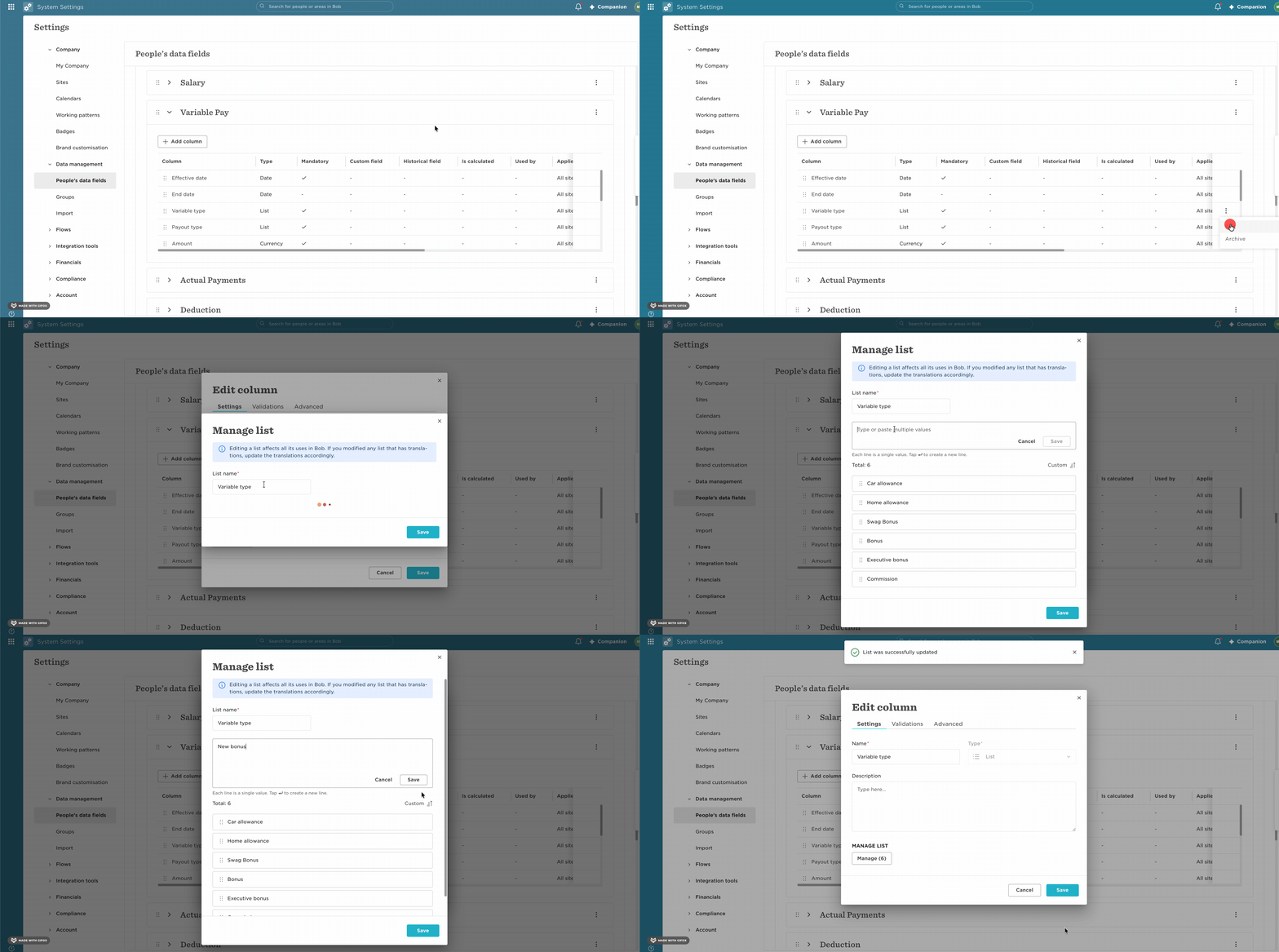
To create a new component, add it to the relevant list in People's data fields:

  1. Go to Settings > People's data fields.
  2. Locate Variable pay type or Payment type, depending on the component you want to create.
  3. Edit and add the new component to the relevant list.
  4. Return to the compensation event setup and select the new component to be reviewed in the event.
Custom fields can't be added directly as components to a compensation event. If the component you need isn't available, create it under Variable pay or Payment type using the process above.

 

1 reply

Andrea Reisinger

Hi Miguel,

thanks for sharing this. I’m trying to understand how this works for existing Actual Payment data in Bob.

In our case, we already store the actual payments employees have received during the current year in Bob. These payments are recorded quarterly, so for example we have actual payment amounts for Q1, Q2, Q3, etc.

For our compensation event, I would like managers to be able to see these historical actual payments as additional columns in the worksheet, mainly for reference when making salary or compensation decisions.

However, I currently cannot find these existing Actual Payment values as selectable columns when setting up the compensation event.

Could you please clarify:

  • Can existing Actual Payment data already recorded in Bob be displayed as columns in a Compensation Event?
  • Can individual quarterly payments, e.g. Q1, Q2, Q3 and Q4, be shown separately?
  • Do these payments need to be configured as separate Payment Types under Settings > People’s data fields before they become available in the event?
  • Is it possible to show these values as read-only/reference information for managers rather than editable compensation components?

Our goal is essentially to give managers visibility of what an employee has actually been paid during the current year while they are completing the compensation review.

Thanks for your help!

Andrea