Solved

Holiday Allowance Set-Up (Adjustments)

  • July 6, 2026
  • 12 replies
  • 63 views

Hello, I’m trying to configure two variations of the policy (with a third still to add but not getting the setup right currently), but the leave adjustments don’t appear to be calculating correctly (showing as adjustments; below), I cant figure out where I am going wrong. Any help greatly appreciated. 


image.png

Best answer by Keren Ringel

Hi ​@Chris Gillespie 

To achieve your goal of applying the bank holiday calendar to individuals, tracking the correct hours per bank holiday (e.g., 8 or 9), and reflecting this in their annual leave/time-off allowance in Hibob, here’s a summary of the current best practices and limitations based on user experiences and Hibob’s features:

1. Assigning Bank Holiday Calendars

  • You can assign specific bank holiday calendars to employees based on their site or region. These calendars will automatically display public holidays in the employee’s time-off calendar, and can also be integrated with external calendars like Google or Outlook for visibility.

2. Deducting Bank Holiday Hours from Annual Leave

  • The most common approach is to include bank holidays in the total annual leave allowance. Then, for each bank holiday that falls on an employee’s working day, the corresponding hours (e.g., 8 or 9) are automatically deducted from their annual leave balance.
  • For example, if a full-time employee has 304 hours of annual leave and there are 8 bank holidays, 64 hours are deducted at the start of the year. For part-time or compressed hours staff, only the holidays that fall on their working days are deducted, based on their working pattern.

3. Handling Different Working Patterns

  • For staff with varying hours (compressed hours, part-time, etc.), it’s recommended to use an hours-based annual leave policy. This allows deductions to match the actual hours they would have worked on a bank holiday.
  • However, Hibob’s automation here is limited: for employees whose working hours differ from the site standard, you may need to manually adjust the deduction for bank holidays that fall on their working days. Some users bulk-book the bank holidays at the start of the year and manually adjust for exceptions.

4. Automatic Calendar Integration

  • Public holidays added to the Hibob calendar will appear in the employee’s time-off calendar and can be pushed to external calendars. However, the actual deduction of hours from annual leave for each individual (especially for non-standard working patterns) may still require manual intervention.

5. Adjustments for Over-Standard Hours

  • If an employee works more than the standard hours on a bank holiday (e.g., 9 instead of 8), you’ll need to manually adjust their annual leave/time-off balance to reflect the correct deduction, as Hibob does not currently automate this for non-standard patterns.

Summary of Steps:

  1. Assign the relevant bank holiday calendar to each employee/site.
  2. Use an hours-based annual leave policy for staff with variable hours.
  3. Include bank holidays in the annual leave pot, and bulk-book/deduct the hours for holidays that fall on working days.
  4. Manually adjust for staff whose working hours differ from the standard or who work more than the default hours on a holiday.
  5. All public holidays will appear in the time-off calendar, but accurate deduction for non-standard patterns may require manual steps.

If you need more automation or have a high number of exceptions, you may need to continue with some manual adjustments until Hibob enhances this functionality.

If you have a specific scenario (e.g., a certain working pattern or country), let me know and I can provide more targeted guidance.


Best

Keren

12 replies

Keren Ringel
Bobber

Hi ​@Chris Gillespie 

I cant seem to be able to open the image, can you please paste the screenshot/video here of what you are trying to do?

Thanks!

Keren


Hi Keren,


I have figured this out now, thank you very much.


Whilst I have you, I am now trying to set our time off - holiday policies into hours rather than days, how do I do this?


Keren Ringel
Bobber

Great to hear ​@Chris Gillespie !

re the policy by hour- this needs to be defined on the policy type level (rather than the policy itself)- then the policy will take this infor from the type.

I hope this helps

Best

Keren


Hi,


Additionally, I am trying to apply our bank holiday calender to individuals to then pull the correct hours they work per bank holiday (say 8 or 9) and include this in addition to their annual leave allowance. Ideally, this automatically goes into their time-off calender, and then where the hours are more than the 8 (normally), this is reflected and taken from time-off/annual leave allowance. 


Keren Ringel
Bobber
  • Bobber
  • Answer
  • July 7, 2026

Hi ​@Chris Gillespie 

To achieve your goal of applying the bank holiday calendar to individuals, tracking the correct hours per bank holiday (e.g., 8 or 9), and reflecting this in their annual leave/time-off allowance in Hibob, here’s a summary of the current best practices and limitations based on user experiences and Hibob’s features:

1. Assigning Bank Holiday Calendars

  • You can assign specific bank holiday calendars to employees based on their site or region. These calendars will automatically display public holidays in the employee’s time-off calendar, and can also be integrated with external calendars like Google or Outlook for visibility.

2. Deducting Bank Holiday Hours from Annual Leave

  • The most common approach is to include bank holidays in the total annual leave allowance. Then, for each bank holiday that falls on an employee’s working day, the corresponding hours (e.g., 8 or 9) are automatically deducted from their annual leave balance.
  • For example, if a full-time employee has 304 hours of annual leave and there are 8 bank holidays, 64 hours are deducted at the start of the year. For part-time or compressed hours staff, only the holidays that fall on their working days are deducted, based on their working pattern.

3. Handling Different Working Patterns

  • For staff with varying hours (compressed hours, part-time, etc.), it’s recommended to use an hours-based annual leave policy. This allows deductions to match the actual hours they would have worked on a bank holiday.
  • However, Hibob’s automation here is limited: for employees whose working hours differ from the site standard, you may need to manually adjust the deduction for bank holidays that fall on their working days. Some users bulk-book the bank holidays at the start of the year and manually adjust for exceptions.

4. Automatic Calendar Integration

  • Public holidays added to the Hibob calendar will appear in the employee’s time-off calendar and can be pushed to external calendars. However, the actual deduction of hours from annual leave for each individual (especially for non-standard working patterns) may still require manual intervention.

5. Adjustments for Over-Standard Hours

  • If an employee works more than the standard hours on a bank holiday (e.g., 9 instead of 8), you’ll need to manually adjust their annual leave/time-off balance to reflect the correct deduction, as Hibob does not currently automate this for non-standard patterns.

Summary of Steps:

  1. Assign the relevant bank holiday calendar to each employee/site.
  2. Use an hours-based annual leave policy for staff with variable hours.
  3. Include bank holidays in the annual leave pot, and bulk-book/deduct the hours for holidays that fall on working days.
  4. Manually adjust for staff whose working hours differ from the standard or who work more than the default hours on a holiday.
  5. All public holidays will appear in the time-off calendar, but accurate deduction for non-standard patterns may require manual steps.

If you need more automation or have a high number of exceptions, you may need to continue with some manual adjustments until Hibob enhances this functionality.

If you have a specific scenario (e.g., a certain working pattern or country), let me know and I can provide more targeted guidance.


Best

Keren


Hi Keren,


Thank you so much, that is really helpful.


How can I do this: “Include bank holidays in the annual leave pot, and bulk-book/deduct the hours for holidays that fall on working days” - I can absolutely then edit those who work longer on these days if it doesn’t automatically trigger this based on their working schedule being applied?


Keren Ringel
Bobber

Great question.

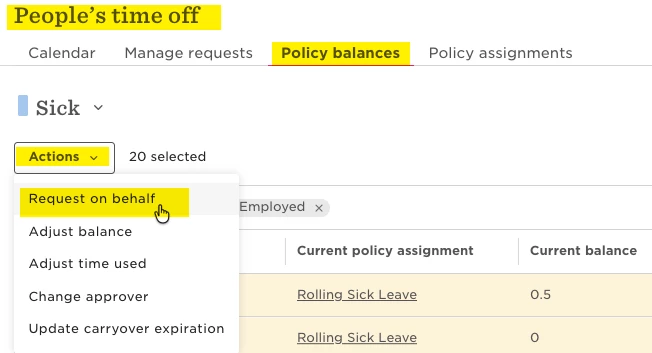
So the idea is that you add these extra days/hours to your time off policy allowance (e.g. if you know it is 13 annual days then add them to the annual allowance of the policy), then you can bulk-request for all relevant employees from the menu under TimeOff section > Peopl’s timeoff > Policy Balances > tick the relevant employees and from the actions dropdown choose “request on behalf”-


I hope this helps, let me know if you need more clarifications


Best

Keren


Hi Keren,


Thanks again.


I have tried to do this and the attached comes up. 


When hovering over the ‘i’ icon it says; “This policy does not allowing requesting time off with full or half day durations” however there was no other option to select bar all day, morning or afternoon. 


Keren Ringel
Bobber

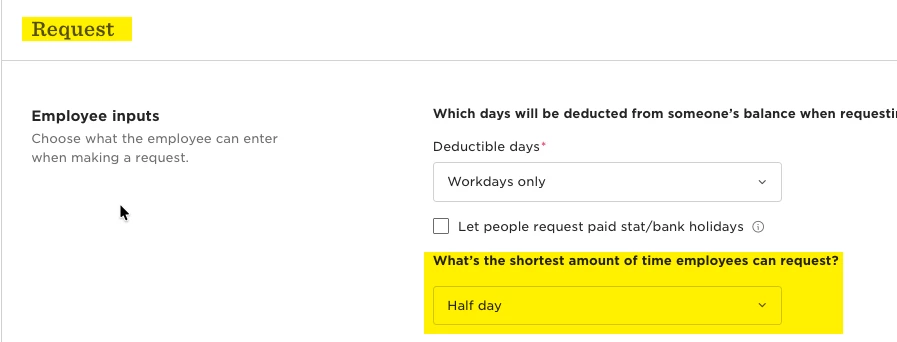
hmmm interesting, can you please check the specific policy under the ‘Request’ section to see what is set there?-


Hi Keren,


For all three of our different time-off policies they are set as attached.


Keren Ringel
Bobber

Thanks for confirming this ​@Chris Gillespie 

I checked, and found that the reason you may not see the option to request a half-day off on behalf of an employee, even though the policy allows it, is likely due to a combination of policy settings and platform limitations:

  1. If the policy is set to allow employees to request a different number of hours each day (i.e., "Allow employees to request different number of hours each day"), the system may not show the half-day option. In this setup, requests in half-day increments are not always available, especially on the mobile app. This is expected behavior, and currently, such requests are only supported on the web browser, not on the mobile app or via Slack. This limitation is known and has been raised with the Product Development team for future updates.

  2. When requesting time off on behalf of an employee using the "Actions" dropdown in the Policy balances tab, you can only request in days or half days—not in hours or custom durations. If you need to request time off in hours, you must open the individual employee's time off balances page and use the "Request on behalf" button there.

  3. There have been recent reports of system malfunctions where the half-day option is missing even when the policy is set up correctly. This has affected multiple users and is being worked on by the Hibob team.

If this is still an issue, I recommend opening a ticket with support, so that they can access your system directly and try to help.

I hope this helps!

Best

Keren


Caroline Dias

Hi Chris,  ​@Chris Gillespie 


To include the bank holidays, go to Settings > Calendar. From there, you can add all of your company's bank holidays (or any company-specific holidays) for the relevant year.

This should be reviewed and updated each year, and once the calendar is set up, the bank holidays will automatically appear in the relevant holiday policies.

For example, in my company we have different holiday entitlements, so I created two calendars and two holiday policies to match the different contracts.

I hope that helps! If you need any further support, I'd be more than happy to jump on a quick call. You can reach me at c.dias@mitsui.com.

Have a great day!

Caroline Dias